

Today there are 122 different AI coding assistants. We spent 148 hours comparing the top 50 to find the seven best you can use to streamline app development.
What is the Best AI Coding Assistant?
- Durable — best of the best
- Cursor — best for devs
- Replit Agent — best for quick code generation
- GitHub Copilot — best for function suggestions
- Amazon Q Developer — best for software insights
- AI2SQL — best for SQL
- Cline — best open-source option
1. Durable
Our Verdict — Best Of The Best
Price: Starts at $25/month
Durable is a one-click AI coding assistant for generating new websites without any coding knowledge. We think it’s the best because of its rapid website generation, effortless customization options, and integrated marketing options.
The Best Part:
It’s lightning-fast. Durable can generate an entire website — with images, copy, and contact forms — in less than 30 seconds!
The Worst Part:
Uniform template designs. While Durable is user-friendly, it falls short on offering different templates as they all look similar across different industries.
Get it if you want a fully functional website up and running faster than lightning.
I recommend you start on the free plan, then get the Launch plan for $25/month to go live on your own domain.
(free plan)
Best For
Durable is best for business owners, developers, and freelancers who want an easy-to-use solution to create quality websites in a snap.
Top Features
Launch in no time. Generate an entire professional-looking website within seconds using Durable's powerful AI technology.
Feel like a pro web developer. You can customize your site effortlessly without any coding skills, thanks to Durable's intuitive editor interface.
Rank your website on Google. Get your site to rank higher with the built-in SEO configurations and analytics provided by Durable.
They take care of everything. With Durable, you can sit back and watch as images, copy, and forms are generated automatically — it's like having an invisible team working tirelessly behind the scenes to build your website.
Free domain name. Get a free custom domain with every Durable subscription you buy, keeping everything under one roof.
Pricing
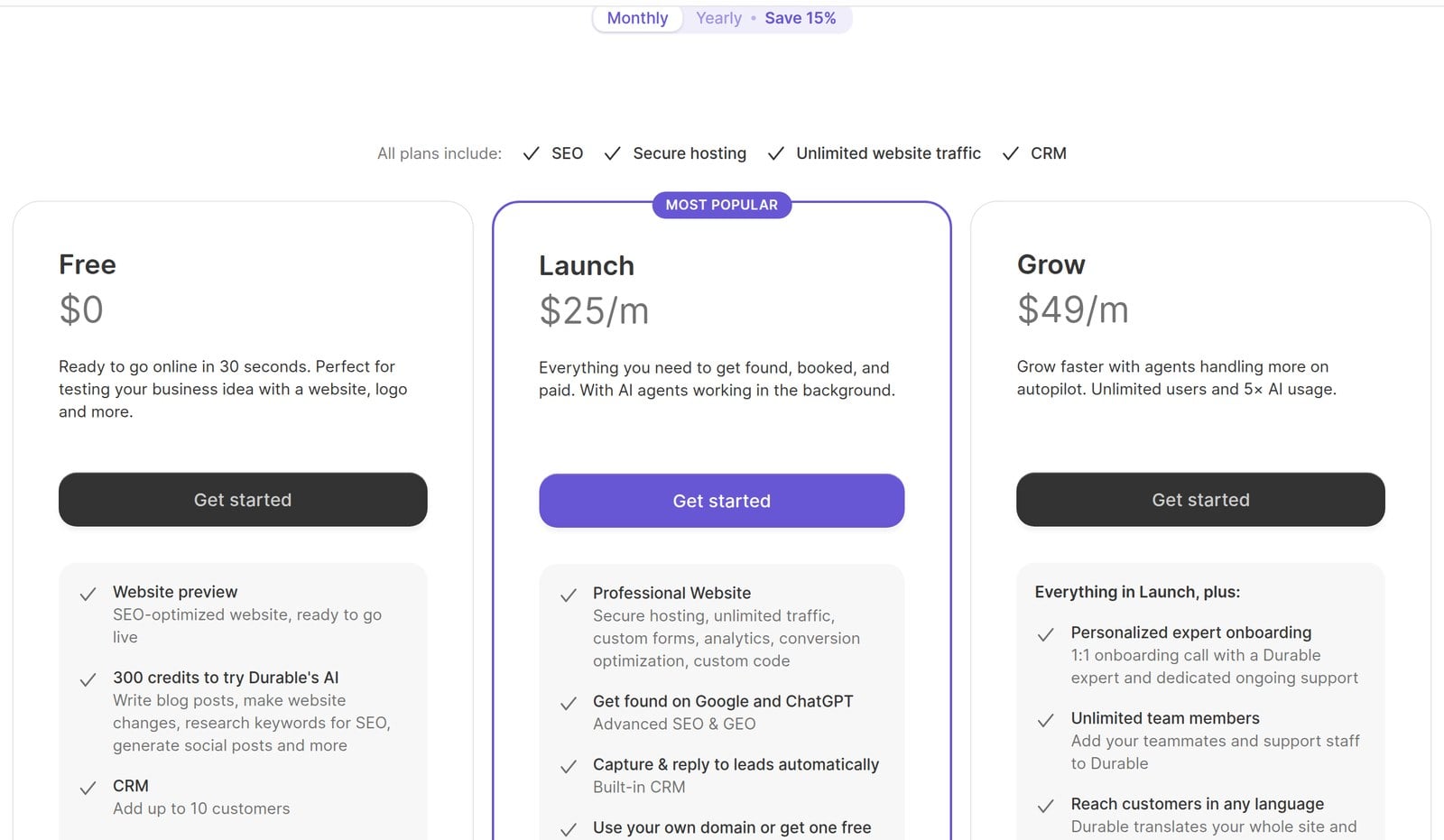
Durable offers three pricing plans:
- Free: Free forever, for business owners who want to test an idea with an SEO-optimized website preview, 300 AI credits, and a CRM for up to 10 customers.
- Launch: $25/month for business owners who want a professional website on their own domain, advanced SEO, online booking, a built-in CRM, and 1,000 AI credits a month.
- Grow: $49/month for growing businesses that want 1:1 onboarding, unlimited team members, site translation, and 5,000 AI credits a month.
Annual plans provide up to a 16% discount.
Try Durable today with the free plan.
2. Cursor
Our Verdict — Best For Devs
Price: Starts at $8/month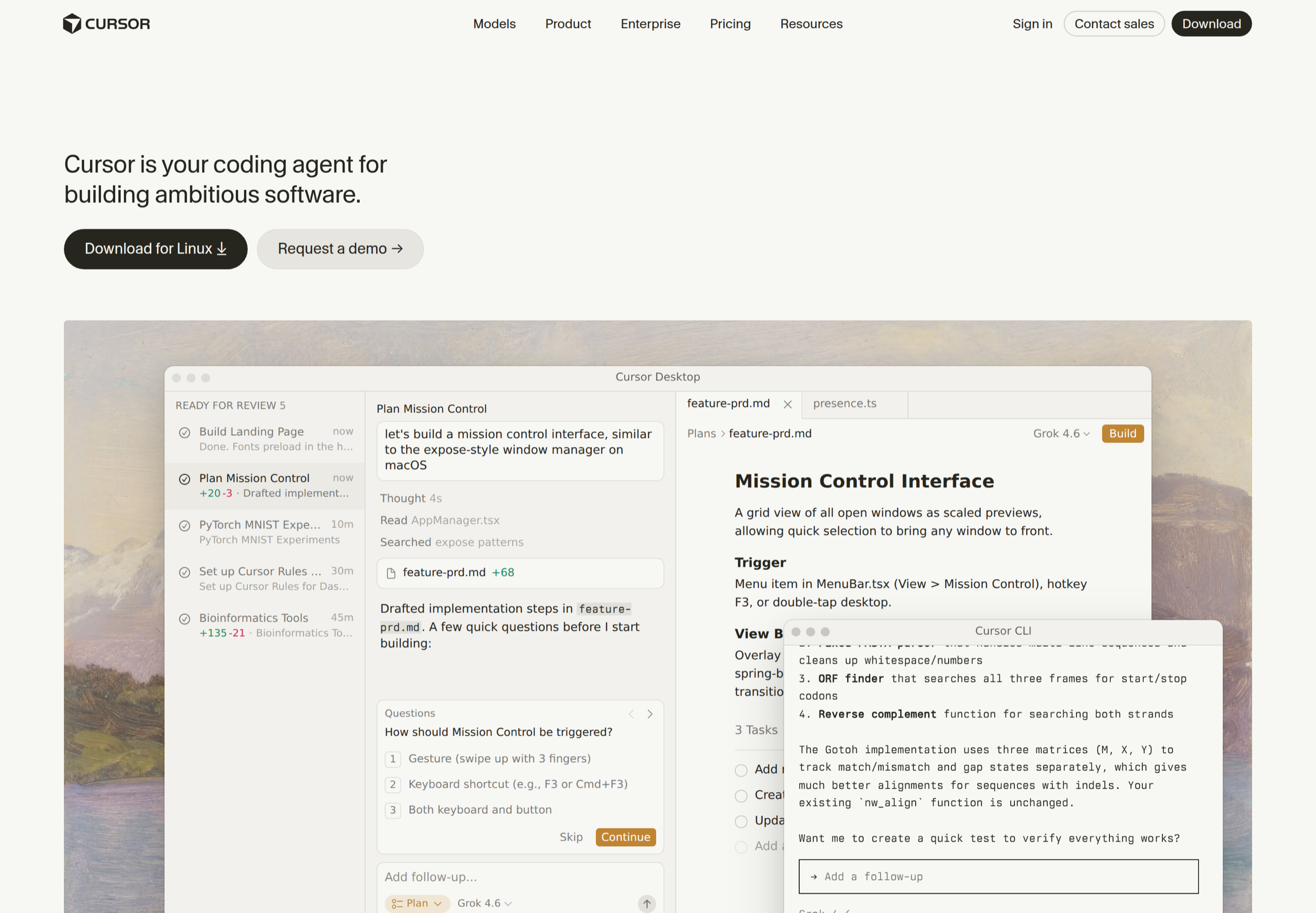
Cursor is an AI coding agent that lives inside its own editor and builds features from plain-English prompts. We think it’s the best for devs because its agent plans the work, edits across your whole codebase, and reviews its own code with frontier models behind it.
The Best Part:
A real coding agent. Describe the feature and Cursor plans it, asks the right questions, then writes the code across your project while you watch it work.
The Worst Part:
Usage limits. Plus only runs Grok models and Premium bills third-party models separately at API list price, so if you lean on third-party models all day, your bill grows with your usage.
Get it if you write code every day and want an AI agent working inside your editor instead of a chat window sitting next to it.
I recommend you start on the Free plan, then get Premium at $30/month.
(free plan)
Best For
Cursor is best for developers who want an AI agent that writes, refactors, and reviews code right inside their editor.
Top Features
Plan before build. Give Cursor a prompt and it drafts the implementation steps, asks its clarifying questions up front, then builds — in the desktop app or straight from the CLI.
Frontier models on tap. Premium adds the latest Grok models plus third-party models at API list price, so the code you get comes from the strongest models available.
MCPs, skills, and hooks. Wire the agent into your own tools and teach it your team’s workflows, so it codes the way your project demands.
Cloud agents. Hand a task off and let it run in the cloud while your editor stays free for the next one.
Bugbot reviews your code. Agentic code review goes through your changes and flags the bugs before they merge.
Pricing
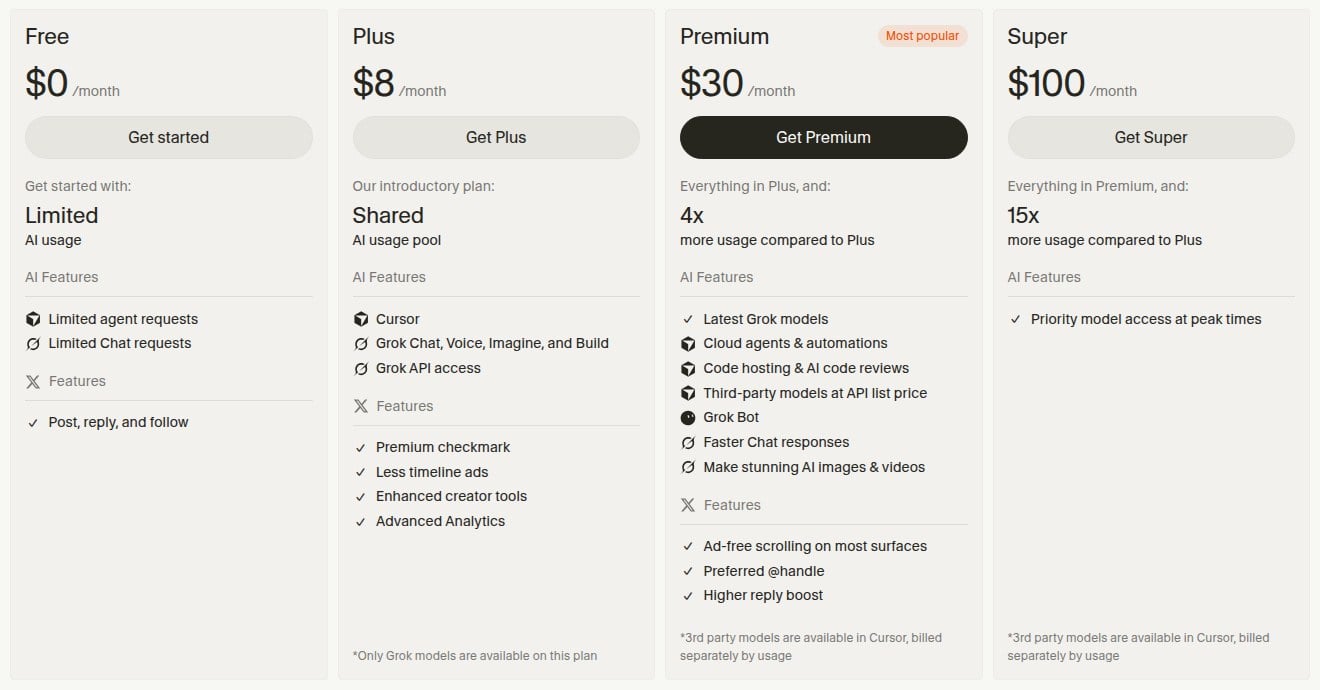
Cursor offers seven pricing plans:
- Free: Free forever, with limited agent and chat requests.
- Plus: $8/month for a shared AI usage pool on Grok models only, plus X Premium perks.
- Premium: $30/month for 4x the usage of Plus, cloud agents and automations, AI code reviews, and third-party models at API list price.
- Super: $100/month for 15x the usage of Plus and priority model access at peak times.
- Ultra: $200/month for 50x the usage of Plus and the earliest access to new products and models.
- Teams: Starts at $30/user/month for teams that want centralized billing, usage analytics, and SSO.
- Enterprise: Custom pricing, for organizations that need pooled usage, access controls, audit logs, and priority support.
Try Cursor today with the free plan.
3. Replit Agent
Our Verdict — Best For Quick Code Generation
Price: Starts at $20/month
Replit Agent is a full-featured AI coding assistant designed to streamline your development process. We think it’s the best for quick code generation because of its mobile app, code generation chat feature, and user-friendly interface.
The Best Part:
You can code anywhere. With Replit Agent's mobile apps for iOS and Android, you've got a top-notch AI coding assistant right at your fingertips — whether you're sipping Java in a coffee shop or riding the subway home.
The Worst Part:
It doesn’t work with other IDEs. If you're hoping to use Replit Agent with your favorite IDE like Visual Studio Code, Xcode, or JetBrains, I hate to be the bearer of bad news; Replit Agent only works within Replit's own integrated development environment.
Get it if you're tired of spinning your wheels on repetitive coding tasks and want more time to focus on creative problem-solving.
I recommend you get their Starter plan to get started, then go for the Core plan for $20/month.
(free plan)
Best For
Replit Agent is best for professional developers who need an AI programming assistant to generate code in over 16 languages.
Top Features
It codes in multiple languages. Whether you're fluent in Python or dabbling in Java, Replit has got your back with support for over 16 programming languages.
User-friendly interface. Navigating through Replit’s integrated development environment (IDE) is as easy as ABC, making coding a breeze even for beginner devs.
Collaborate with your team. With integrated chat, multiplayer functionality, and comment features, collaborating on projects becomes a piece of cake.
Deploy projects faster. Launch your projects faster than you can say "Go!" with Replit's Google Cloud-backed deployment features.
It tests its own work. Replit Agent tests and fixes its code in a reflection loop, so bugs get caught while your app is still being built.
Pricing
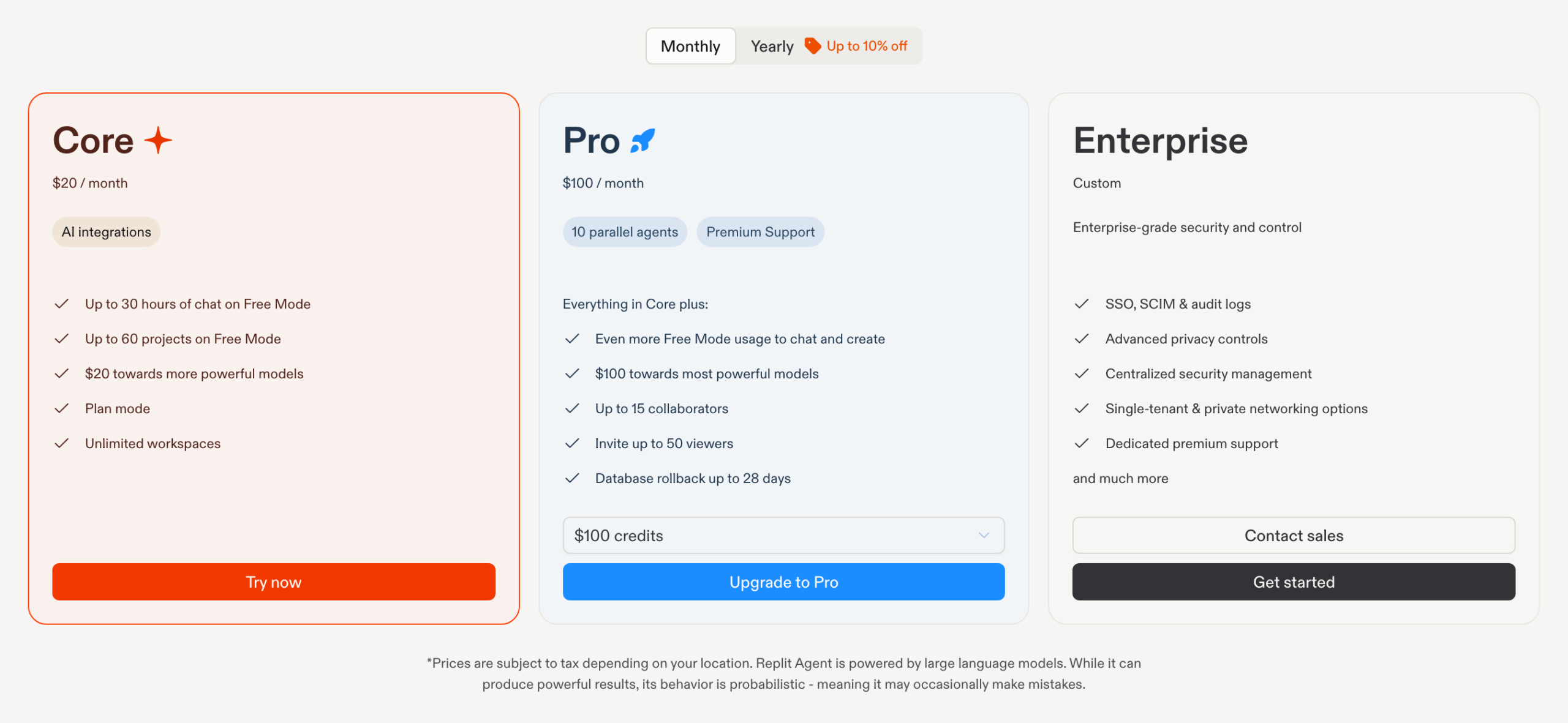
Replit Agent offers three pricing plans:
- Starter: Free forever, for beginners learning to code who want to try Replit Agent with limited daily usage.
- Core: $20/month for developers who want more agent usage, with $20 in monthly credits toward the most powerful AI models.
- Pro: $100/month for professional coders who want up to 10 parallel agents, $100 in monthly credits, and up to 15 collaborators.
Try Replit Agent today with the free plan.
Our Top Three Picks
Here’s a quick summary of our top three picks:
- Durable — best of the best
- Cursor — best for devs
- Replit Agent — best for quick code generation
Here’s a quick comparison of our top seven picks:
Tool | Entry Offer | Pricing |
|---|---|---|
Durable | Free plan | Starts at $25/mo |
Cursor | Free plan | Starts at $8/mo |
Replit Agent | Free plan | Starts at $20/mo |
GitHub Copilot | Free plan | Starts at $10/mo |
Amazon Q Developer | Free plan | Starts at $19/mo |
AI2SQL | 7-day free trial | Starts at $9/mo |
Cline | Free plan | Free + AI usage |
Here are the top 50 best AI coding assistant software we considered in this review:
- Durable
- Cursor
- Replit Agent
- GitHub Copilot
- Amazon Q Developer
- AI2SQL
- Cline
- Google Antigravity
- Sourcegraph Cody
- Claude Code
- Bugasura
- Telex
- SQLAI.ai
- Gemini in Android Studio
- Firebase Studio
- WPCode
- ChatGPT
- CodeT5
- PolyCoder
- Snyk
- OpenAI Codex
- Copilot
- AlphaCode
- JetBrains Air
- Lovable
- Warp
- Visual Studio IntelliCode
- PyCharm
- AIXcoder
- Aider
- Jedi
- Wing Python IDE Pro
- Smol Developer
- v0
- Gemini Code Assist
- Jules
- Zed
- CodeRabbit
- Devin
- Kiro
- Augment Code
- Embold
- Infer
- Functionize
- Applitools
- Amp
- Qodo
- Cortex
- Bolt.new
- Neural Designer
Frequently Asked Questions About AI Coding Assistants
What is the best AI coding assistant?
Durable is our top pick overall for spinning up a website fast without coding. We reviewed a large field to land on the seven best, and Durable gives you a free plan plus Launch and Grow plans to grow into.
What should I look for in an AI coding assistant?
Match the tool to your goal. Reach for Durable for rapid website generation without coding, Cursor if you are a developer, AI2SQL for SQL, and GitHub Copilot for function suggestions. Decide whether you need full-site generation, multifile code, or targeted help, then test the fit before you commit.
Are there free AI coding assistants?
Yes. Durable, Cursor, and Replit Agent all have free-forever plans for beginners, and GitHub Copilot and Amazon Q Developer have free tiers too.
What is GitHub Copilot best for?
GitHub Copilot is our pick for function suggestions. It comes with a free plan of 2,000 completions a month, so you can see how well its suggestions fit your workflow before you subscribe.
Which AI coding assistant is best for SQL?
AI2SQL is our pick for SQL. It is one of the seven we recommend, built to turn plain requests into SQL queries.
What is the best AI coding assistant for developers?
Cursor is our pick for developers. Its agent plans and edits across your whole codebase, and the Premium plan at $30/month is the one to reach for when you want third-party models and cloud agents on the job.
Durable vs Cursor, which should I choose?
Durable is our pick for building a site fast without code, and Cursor is our pick for developers. Choose Durable when you want a site built fast, and Cursor when you write code and want an AI agent working inside your editor.
Which programming languages do these AI coding assistants support?
These tools cover languages like JavaScript/TypeScript, Python, and Java. Python is a favorite for AI work because it is simple and readable.
The Bottom Line
To recap, here are the best AI coding assistant software to try this year:
- Durable — best of the best
- Cursor — best for devs
- Replit Agent — best for quick code generation
- GitHub Copilot — best for function suggestions
- Amazon Q Developer — best for software insights
- AI2SQL — best for SQL
- Cline — best open-source option