

Today there are 93 different AI video editor software. We spent 70 hours comparing the top 50 to find the seven best you can use to effortlessly create professional-quality videos.
What is the Best AI Video Editor?
1. Filmora
Our Verdict — Best Of The Best
Price: Starts at $49.99/year
Filmora enables anyone to create stunning videos. We think it's the best because of its outstanding motion tracking capabilities.
The Best Part:
- Up your editing game with motion tracking. Filmora's Motion Tracker tool lets you seamlessly track movement in your video, allowing you to add elements, videos, images, and text that follow the motion for an engaging and dynamic result.
The Worst Part:
- Watermarks. Filmora's free plan places a watermark on your exported videos, which might be a deal-breaker for those who want a clean and unbranded output for free.
Get it if you want an easy-to-master video editor with powerful AI features that help you edit videos in no time.
I recommend you get started with the free plan, then get the Perpetual Plan for $79.99.
(free plan)
Best For
Filmora is best for amateur and aspiring video creators who want an AI-powered editor that delivers professional-quality videos without breaking the bank.
Top Features
It makes your audio pop. Fine-tune your audio tracks with Filmora's built-in equalizer and AI-powered noise removal tools.
Tell your tale with many screens. Combine multiple video clips into a single frame for a captivating storytelling experience.
Shake off that shaky footage. Let AI stabilize your videos with just a few clicks for a smooth, polished output.
Effortless green screen removal. Create professional-looking visual effects by easily removing green screen backgrounds.
Distribution center. Share your videos quickly with Filmora's direct export options for popular platforms such as YouTube, Vimeo, and more.
Pricing
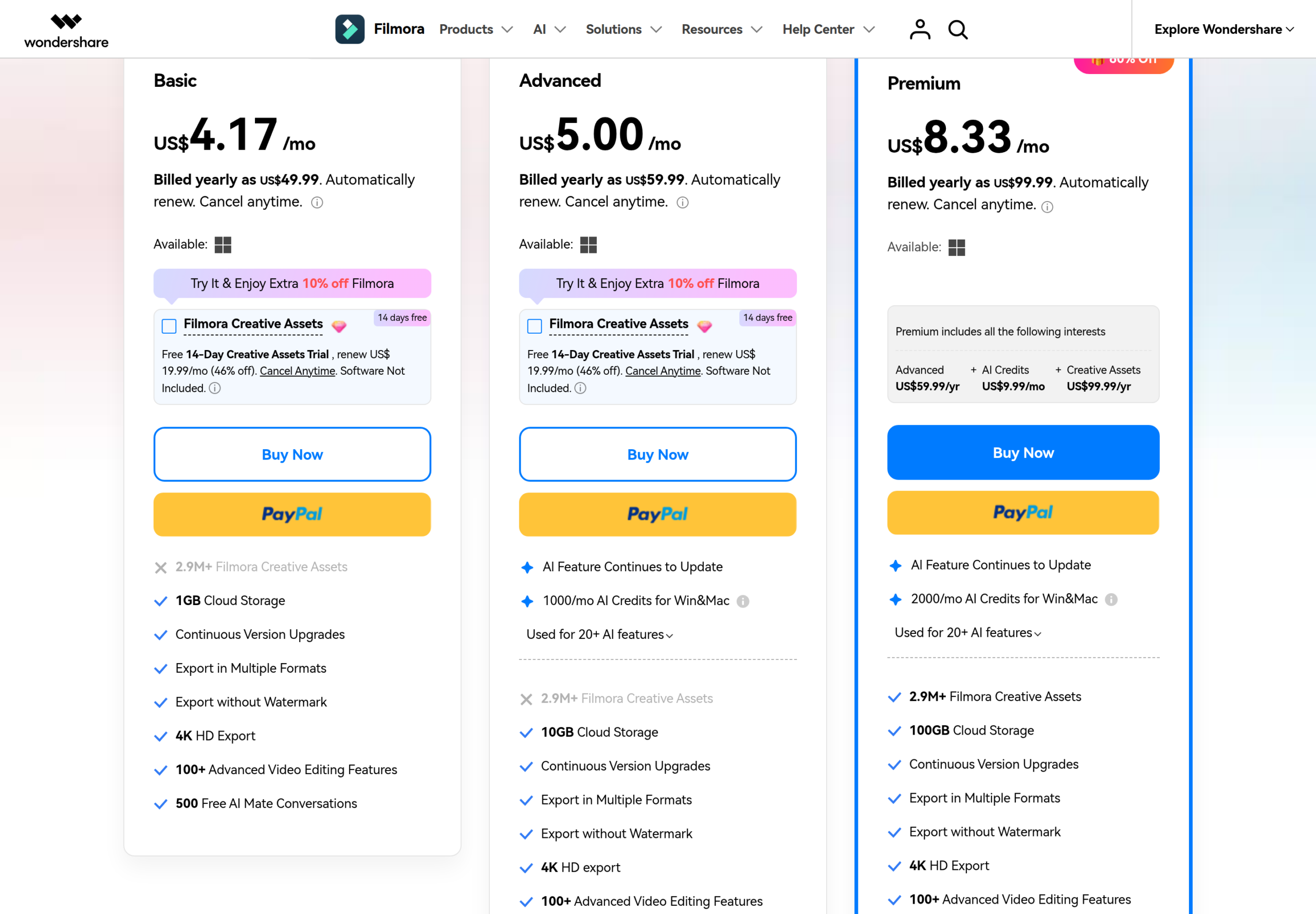
Filmora offers four pricing plans:
- Basic Plan: $49.99/year for casual creators who need Filmora’s editing features and 1GB of cloud storage.
- Advanced Plan: $59.99/year for creators who want 1,000 monthly AI credits and 10GB of cloud storage.
- Premium Plan: $99.99/year for creators who want 2,000 monthly AI credits, 100GB of cloud storage, and the Creative Assets library.
- Perpetual Plan: $79.99 one-time payment, for a lifetime license with no recurring costs.
Try Filmora today with the free plan.
Our Verdict — Best For Extensive Video Editing
Price: Starts at $29.95/month
Movavi Video Suite is a true "swiss knife" type of video editing software. We think it's the best for extensive video editing because of its huge selection of video editing tools.
The Best Part:
- Transitions that sing. Movavi Video Suite spices up your videos with seamless transitions that come complete with catchy sound effects.
The Worst Part:
- Missing advanced trimming options. Movavi Video Suite could use a boost when it comes to advanced trim modes and clip pre-trimming for users who value precision.
Get it if you want to unleash your creative potential with a video editor packed to the brim with AI-driven features.
I recommend you try out Movavi with the 7-day free trial, then get the Video Suite Plus plan for $99.95/year.
(7-day free trial)
Best For
Movavi Video Suite is best for experienced content creators who want an AI-powered video editor that's both versatile and easy to use.
Top Features
Get your creative juices flowing. Mix and match various filters, transitions, and titles with Movavi Video Suite's AI-driven effects.
Level up your audio game. Amp up your video's sound quality with Movavi's AI audio editing tools and effects.
Give it some flair. Spice up your videos with dynamic callouts, shapes, and clips with Movavi's animation tools.
Tell your story like a pro. Add stylish captions and text effects to your videos with Movavi's title editor.
Control your pace. Speed up or slow down your footage to create captivating time-lapse or slow-motion effects.
Pricing
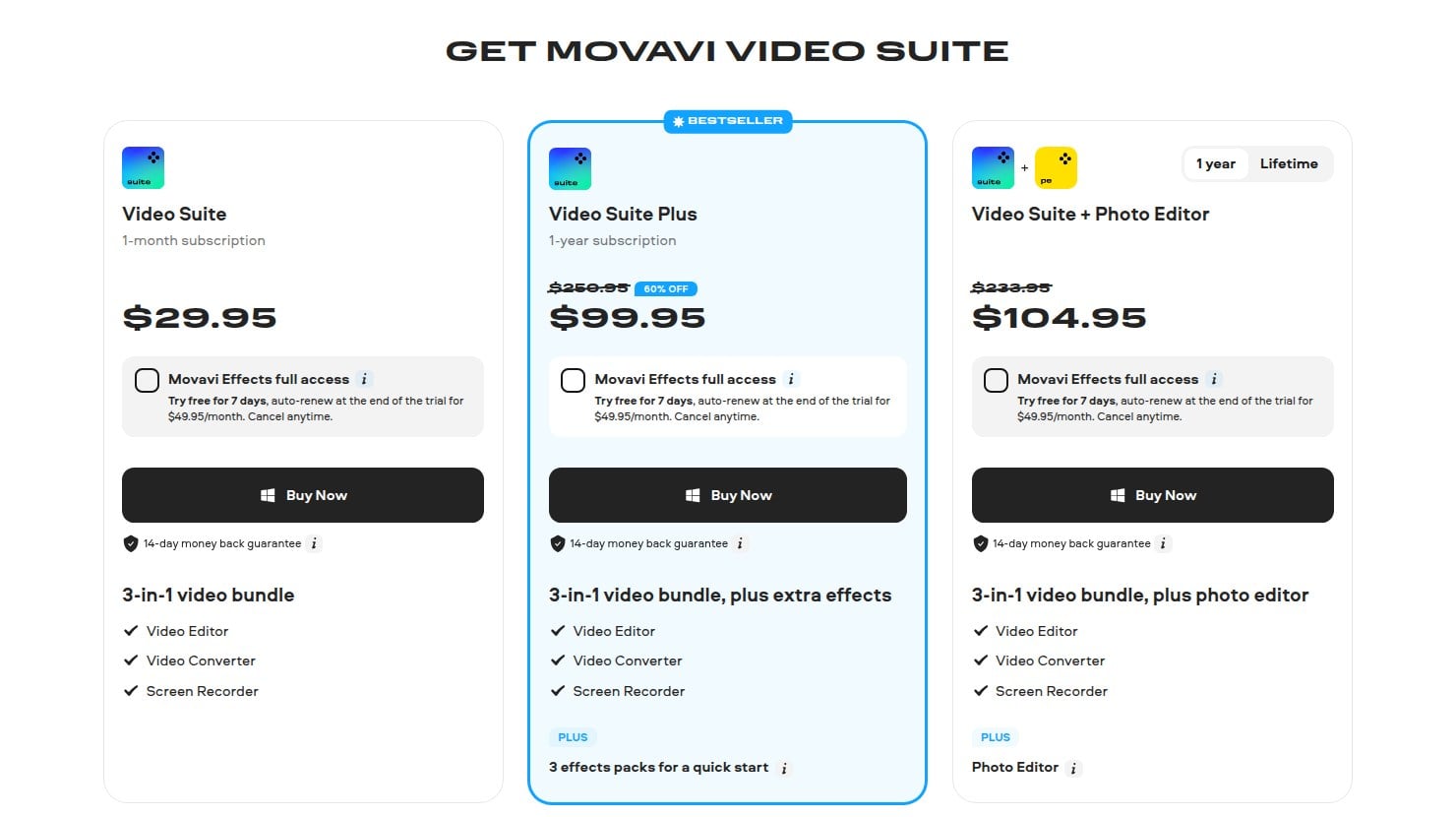
Movavi Video Suite offers three pricing plans:
- Video Suite: $29.95 for the first month, then $49.95/month, for casual creators who want to start using powerful AI video editing tools.
- Video Suite Plus: $99.95/year for creators who want the full video bundle plus 3 extra effects packs.
- Video Suite + Photo Editor: $104.95/year for experienced creators who want a complete video and photo editing solution.
Try Movavi Video Suite today with a free 7-day trial.
3. FlexClip
Our Verdict — Best For Quick Video Editing
Price: Starts at $19.99/month
FlexClip is a no-frills AI video editor. We think it's the best for quick video editing because of its surprising collection of video templates.
The Best Part:
- Impressive template collection. FlexClip's wide range of templates covers various themes — like birthdays, travel clips, and real estate tours — making it a breeze to create professional-looking videos, quickly.
The Worst Part:
- It’s a bit basic. FlexClip might feel somewhat limited in features and capabilities when stacked against more advanced AI video editors such as Movavi Video Suite or Filmora.
Get it if you want an easy-to-use AI tool that simplifies and speeds up your video editing process.
I recommend you start with the free plan, then get the Plus plan for $19.99/month.
(free plan)
Best For
FlexClip is best for small business owners who need a quick and easy solution to produce engaging promotional videos.
Top Features
AI-generated subtitles. FlexClip's AI technology can automatically transcribe your video's audio and generate accurate subtitles on autopilot.
AI background remover. Remove or replace the background of your videos effortlessly with FlexClip's AI-powered background remover, allowing you to create professional-looking visuals without the need for green screens or manual editing.
AI-assisted text-to-speech. Convert text to natural-sounding voice overs with FlexClip's advanced text-to-speech feature.
Auto color correction. Let the AI take care of balancing colors in your video for a polished and professional look.
Make it yours. Customize your video with your own logo, colors, and typography by using FlexClip's easy branding options.
Pricing
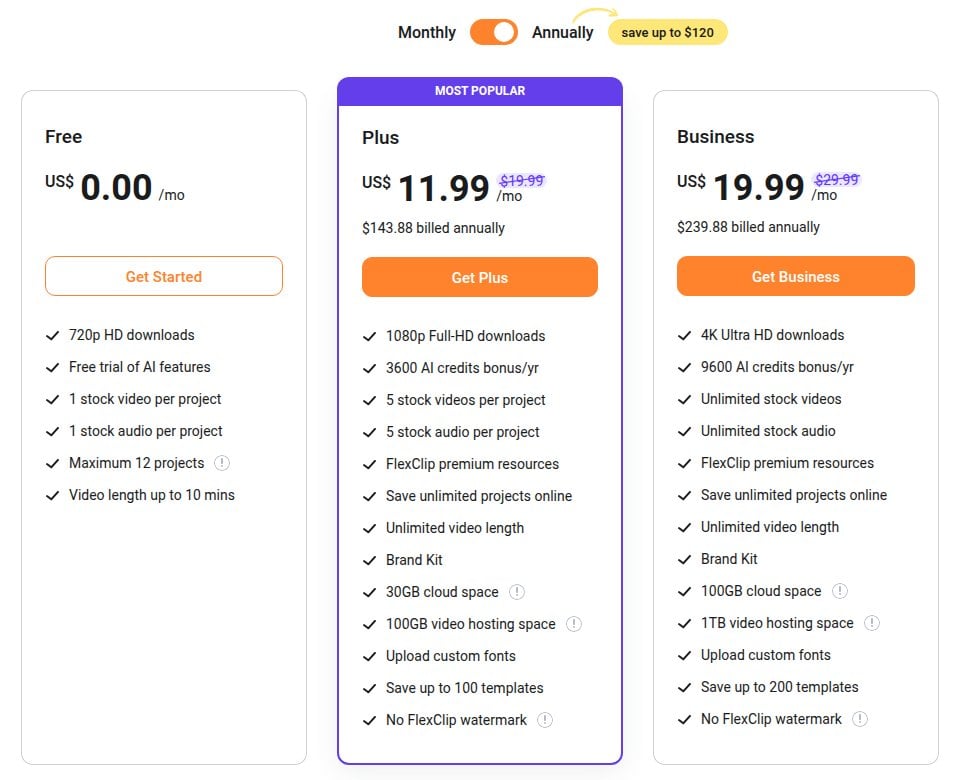
FlexClip offers three pricing plans:
- Free: Free forever, for beginners and casual users who need fast and basic AI video editing features with watermarked exports.
- Plus: $19.99/month for small business owners and content creators who require more advanced editing tools and higher-quality, watermark-free exports.
- Business: $29.99/month for professionals and businesses that need a comprehensive video editing solution with higher limits and unlimited use of resources such as stock audio and video.
Annual plans provide up to a 40% discount.
Try FlexClip today with the free plan.
4. InVideo
Our Verdict — Best For Pre-Built Templates
Price: Starts at $20/month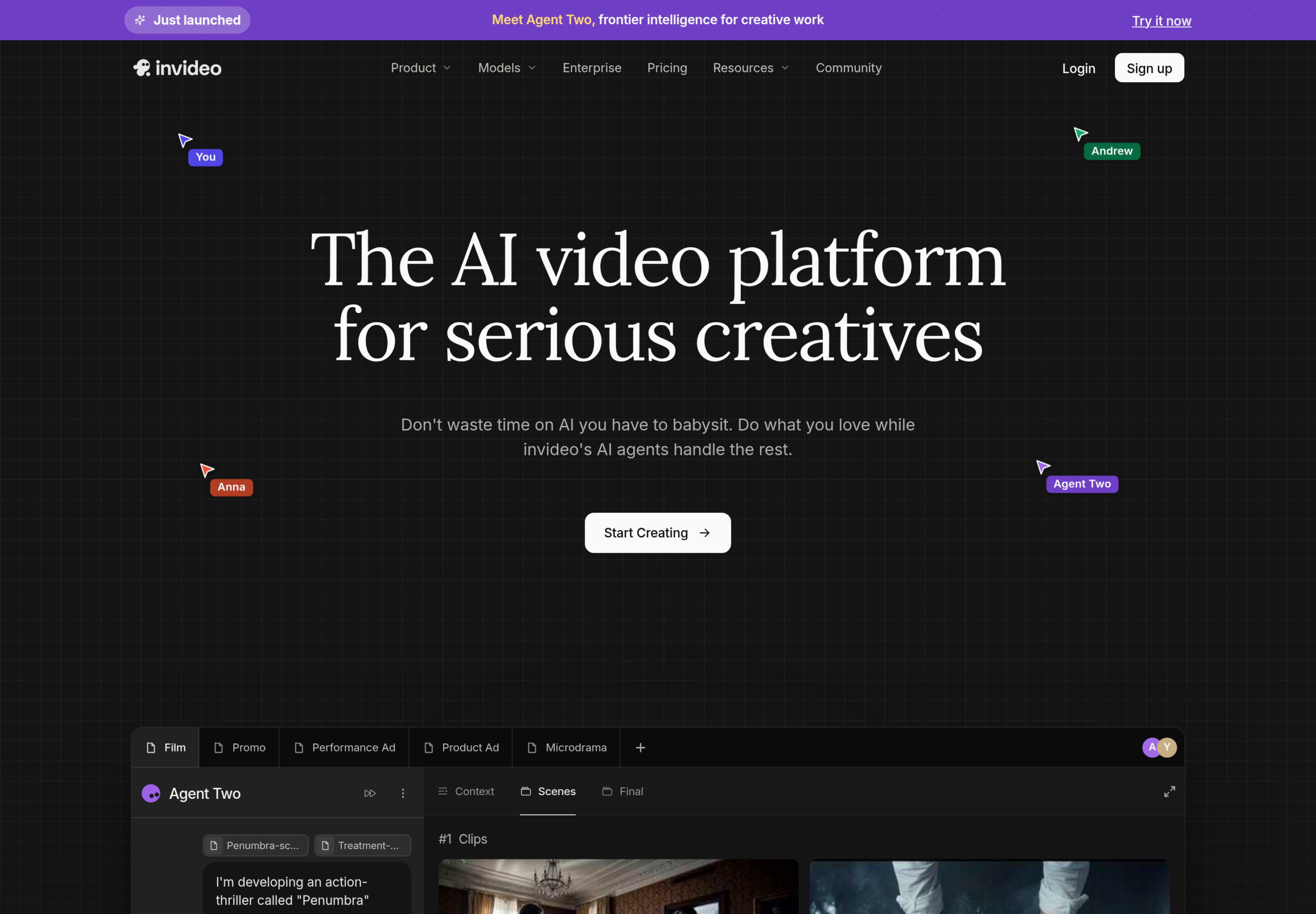
InVideo is an AI video platform with an agentic editor, AI video models like Seedance, and more than 5,000 ready-made templates in invideo Studio. We think it’s the best for pre-built templates because you can pick a template by platform, industry, or content type and make it yours with simple drag-drop-replace edits.
The Best Part:
- Templates for every occasion. invideo Studio has 5,000+ professionally created templates, from YouTube intros and Instagram Reels to real estate and wedding videos.
The Worst Part:
- Credits run out fast. Every AI generation uses credits, and the Starter plan gives you 400 a month.
Get it if you want to start from a ready-made template and let AI agents handle the edit.
I recommend you start with the Starter plan for $20/month, or $10/month billed annually.
(from $20/month)
Best For
InVideo is best for marketers and social media creators who want polished videos without starting from a blank timeline.
Top Features
Agentic editing. Describe the edit in plain words and invideo’s editing agent does it on a real multitrack timeline you can take over at any frame.
Batch changes. Give the editing agent one direction and it applies it to every shot on the timeline.
Footage memory. The agent watches every clip and logs it, so you can find any moment by describing it.
Multiplayer mode. Edit together in real time, with live cursors that show what everyone is working on.
Storyboarding. Turn a script or idea into a shot-by-shot plan before you generate anything.
Pricing
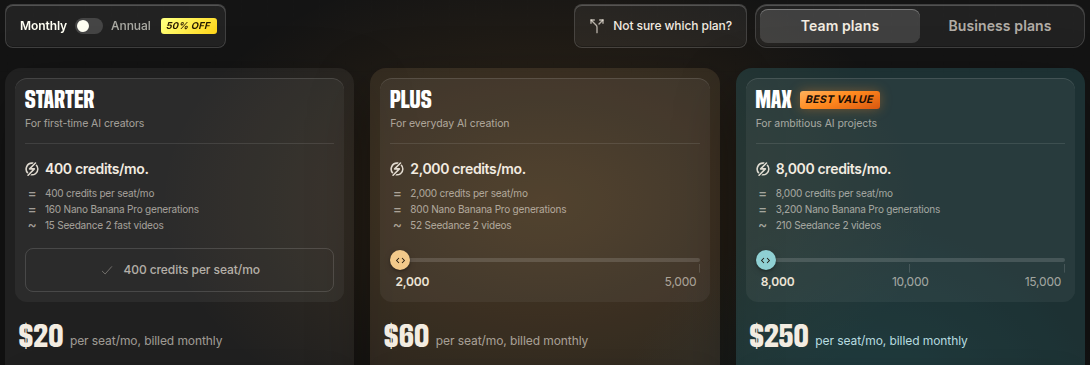
InVideo offers three pricing plans:
- Starter: $20/month per seat, or $10/month billed annually, for 400 credits a month, the full timeline editor, and up to 5 seats.
- Plus: $60/month per seat, or $30/month billed annually, for 2,000 credits a month, every Seedance model, and up to 10 seats.
- Max: $250/month per seat, for 8,000 credits a month, the lowest cost per credit, and up to 20 seats.
Annual subscriptions provide up to a 50% discount.
Try InVideo today with the Starter plan.
5. Clipchamp
Our Verdict — Best For Straightforward Interface
Price: Starts at $9.99/month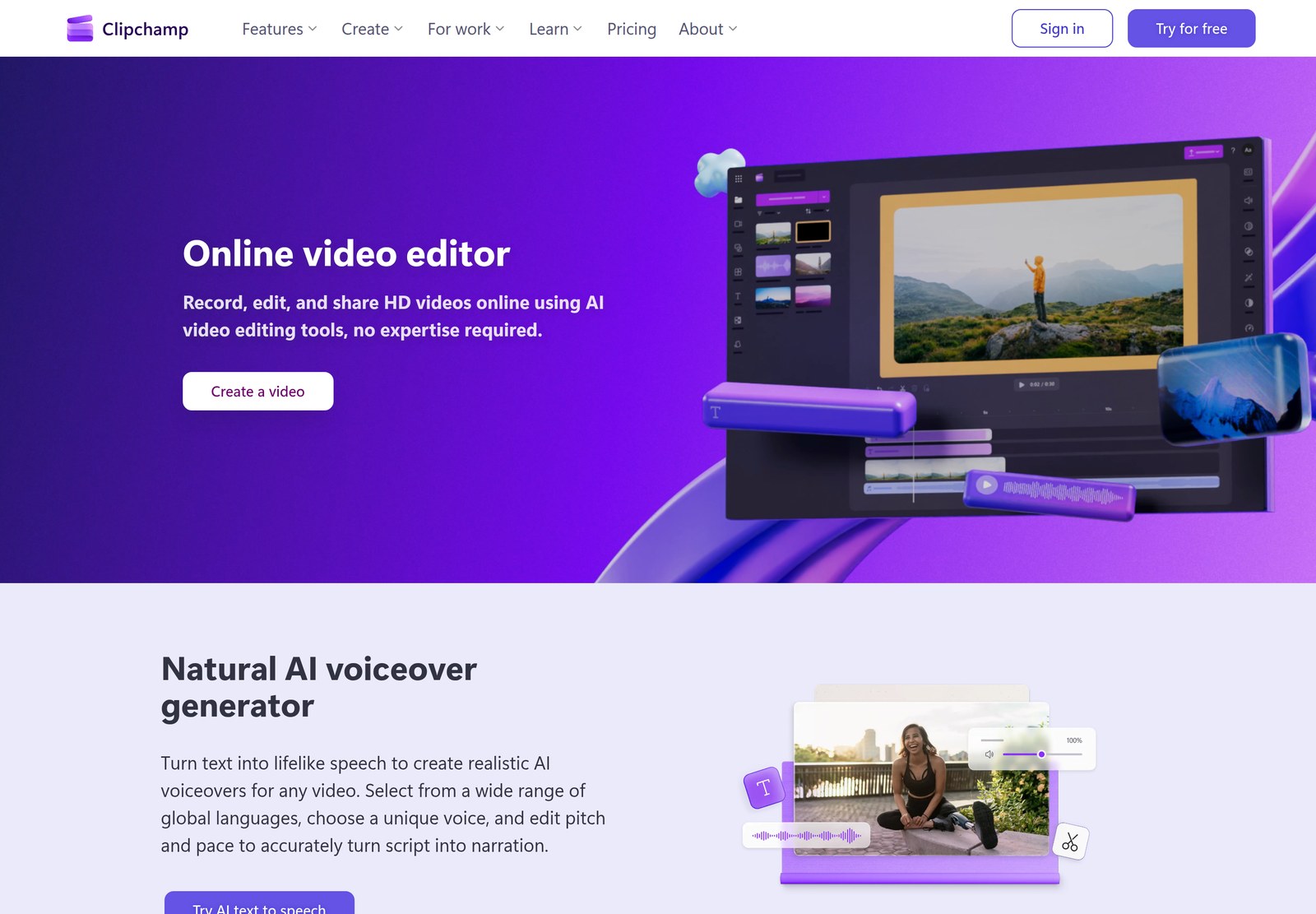
Clipchamp is Microsoft’s video editor, free with a personal Microsoft account and built into Windows 11. We think it’s the best for a straightforward interface because you trim, crop, and add text, voiceovers, and captions in an editor that runs right in your browser.
The Best Part:
- Free exports with no watermark. The free plan exports your videos in up to 1080p HD without a watermark.
The Worst Part:
- 4K needs Microsoft 365. Ultra HD exports, premium stock, and the brand kit come only with the Microsoft 365 Personal and Family plans.
Get it if you want a simple video editor you can open in your browser and use right away.
I recommend you start with the free plan, then add Microsoft 365 Personal for $9.99/month when you need 4K exports.
(free plan)
Best For
Clipchamp is best for beginners, students, and Windows users who want clean videos without learning a pro editor.
Top Features
AI voiceovers. Turn text into lifelike speech in a wide range of languages, and adjust the pitch and pace.
Automatic subtitles. Generate captions in over 80 languages, then edit their style, font, and colors.
Screen and webcam recorder. Record your screen, camera, and voice right inside the editor, with unlimited retakes.
Audio cleanup. Remove background noise, long pauses, and filler words to make voices clearer.
Royalty-free stock. Add stock videos, images, music, stickers, GIFs, and sound effects from the built-in library.
Pricing
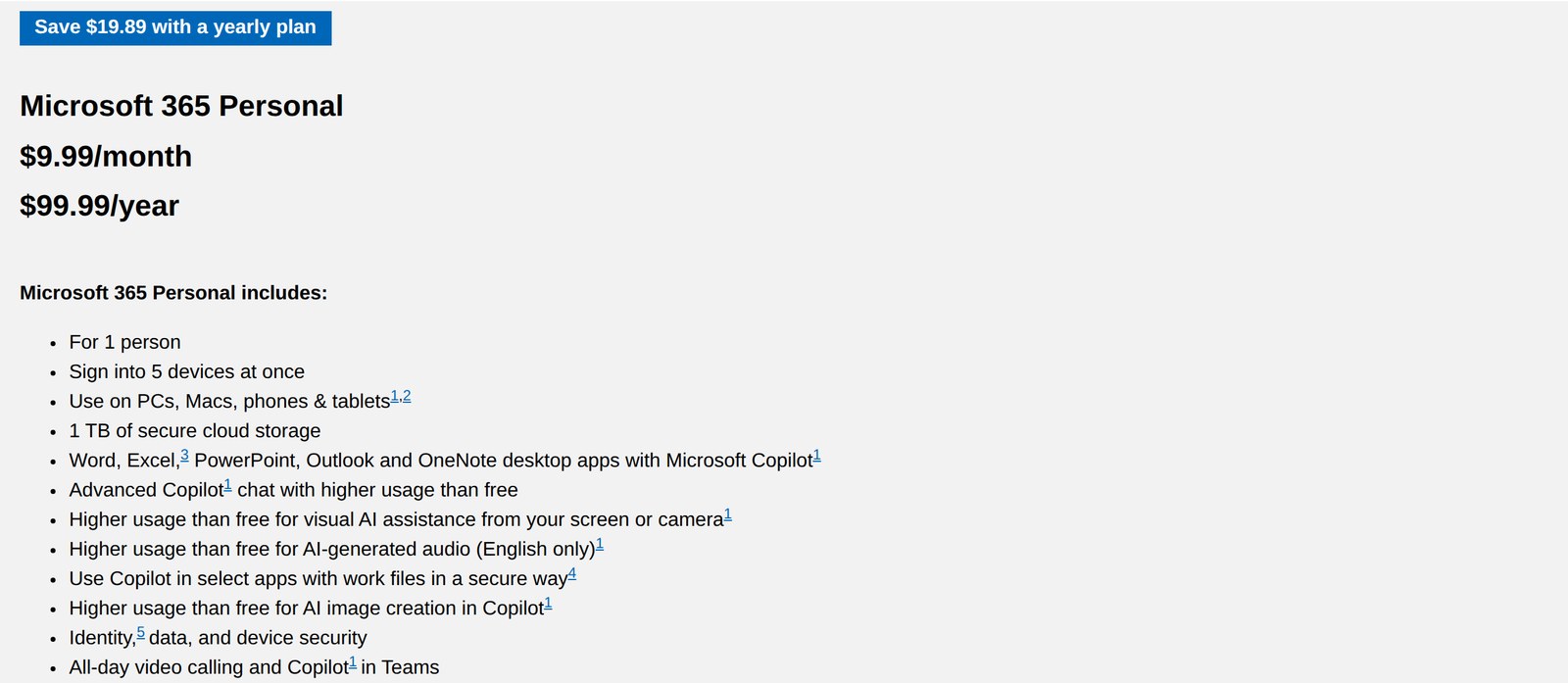
Clipchamp offers three pricing plans:
- Free: $0, for watermark-free exports in up to 1080p HD, the AI editing tools, and free stock assets.
- Microsoft 365 Personal: $9.99/month, or $99.99/year, for 4K UHD exports, premium stock assets, premium filters, and the brand kit.
- Microsoft 365 Family: $12.99/month, or $129.99/year, for up to 6 people, with Clipchamp’s premium features included.
Annual subscriptions provide up to a 17% discount.
Try Clipchamp today with the free plan.
6. Lumen5
Our Verdict — Best For Social Media Content
Price: Starts at $29/month
Lumen5 is an AI video maker that turns blog posts, articles, scripts, and documents into videos in minutes. We think it’s the best for social media content because you can drop in a link or a few bullet points and get a branded video ready to share, with no editing experience needed.
The Best Part:
- Blog post to video. Paste a link to an article and Lumen5’s AI builds the first cut of the video for you.
The Worst Part:
- Short videos on the free plan. The free plan caps you at five videos a month, two minutes each, with a Lumen5 branded outro.
Get it if you want to repurpose your written content into videos for your social channels.
I recommend you start with the free plan, then get the Basic plan for $19/month, billed yearly.
(free plan)
Best For
Lumen5 is best for marketers and content teams who want to turn their blogs and articles into social videos at scale.
Top Features
Drag-and-drop editor. Build videos the way you build slides, with no scripts and no learning curve.
AI voiceovers. Choose from 1,000+ lifelike AI voices, or clone your own voice, on the paid plans.
Automated captions. Every plan adds captions to your videos automatically.
Licensed stock library. Pull from millions of commercially licensed stock photos and video clips, built in.
Brand kits. Save your logos, colors, and fonts so every video stays on brand.
Pricing
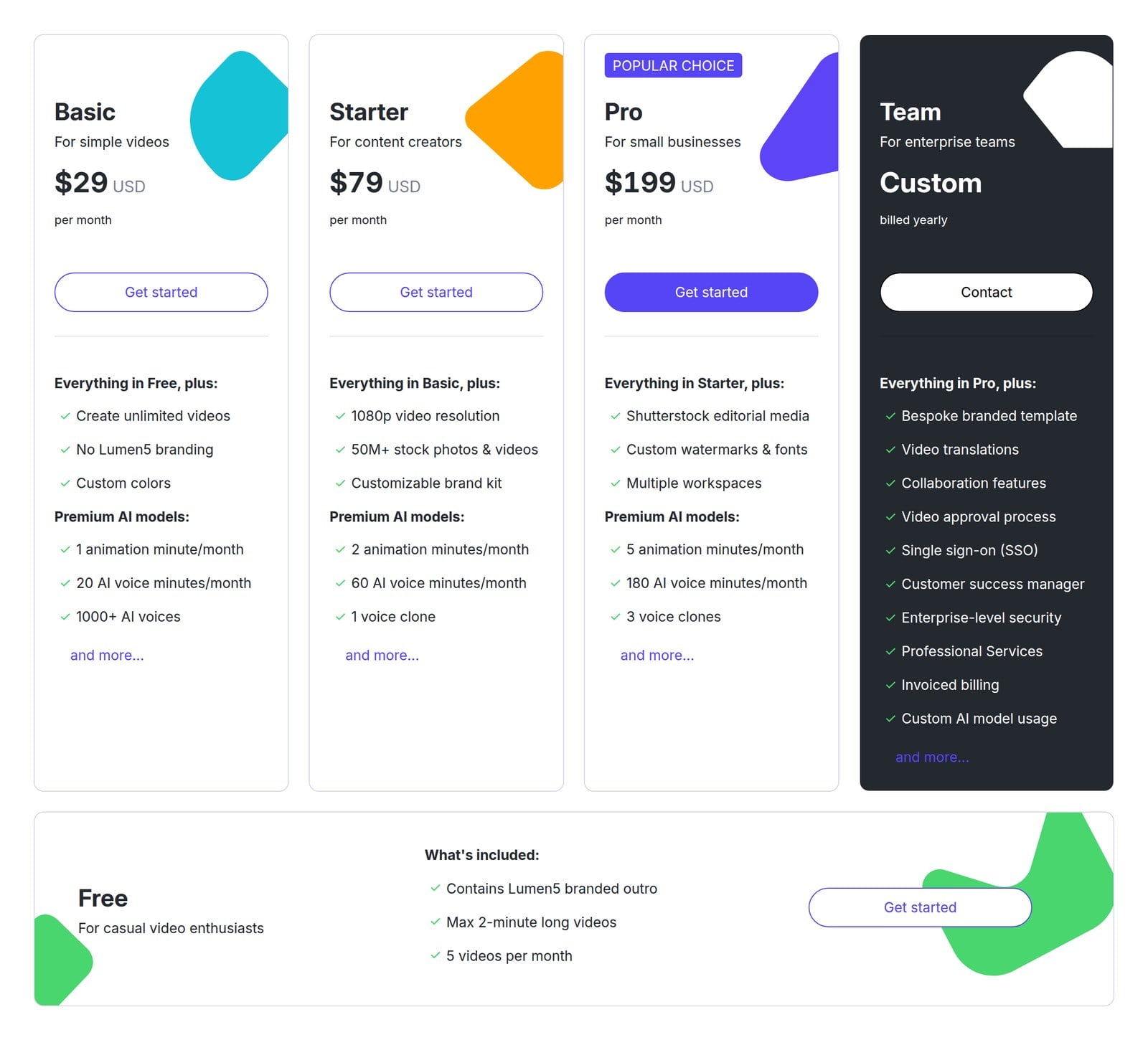
Lumen5 offers five pricing plans:
- Free: $0, for 5 videos a month of up to 2 minutes, with a Lumen5 branded outro.
- Basic: $29/month, or $19/month billed yearly, for unlimited videos with no Lumen5 branding.
- Starter: $79/month, or $59/month billed yearly, for 1080p videos, 50M+ stock photos and videos, and a customizable brand kit.
- Pro: $199/month, or $149/month billed yearly, for Shutterstock editorial media, custom watermarks and fonts, and multiple workspaces.
- Team: Custom pricing, billed yearly, for bespoke branded templates, unlimited video translations, and single sign-on.
Annual subscriptions provide up to a 34% discount.
Try Lumen5 today with the free plan.
7. Animoto
Our Verdict — Best For Slideshow-Style Videos
Price: Starts at $19/month
Animoto is a drag-and-drop video maker for turning photos, screen recordings, and short clips into polished videos. We think it’s the best for slideshow-style videos because you can drop your pictures into a template, pick a licensed soundtrack, and have a finished slideshow without any editing skills.
The Best Part:
- Photos to video in minutes. Upload your pictures and clips, choose a template, and add music, text, and effects with drag and drop.
The Worst Part:
- Watermark on the free plan. Free videos carry an Animoto watermark and top out at 720p.
Get it if you want to turn your photos and clips into a good-looking video without learning to edit.
I recommend you start with the free plan, then get the Basic plan for $9/month, billed annually.
(free plan)
Best For
Animoto is best for small businesses, marketers, and families who want slideshows and promo videos made from photos.
Top Features
Hundreds of templates. Start from one of hundreds of professional templates for social media videos, ads, and more.
Licensed music library. Pick a worry-free soundtrack from Animoto’s licensed library, or upload your own.
Getty Images stock. Add licensed stock photos and videos from Getty Images on the Professional plans.
Screen and webcam recording. Capture your screen and webcam without leaving Animoto.
Saved branding. Save your logo, colors, and fonts to apply consistent branding to every video.
Pricing
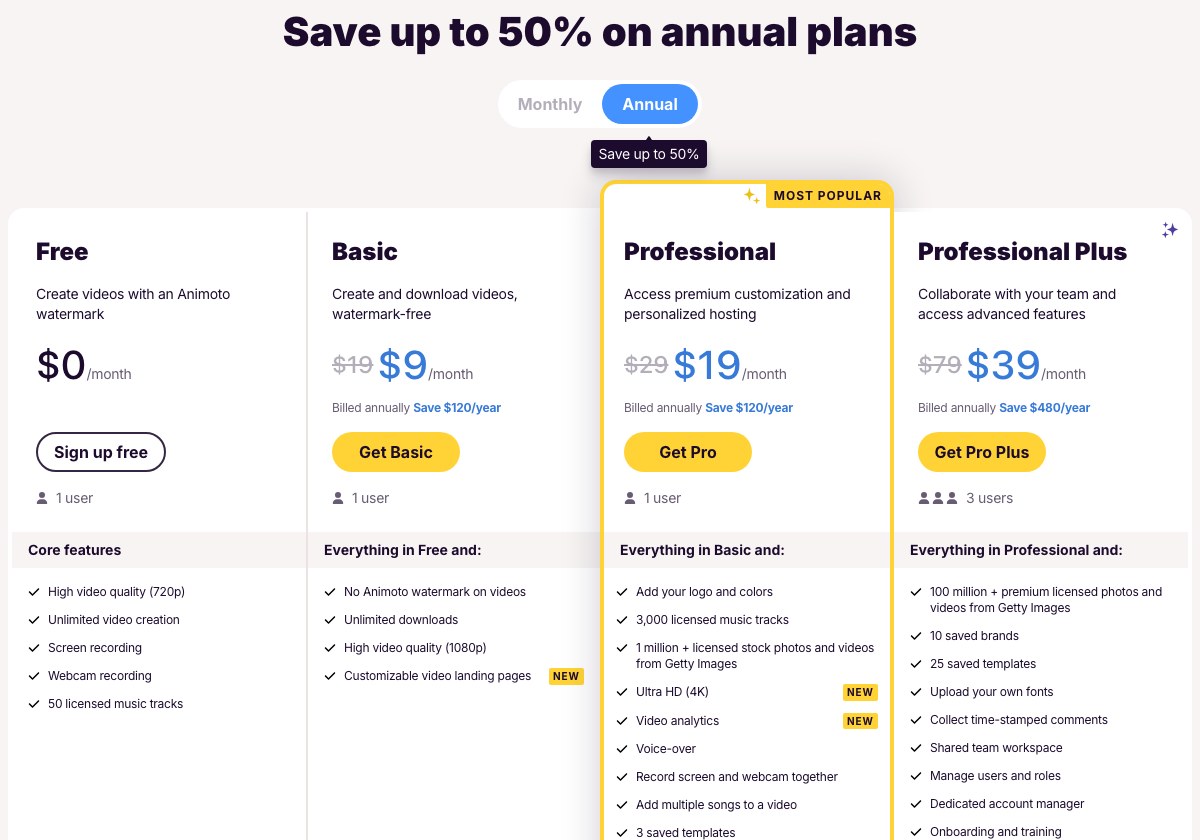
Animoto offers four pricing plans:
- Free: $0/month, for unlimited videos in 720p with an Animoto watermark.
- Basic: $19/month, or $9/month billed annually, for watermark-free videos, unlimited downloads, and 1080p quality.
- Professional: $29/month, or $19/month billed annually, for your logo and colors, 3,000 licensed music tracks, 1 million+ Getty Images photos and videos, and 4K.
- Professional Plus: $79/month, or $39/month billed annually, for 3 users, 100 million+ Getty Images photos and videos, and a shared team workspace.
Annual subscriptions provide up to a 53% discount.
Try Animoto today with the free plan.
Our Top Three Picks
Here’s a quick summary of our top three picks:
- Filmora — best of the best
- Movavi Video Suite — best for extensive video editing
- FlexClip — best for quick video editing
Here’s a quick comparison of our top seven picks:
Tool | Entry Offer | Pricing |
|---|---|---|
Filmora | Free plan | Starts at $49.99/yr |
Movavi Video Suite | 7-day free trial | Starts at $29.95/mo |
FlexClip | Free plan | Starts at $19.99/mo |
InVideo | None | Starts at $20/mo |
Clipchamp | Free plan | Starts at $9.99/mo |
Lumen5 | Free plan | Starts at $29/mo |
Animoto | Free plan | Starts at $19/mo |
Here are the top 50 AI video editors we considered in this review:
- Filmora
- Movavi Video Suite
- FlexClip
- InVideo
- Clipchamp
- Lumen5
- Animoto
- Adobe Premiere
- Final Cut Pro
- Lightworks
- Pinnacle Studio
- VideoPad
- Shotcut
- PowerDirector
- CyberLink
- DaVinci Resolve
- iMovie
- Captions
- Blender's Video Editor
- Descript
- Rocketium
- Adobe Firefly
- WeVideo
- VideoCreek
- Promo.com
- Wave.video
- CapCut
- Biteable
- Canva Video Editor
- Kapwing
- Hippo Video
- Headliner
- Typito
- VEED
- VideoScribe
- Animaker
- Vimeo Create
- Riverside
- Vyond
- Renderforest
- OpusClip
- Powtoon
- Topaz Video AI
- Doodly
- Toonly
- Runway
- Pictory
- Movie Maker Online
- Pizap
- ScreenPal
Frequently Asked Questions About AI Video Editor Software
What is the best AI video editor?
Filmora is our top pick overall. Its motion tracking stands out, and you also get audio equalization, noise removal, video stabilization, and green screen removal in one place.
Which AI video editor is best for extensive editing?
Reach for Movavi Video Suite when your projects get big. You get transitions with sound effects, filters, animations, and caption effects for more involved edits.
Are there any free AI video editors?
Yes, several. Filmora and FlexClip both run a free plan, Movavi Video Suite gives you a free trial, and Clipchamp, Lumen5, and Animoto each offer a free plan.
Can AI video editors create videos from text or scripts?
Yes. Making AI-generated videos from text, scripts, or source files is a core feature to look for. FlexClip does it well, with AI subtitles, an AI background remover, and text-to-speech built in.
What should I look for when choosing an AI video editor?
Weigh the editing toolset, the ability to switch aspect ratios for different platforms, quality enhancement, AI generation from text or scripts, stock footage access, and whether it runs online without a download.
Which AI video editor is best for social media content?
Lumen5 is the pick for social content. It turns a blog link, script, or a few bullet points into a branded first cut, so one article becomes videos for every channel.
What is the best AI video editor for quick editing?
FlexClip is the pick for fast edits. You get AI subtitles, an AI background remover, text-to-speech, and auto color correction, so you go from raw clip to finished cut quickly.
Filmora vs Movavi: which is better?
Filmora is our best overall and Movavi Video Suite is the pick for heavy editing. Filmora leans on motion tracking, while Movavi gives you transitions with sound effects, filters, animations, and caption effects.
Which AI video editors are worth a closer look?
Start with Filmora, Movavi Video Suite, FlexClip, InVideo, Clipchamp, Lumen5, and Animoto. These are the ones worth a deep look, with a longer roster of extra tools behind them if none quite fit.
What to look for when buying AI video editor software?
- A set of tools for videos editing
- Being able to set different aspect ratios for all the different social media platforms
- The ability to enhance video quality
- Ability to create AI-generated videos from text, scripts, or source files
- Powerful tools that make editing videos easier
- Tools and templates to create marketing videos
- Access to stock footage is a huge time-saver
- Online tools that require no downloads and are always updated
The Bottom Line
To recap, here are the best AI video editors to try this year:
- Filmora — best of the best
- Movavi Video Suite — best for extensive video editing
- FlexClip — best for quick video editing
- InVideo — best for pre-built templates
- Clipchamp — best for straightforward interface
- Lumen5 — best for social media content
- Animoto — best for slideshow-style videos