

Today there are 73 different image CDN software. We spent 118 hours comparing the top 50 to find the seven best you can use to optimize your website's image loading speed.
What is the Best Image CDN?
- Optimole — best of the best
- Bunny Optimizer — best for fast image processing
- Cloudimage — best image quality
- Uploadcare — best for image compression
- Cloudflare — best for comprehensive optimization
- Fastly — best for edge computing capabilities
- Amazon CloudFront — best for AWS integration
1. Optimole
Our Verdict — Best Of The Best
Price: Starts at $22.90/month
Optimole crushes your image sizes by up to 80% without losing any of the quality. We think it’s the best image CDN because of its real-time resizing capabilities and the use of the AVIF format, for faster loading.
The Best Part:
- Welcome to the future. Optimole converts your images into the cutting-edge AVIF format, providing superior compression and quality for the fastest loading times.
The Worst Part:
- Focused on WordPress. Optimole targets all of their communication for WordPress website owners, which might leave users of other platforms feeling left out.
Get it if you want a hassle-free solution for optimizing and updating the performance of your website without compromising image quality.
I recommend you get started with the free plan, then get the Starter plan for $22.90/month.
(free plan)
Best For
Optimole is best for anyone who wants an easy-to-use image CDN solution that delivers superior performance without sacrificing image quality.
Top Features
Lightning-fast delivery. Optimole delivers your images through its global CDN network to ensure blazing-fast loading times.
Smart compression. Thanks to the AVIF format support, Optimole's smart compression tech shrinks file sizes without skimping on image quality.
Flexible lazy loading options. Optimole lets you set up lazy loading settings for all of your images, videos, and iframes, easy-peasy.
Smart image resizing. Optimole's got your back with advanced resizing options that automatically make images fit on every screen, no matter what device your visitors are on.
User-friendly dashboard. Manage your settings and monitor your usage through a simple and intuitive interface.
Pricing
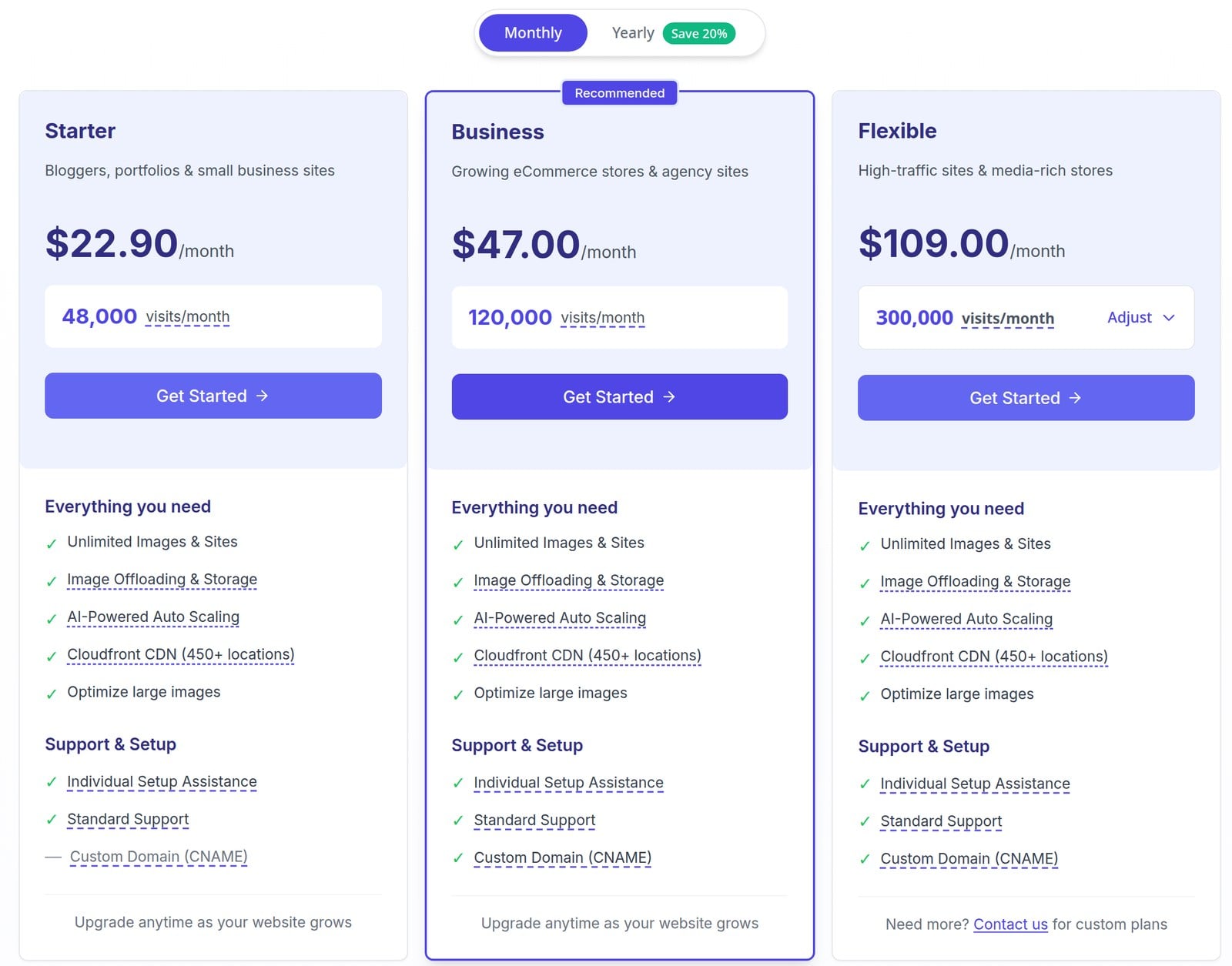
Optimole offers four pricing plans:
- Free: Free plan, no credit card required, for small sites that want to try Optimole.
- Starter: $22.90/month, or $19.08/month on annual billing, for bloggers, portfolios, and small business sites with up to 48,000 visits a month.
- Business: $47/month, or $39.08/month on annual billing, for growing eCommerce stores and agency sites with up to 120,000 visits a month and a custom domain.
- Flexible: Starts at $109/month, or $90.83/month on annual billing, for high-traffic sites and media-rich stores with 300,000+ visits a month.
Annual plans provide a 17% discount.
All paid plans have a 7-day money-back guarantee.
Try Optimole today with the free plan.
Our Verdict — Best For Fast Image Processing
Price: Starts at $9.50/month
Bunny Optimizer is a flexible image optimization tool that’s perfect for batch image processing. We think it’s the best for fast image processing because of its built-in image editing tools.
The Best Part:
- Built-in editing features. Bunny Optimizer's extensive image editing capabilities, such as resizing, cropping, filters, and color adjustments, help your images load faster while they look better than ever.
The Worst Part:
- Inconsistent speeds across regions. Bunny Optimizer's performance may vary depending on where your visitors come from.
Get it if you want a top-tier image CDN that focuses on fast image processing and delivers lightning-fast loading times for your website visitors.
I recommend you sign up for a 14-day free trial, then upgrade for $9.50/month per optimized website.
(14-day free trial)
Best For
Bunny Optimizer is best for businesses and individuals who want an affordable image CDN solution that delivers ultra-fast speed.
Top Features
Lightning-fast processing. Bunny Optimizer optimizes images in the blink of an eye. It quickly and automatically handles all image content that you upload to your site.
Perfect resizing and cropping. Bunny Optimizer lets you easily adjust image dimensions, making sure they fit any screen like a charm, even if you're new to image CDNs.
Edit your images. Make your images blurry, or more sharp, use filters, overlay colors, and more, right from your dashboard.
Flexible and quick API. Bunny Optimizer's easy-to-use and speedy API takes the hassle out of image optimization, allowing developers to focus on what really matters.
It secures your images. Bunny Optimizer safeguards your images with features like watermarking and token authentication, to keep your original content always safe and sound.
Pricing

Bunny Optimizer offers two pricing plans:
- Simple Monthly Pricing: $9.50/month per website, for individual site owners who require a fast image processing CDN solution.
- Custom: Custom pricing, for businesses and agencies that manage over 20 websites.
Try Bunny Optimizer today with a free 14-day trial.
3. Cloudimage
Our Verdict — Best Image Quality
Price: Starts at $64/month
Cloudimage is an image CDN provider that delivers pixel-perfect images. We think it’s the best for preserving image quality because its images stay sharp, even on the highest compression settings.
The Best Part:
- Pixel-perfect results. Cloudimage's optimization algorithm keeps your images looking stunning, without sacrificing quality or detail. Say goodbye to blurry or pixelated images!
The Worst Part:
- No built-in editing tools. While Cloudimage excels at optimizing and delivering images, it doesn't offer any built-in editing features other than resizing.
Get it if you want a reliable solution for processing and delivering high-quality images quickly for visitors across the globe.
I recommend you get started with the 30-day free trial, then get the Essential plan for $64/month.
(30-day free trial)
Best For
Cloudimage is best for web developers and businesses that need a high-quality image CDN that delivers pixel-perfect results.
Top Features
Super-fast loading. With Cloudimage, your images load in a flash thanks to their multi-CDN. Users around the world enjoy a seamless and enjoyable browsing experience.
Real-time optimization. Optimize images on the fly on platforms such as WordPress, Shopify, or Magento, without any real effort on your part.
Impressive compression. Enjoy on-the-fly compression and conversions to the latest formats like WebP and AVIF, reducing image sizes by up to 75% without sacrificing visual quality.
Monitor your images. See exactly how your images impact your website's traffic and user experience. Cloudimage will even give you tips to enhance your speed.
It accelerates static content. Boost the speed of media assets and static files such as PDFs, JS, and CSS through Cloudimage's global optimization infrastructure.
Pricing
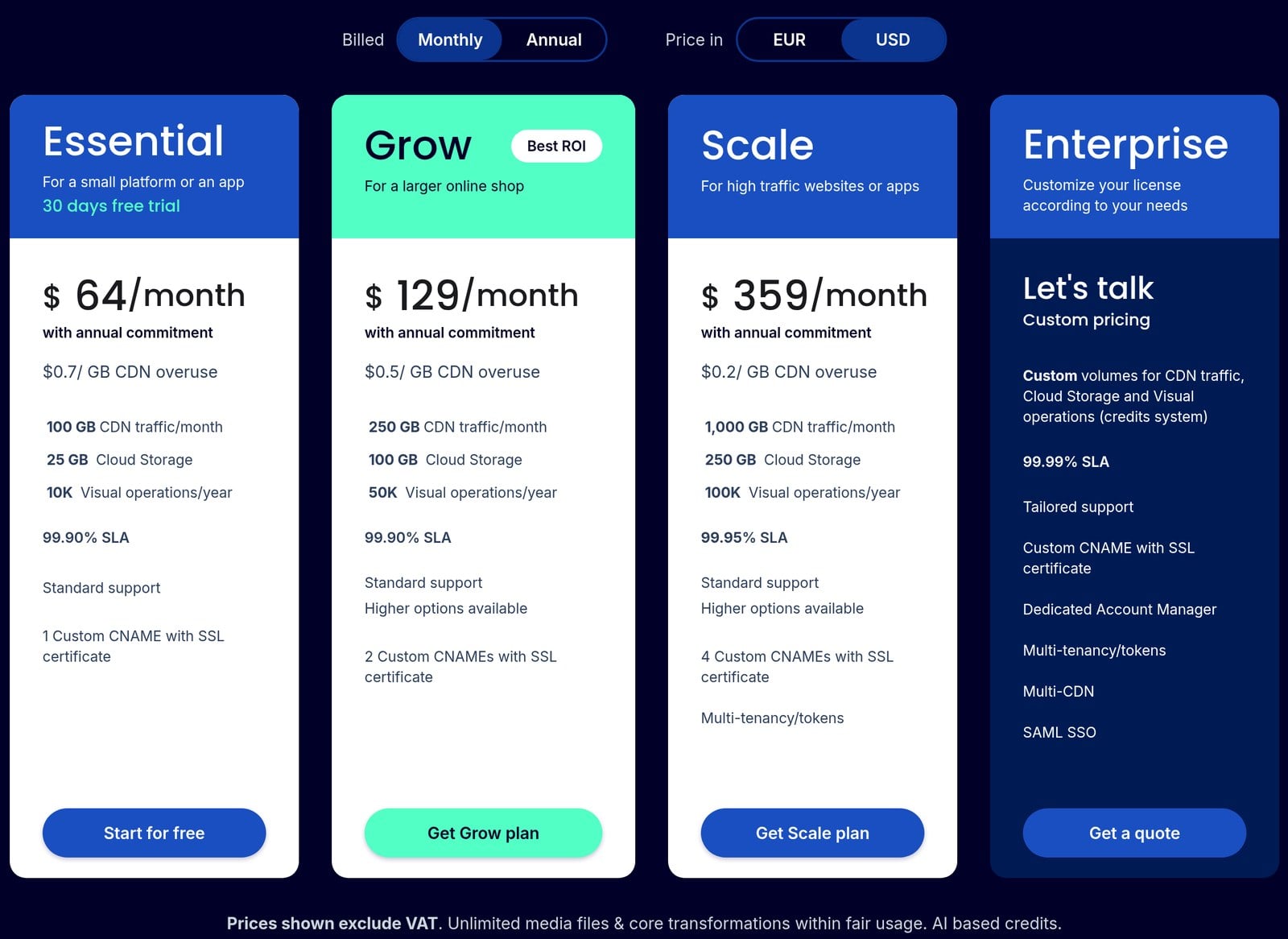
Cloudimage offers three pricing plans:
- Essential: $64/month with an annual commitment, or $59/month prepaid annually ($708/year), for a small platform or app with 100 GB of CDN traffic per month.
- Grow: $129/month with an annual commitment, or $119/month prepaid annually ($1,428/year), for a larger online shop with 250 GB of CDN traffic per month.
- Scale: $359/month with an annual commitment, or $329/month prepaid annually ($3,948/year), for high-traffic websites or apps with 1,000 GB of CDN traffic per month.
Annual subscriptions provide up to an 8% discount.
Try Cloudimage today with a free 30-day trial.
4. Uploadcare
Our Verdict — Best For Image Compression
Price: Starts at $79/month
Uploadcare is a complete media handling platform that comes with an image CDN. We think it’s the best for image compression because of its adaptive delivery technology.
The Best Part:
- AI scaling with Adaptive Delivery. Uploadcare delivers the most efficient format that the client's browser and device support, for the most optimized result… Every time.
The Worst Part:
- Steep learning curve. Uploadcare offers a comprehensive set of options and the documentation is pretty straightforward, but getting familiar with all the advanced features might require some time and effort, particularly for users who are new to image optimization and manipulation.
Get it if you’re dealing with image-heavy websites and need a reliable image CDN service with adaptive delivery and smart image transformations, on the fly.
I recommend you get started with the free plan, then upgrade to Pro as your traffic grows.
(free plan)
Best For
Uploadcare is best for small to medium businesses and companies who want a reliable image CDN solution that allows for all kinds of image transformations.
Top Features
Adaptive and efficient. Uploadcare offers lightning-fast, on-the-fly image and non-image file operations, such as document conversion or changing file delivery behavior, so that the end-user always has the best experience.
Smart resizing and cropping. Uploadcare lets you perform Content-aware resizing and cropping, keeping original proportions of faces and other objects while resizing the rest of the image using intelligent algorithms.
Robust security features. Uploadcare prioritizes security by offering features like content encryption and access control, ensuring that your media assets are protected throughout the upload and delivery process. The platform is HIPAA compliant.
Tech-stack agnostic. Uploadcare easily integrates with a variety of third-party platforms and tools, making it easy to incorporate its image handling capabilities into your existing workflows and applications.
Incredible customer support. Uploadcare customer support gets high praise from a ton of users of review sites.
Pricing
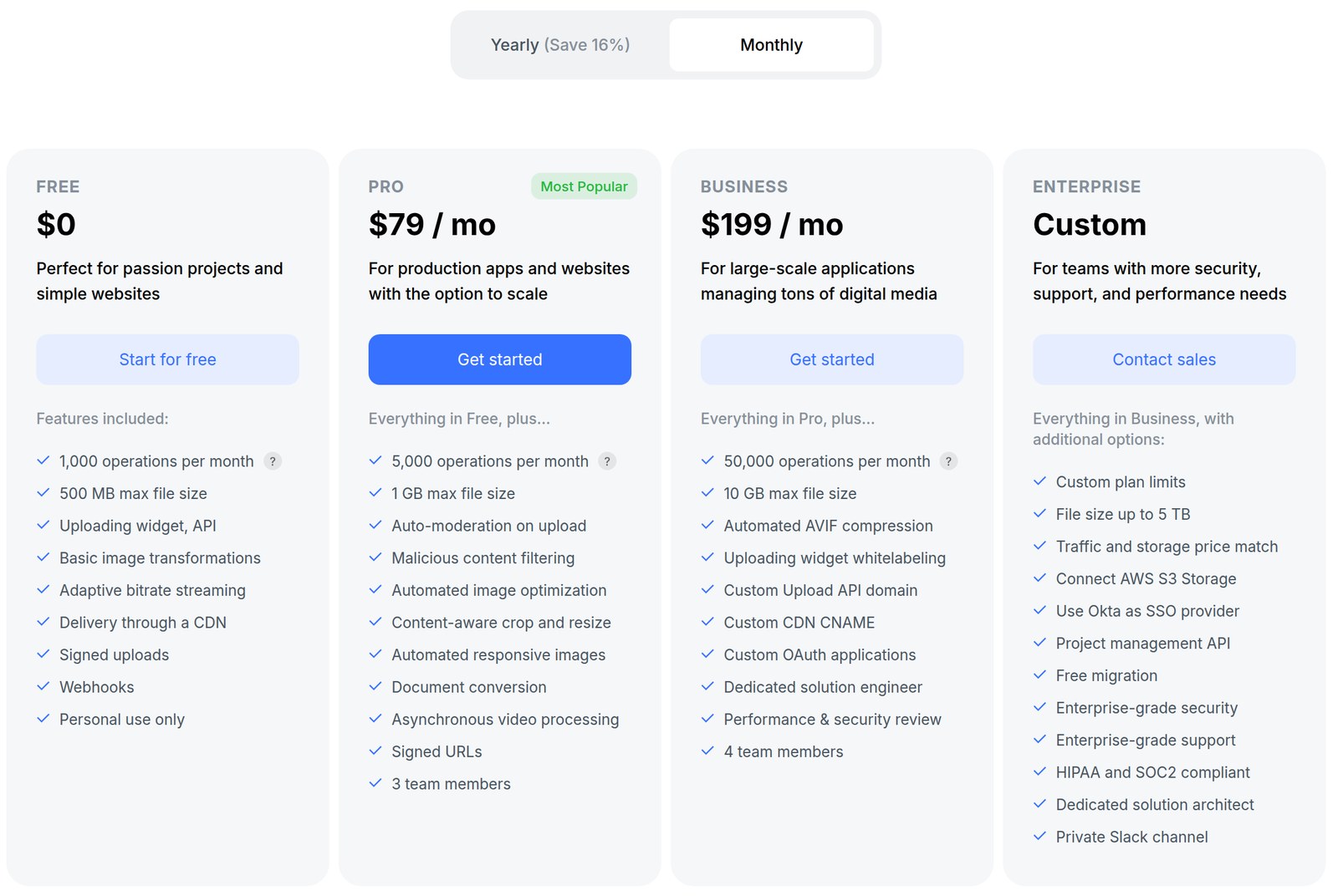
Uploadcare offers four pricing plans:
- Free: Free forever, for personal hobby projects and simple websites that need up to 1,000 operations per month.
- Pro: $79/month, or $66/month on annual billing, for production apps and websites that need 5,000 operations per month, automated image optimization, and 3 team members.
- Business: $199/month, or $166/month on annual billing, for large-scale applications that need 50,000 operations per month, automated AVIF compression, and 4 team members.
- Enterprise: Custom pricing, for teams that need custom limits, more security, and dedicated support.
Annual subscriptions provide up to a 17% discount.
Try Uploadcare today with the free plan.
5. Cloudflare
Our Verdict — Best For Comprehensive Optimization
Price: Starts at $25/month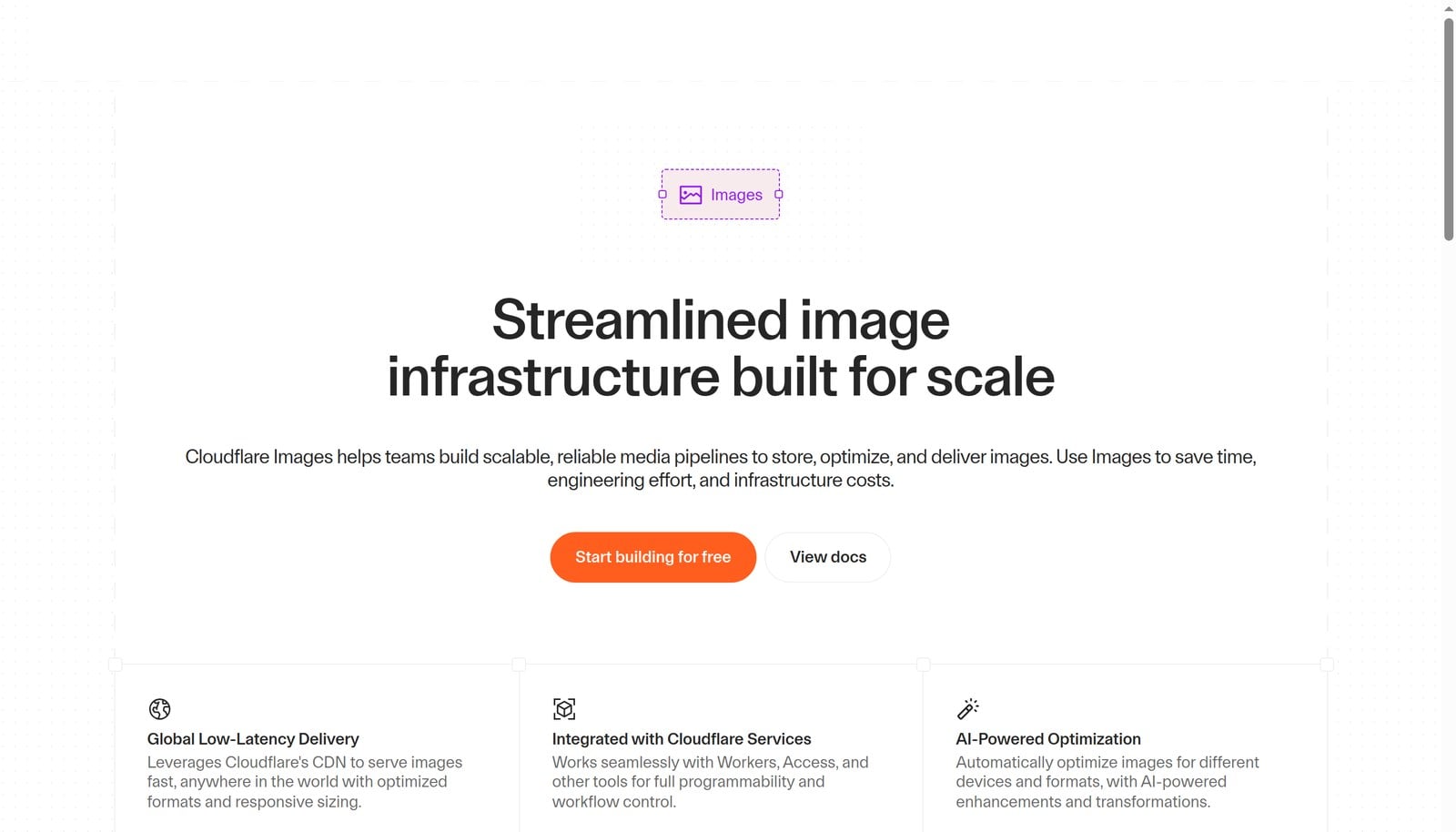
Cloudflare is a global network that speeds up and protects your whole website, and Cloudflare Images stores, resizes, and delivers your images on top of it. We think it’s the best for comprehensive optimization because you get a CDN, security, and image optimization from one provider.
The Best Part:
- Everything in one place. Your CDN, DNS, SSL, DDoS protection, and image optimization all live in one Cloudflare dashboard.
The Worst Part:
- Image tools cost extra. Lossless image optimization starts on the Pro plan, and going past 5,000 Cloudflare Images transformations a month takes the paid Images plan.
Get it if you want to speed up and secure your whole site, not just your images.
I recommend you get started with the free plan, then get the Pro plan for $25/month when you want lossless image optimization.
(free plan)
Best For
Cloudflare is best for website owners and developers who want a CDN, security, and image optimization from one provider.
Top Features
Optimal formats. Cloudflare Images serves WebP, AVIF, or JPEG automatically, depending on the visitor’s browser.
Responsive images. Generate the right size for every device with srcset attributes, URL rewrites, and query parameters.
Global delivery. Images go out through Cloudflare’s CDN, so they load fast anywhere in the world.
Workers integration. Build your own image pipelines with Cloudflare Workers and Workers AI.
Built-in security. Every plan includes unmetered DDoS protection, a free SSL certificate, and a web application firewall.
Pricing

Cloudflare offers four pricing plans:
- Free: $0/month, for personal or hobby projects that aren’t business-critical.
- Pro: $25/month, or $20/month billed annually, for professional websites that want lossless image optimization.
- Business: $250/month, or $200/month billed annually, for small businesses operating online.
- Contract: Custom pricing billed annually, for mission-critical applications.
Annual subscriptions provide a 20% discount.
Try Cloudflare today with the free plan.
6. Fastly
Our Verdict — Best For Edge Computing Capabilities
Price: Free, then $0.50 per 10,000 image requests
Fastly is an edge cloud platform, and its Image Optimizer transforms and delivers your images right at the edge. We think it’s the best for edge computing capabilities because it resizes, crops, and converts each image on demand, close to your visitors.
The Best Part:
- It works at the edge. Fastly resizes, adjusts quality, crops, converts formats, caches, and delivers your images on demand, which cuts latency and speeds up your pages.
The Worst Part:
- Usage-based bills. Past the free 100,000 image requests a month, you pay for every request, so a traffic spike means a bigger bill.
Get it if you run an image-heavy site or app and want image processing to happen at the edge.
I recommend you sign up for free, then pay as you go when you pass 100,000 image requests a month.
(free plan)
Best For
Fastly is best for developers and image-heavy sites that want fast, on-demand image transformations at the edge.
Top Features
On-demand transformations. Resize, crop, trim, change orientation, and adjust quality when an image is requested.
Format conversion. Convert images to modern formats for faster loading.
Edge caching. Cache more of your images at the edge to lower your egress costs.
One source file. Store a single original and let Fastly generate every size and format you need.
Object Storage. Keep your originals in Fastly’s zero-egress Object Storage to save even more.
Pricing
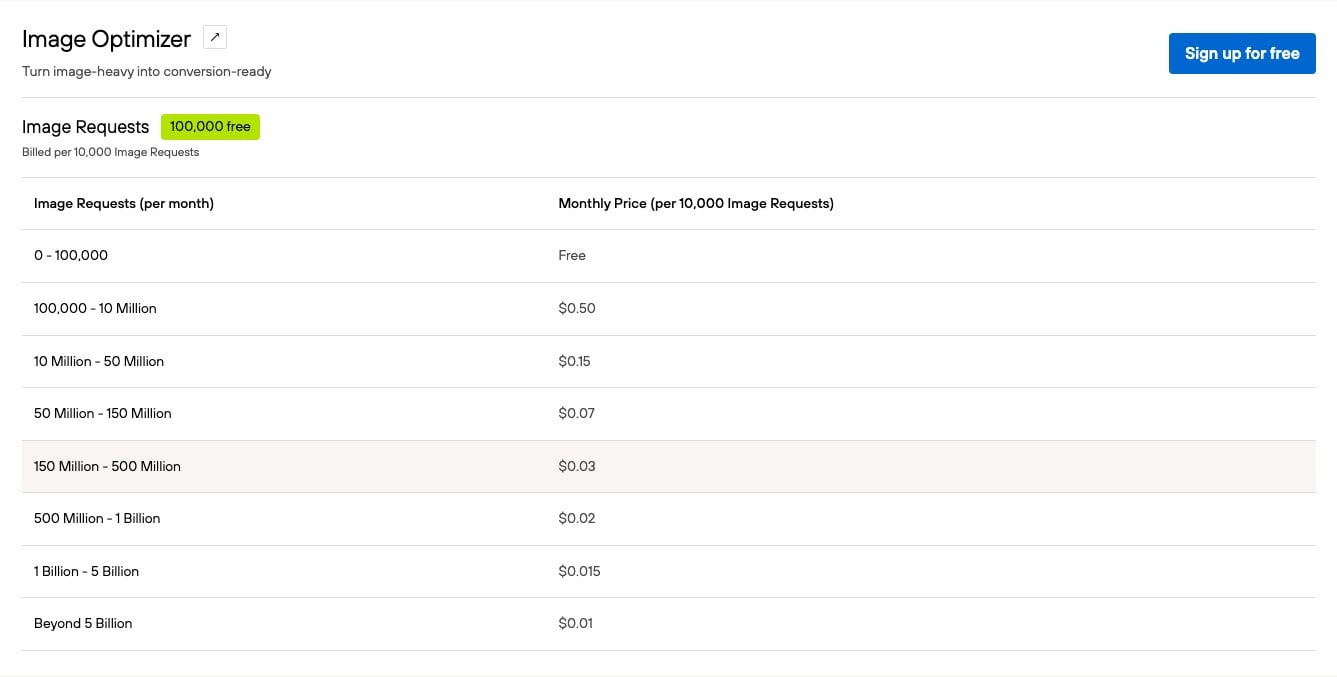
Fastly offers three pricing plans:
- Free: Your first 100,000 image requests every month, for developers who want to experiment and prototype.
- Growth: $0.50 per 10,000 image requests from 100,000 to 10 million a month, with lower rates down to $0.01 per 10,000 at higher volumes.
- Enterprise: Custom pricing, with expert guidance and enterprise support.
Try Fastly today for free.
Our Verdict — Best For AWS Integration
Price: Starts at $15/month
Amazon CloudFront is the content delivery network from Amazon Web Services. We think it’s the best for AWS integration because it plugs straight into S3, AWS WAF, Route 53, and the rest of your AWS stack.
The Best Part:
- Flat-rate pricing. CloudFront’s flat-rate plans bundle the CDN, security, DNS, and S3 storage credits into one monthly price with no overage charges.
The Worst Part:
- No image optimizer out of the box. CloudFront delivers your images fast, but resizing and format conversion need extra setup with other AWS services.
Get it if your website or app already runs on AWS and you want your images delivered from the same stack.
I recommend you get started with the free plan, then get the Pro plan for $15/month as your site grows.
(free plan)
Best For
Amazon CloudFront is best for businesses and developers who already run on AWS and want a CDN that fits right in.
Top Features
AWS WAF and DDoS protection. Every flat-rate plan includes a web application firewall and always-on DDoS protection.
Amazon Route 53 DNS. Get DNS included in your monthly price.
Serverless edge compute. Run code at the edge on every plan.
S3 storage credits. Get monthly Amazon S3 storage credits, from 5 GB on Free to 5 TB on Premium.
TLS certificate. Serve your images over HTTPS with an included TLS certificate.
Pricing
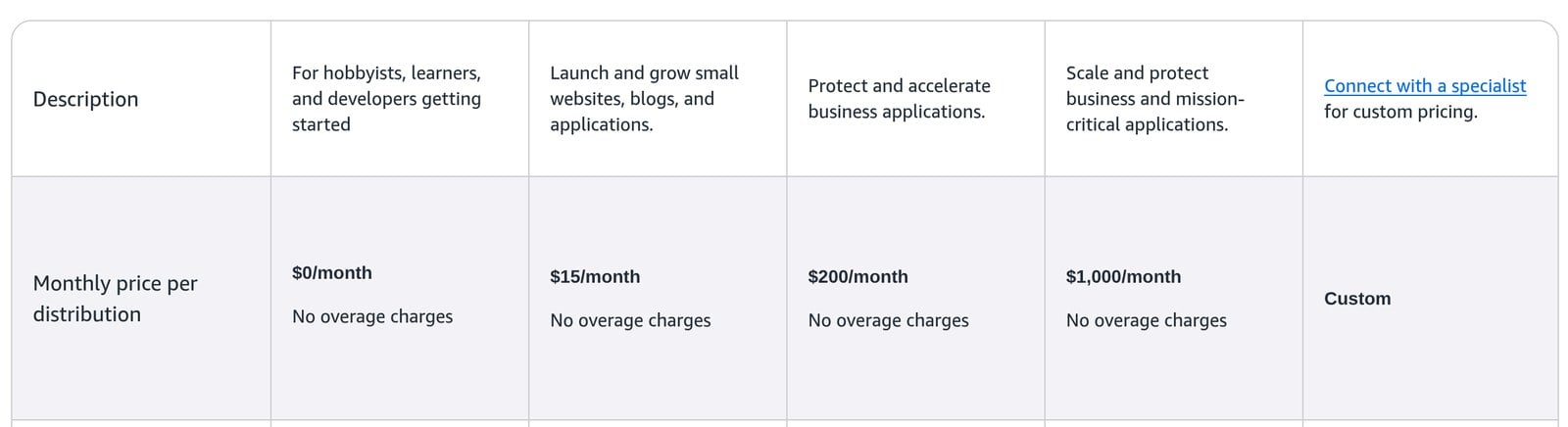
Amazon CloudFront offers five flat-rate pricing plans, plus pay-as-you-go pricing:
- Free: $0/month, for hobbyists, learners, and developers getting started.
- Pro: $15/month per distribution, to launch and grow small websites, blogs, and applications.
- Business: $200/month per distribution, to protect and accelerate business applications.
- Premium: $1,000/month per distribution, to scale and protect business and mission-critical applications.
- Custom: Custom pricing, through a specialist.
Try Amazon CloudFront today with the free plan.
Our Top Three Picks
Here’s a quick summary of our top three picks:
- Optimole — best of the best
- Bunny Optimizer — best for fast image processing
- Cloudimage — best image quality
Here’s a quick comparison of our top seven picks:
Tool | Entry Offer | Pricing |
|---|---|---|
Optimole | Free plan | Starts at $22.90/mo |
Bunny Optimizer | 14-day free trial | Starts at $9.50/mo |
Cloudimage | 30-day free trial | Starts at $64/mo |
Uploadcare | Free plan | Starts at $79/mo |
Cloudflare | Free plan | Starts at $25/mo |
Fastly | Free plan | Free, then $0.50 per 10K requests |
Amazon CloudFront | Free plan | Starts at $15/mo |
Here are the top 50 image CDN software we considered in this review:
- Optimole
- Bunny Optimizer
- Cloudimage
- Uploadcare
- Cloudflare
- Fastly
- Amazon CloudFront
- Akamai
- Cloudinary
- KeyCDN
- Sirv
- Imgix
- Imagekit.io
- Rackspace CDN
- Microsoft Azure CDN
- Google Cloud CDN
- TwicPics
- Imperva CDN
- CDN77
- CacheFly
- LeaseWeb CDN
- MetaCDN
- BelugaCDN
- G-Core Labs CDN
- Verizon Media
- Netlify Image Transformations
- Sucuri Firewall & CDN
- ImageEngine
- Cachoid CDN
- imgproxy
- Thumbor
- CDNetworks
- NGENIX
- EdgeNext
- QUANTIL
- FastComet Image Optimization & CDN Service
- SiteLock TrueSpeed CDN
- Yottaa Website Acceleration & CDN Service
- Photon by Jetpack
- Kinsta CDN
- Siteground SuperCacher & Cloudflare CDN
- WPX Hosting CDN
- Flywheel's Fastly CDN
- CloudwaysCDN
- Pressable's CDN
- Pantheon Global CDN
- Hostinger CDN
- DreamHost DreamSpeed CDN
- Webflow CDN
- Gumlet Image CDN
Frequently Asked Questions About Image CDNs
What is the best image CDN?
Optimole is our top pick. It crushes your image sizes without dropping quality and serves everything from a fast global network, so pages load quicker for visitors anywhere.
Who should use an image CDN?
Reach for an image CDN if your site serves a lot of images and you want faster load times. Online stores and media-heavy pages get the biggest lift, since visitors get responsive images delivered quickly wherever they are.
Is there a free image CDN?
Yes. Optimole, Uploadcare, Cloudflare, Fastly, and Amazon CloudFront all let you start for free. Bunny Optimizer and Cloudimage run on a free trial instead.
Which image CDN has a free trial?
Bunny Optimizer and Cloudimage both give you a free trial. If you want a standing free plan instead, go with Optimole, Uploadcare, Cloudflare, Fastly, or Amazon CloudFront.
Which image CDN is best for image quality?
Cloudimage is our pick for image quality. If compression is what you care about most, reach for Uploadcare.
How much can an image CDN compress images?
Optimole crushes your image sizes without losing any quality, and image CDNs support modern formats like WebP and AVIF plus real-time resizing, so you shrink files without visible loss.
Which image CDN is best for AWS users?
Amazon CloudFront is our pick if you already run on Amazon Web Services, since it drops right into your stack. For fast image processing on its own, reach for Bunny Optimizer.
What should I look for when choosing an image CDN?
Look for fast image delivery, custom domain support, high compression that keeps quality, the ability to handle traffic peaks, responsive delivery, and servers close to your most profitable visitors. Lazy loading, smart cropping, and adaptive delivery round out a strong pick.
Optimole vs Cloudflare: which image CDN is better?
Optimole is our overall pick, while Cloudflare wins if you want comprehensive optimization. Both give you a free plan to start, so let quality needs and budget decide.
What to look for when buying image CDNs?
- Lightning speeds on image delivery
- The ability to use custom domain names for all your image URLs
- Smart cropping of images, according to what's being displayed
- A high rate of image compression, while keeping image quality levels
- The ability to handle high volumes of image requests during traffic peaks
- That it actually reduces image load times (run your tests)
- Automatic image optimization tools and plugins
- Dynamic image processing capabilities to enhance efficiency
- Support for delivering responsive images
- Find the ones with servers closest to where your most profitable visitors come from
The Bottom Line
To recap, here are the best image CDN software to try this year:
- Optimole — best of the best
- Bunny Optimizer — best for fast image processing
- Cloudimage — best image quality
- Uploadcare — best for image compression
- Cloudflare — best for comprehensive optimization
- Fastly — best for edge computing capabilities
- Amazon CloudFront — best for AWS integration