

Today there are 97 different open source blogging platforms. We spent 78 hours comparing the top 50 to find the seven best you can use to successfully build and grow an online blog.
What is the Best Open Source Blogging?
1. Ghost
Our Verdict — Best Of The Best
Price: Starts at $18/month
Ghost is the go-to open source blogging platform for beginners looking to create a professional-looking site swiftly. We think it’s the best because of its beginner-friendly interface, built-in email and membership management tools, and reasonable hosting options.
The Best Part:
It’s beginner-friendly. Ghost's user interface is incredibly simple and intuitive, making it perfect for beginners with zero technical background.
The Worst Part:
Not so customizable. Ghost doesn’t come with lots of personalization and complex modification options — unless you're well-versed in coding.
Get it if you want an easy-to-use open source blogging platform that takes care of the technical stuff so you can effortlessly get your blog going.
I recommend you get started with a 14-day free trial, then get Ghost’s Starter plan ($18/month).
(14-day free trial)
Best For
Ghost is best for anyone who wants to get started with blogging without getting tangled in technicalities.
Top Features
Go free or pay up. Ghost, being open-source, lets you self-host at no cost. But if you'd rather not worry about hosting, hire one of their paid plans and they’ll have you covered.
Teamwork made easy. Ghost lets you invite your team or buddies to join in the blogging adventure — co-writing posts, managing your blog, and even managing your email list.
Conversion focused. Thanks to Ghost’s conversion-optimized themes, turning visitors into subscribers is made a lot easier for you — just drive the traffic and watch the magic happen.
Keep it clean and classy. Ghost's minimalist design ensures that your readers' eyes stay glued to your content.
Scale-friendly. Ghost integrates with tools such as Zapier, ConvertKit, Stripe, and Google Analytics, so you can grow your blog’s ecosystem.
Pricing
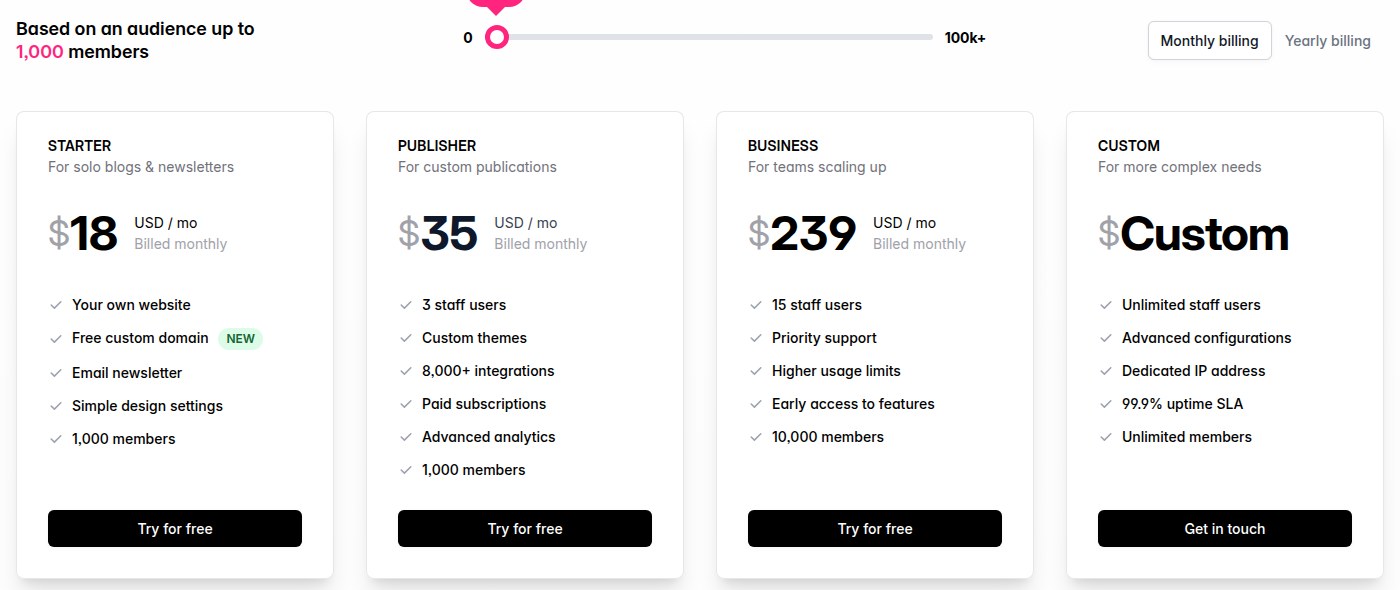
Ghost offers five pricing plans:
- Free: Free forever, for tech-savvy bloggers who prefer self-hosting.
- Starter: $18/month for solo bloggers who want their own website, a free custom domain, an email newsletter, and up to 1,000 members.
- Publisher: $35/month for custom publications that want 3 staff users, custom themes, paid subscriptions, 8,000+ integrations, and advanced analytics.
- Business: $239/month for teams scaling up that want 15 staff users, priority support, higher usage limits, and up to 10,000 members.
- Custom: Custom pricing, for complex publications that need unlimited staff users, a dedicated IP address, and a 99.9% uptime SLA.
Annual subscriptions provide a 17% discount.
Try Ghost today with a free 14-day trial.
2. WordPress (1-Click Install on Bluehost)
Our Verdict — Best For Businesses
Price: Starts at $15.99/month
WordPress is the world’s most popular open source blogging platform and the best for growing a business blog. We think it’s the best for businesses because of its advanced SEO plugins, extensive array of customization options, and professional-looking website themes.
The Best Part:
Rank easily on Google. With WordPress’s advanced SEO settings and third-party plugins like Yoast, your content has a better shot at reaching the top of Google rankings.
The Worst Part:
Lengthy setup time. WordPress can take a bit of time to set up, especially when it comes to navigating through parameters, setting up a theme, and designing website pages.
Get it if you want an open source blogging platform that helps you rank and market your business.
I recommend you host WordPress on Bluehost with the Starter plan ($3.99/month on a 36-month term).
(30-day money-back guarantee)
Best For
WordPress is best for businesses that want an open-source blogging platform that can help them grow and attract more visitors.
Top Features
Make it yours. WordPress lets you tweak every little detail of your blog — color schemes, fonts, branding assets… So much more.
Trusted by everyone. Four out of every 10 websites on the internet are running on WordPress. It’s the most trusted solution out there.
Ironclad site security. WordPress equips you with robust security measures that keep spam and hackers at bay.
Supercharge your blog. WordPress's plugin library is packed to the brim, allowing you to do everything — advanced SEO tools, email marketing, ecommerce solutions… There’s nothing you can’t do with your blog.
Keep your readers engaged. WordPress lets you stir up conversations in the comments, share posts through newsletters, and even send browser notifications for new content.
Pricing
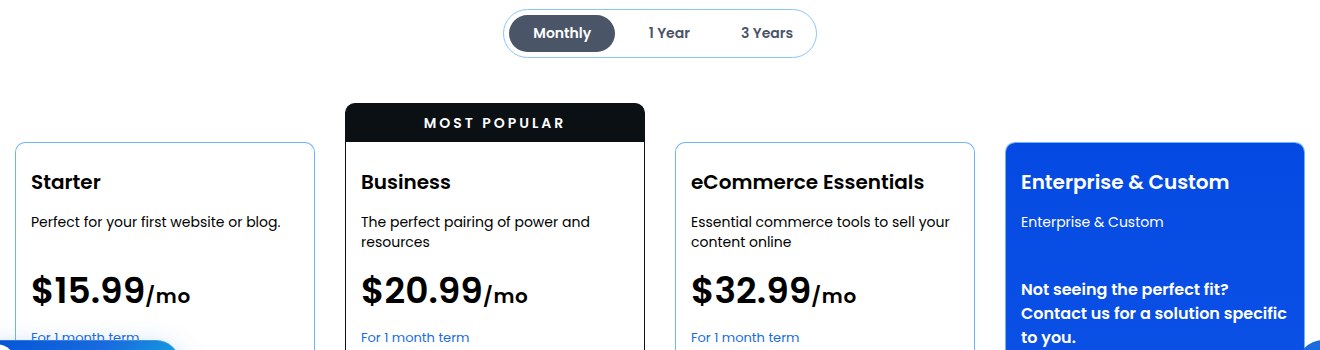
Bluehost offers three self-serve pricing plans for WordPress:
- Starter: $15.99/month, or $3.99/month on a 36-month term (renews at $9.99/month), for new bloggers who need up to 10 websites and 10GB of NVMe storage.
- Business: $20.99/month, or $6.99/month on a 36-month term (renews at $13.99/month), for businesses running up to 50 websites that want phone support and malware removal.
- eCommerce Essentials: $32.99/month, or $14.99/month on a 36-month term (renews at $21.99/month), for blogs that sell online, with up to 100 websites and built-in commerce tools.
Try WordPress today.
3. Joomla (1-Click Install on ScalaHosting)
Our Verdict — Best For High-Traffic Blogs
Price: Starts at $11.95/month
Joomla is an open source CMS and blogging platform that’s equipped to handle high-traffic blogs with complex settings. We think it’s the best for high-traffic blogs because of its advanced user management options, user-friendly dashboard, and wide range of extensions.
The Best Part:
User-friendly interface. Joomla doesn't make you feel like you're trying to herd cats. Its intuitive interface and user-friendly design make it easy for anyone to get it going.
The Worst Part:
Needs constant updates. Joomla is constantly requiring you to schedule routine website backups and to update to the latest version, in order for you to dodge potential security problems with your blog.
Get it if you want comprehensive control over your high-traffic blog and aren't afraid to tackle complex CMS features head-on.
I recommend you host Joomla on ScalaHosting with the Entry Cloud plan ($14.95/month on a 12-month intro term).
(money-back guarantee)
Best For
Joomla is best for successful bloggers and businesses that expect high traffic and want a powerful open source blogging platform with advanced settings.
Top Features
Advanced user management. Joomla lets you call the shots when it comes to who does what on your blog. It’s easy to assign specific roles, setting varied access levels for different team members.
Turn it up a notch. Joomla offers tons of extensions that can add all sorts of features to your site. Whether you need SEO tools, extra security features, or fancy design elements, there's an extension for just about everything.
Menus are a breeze. Setting up and organizing menus and categories on a Joomla website feels as easy as arranging apps on your phone: just drag and drop.
Keeps content well-organized. Joomla features for categorizing posts, smart search functionality, and version control make managing your blog as easy as 1-2-3!
Expand your site. Joomla allows you to run an e-commerce store, a news portal, and a blog all on the same site.
Pricing
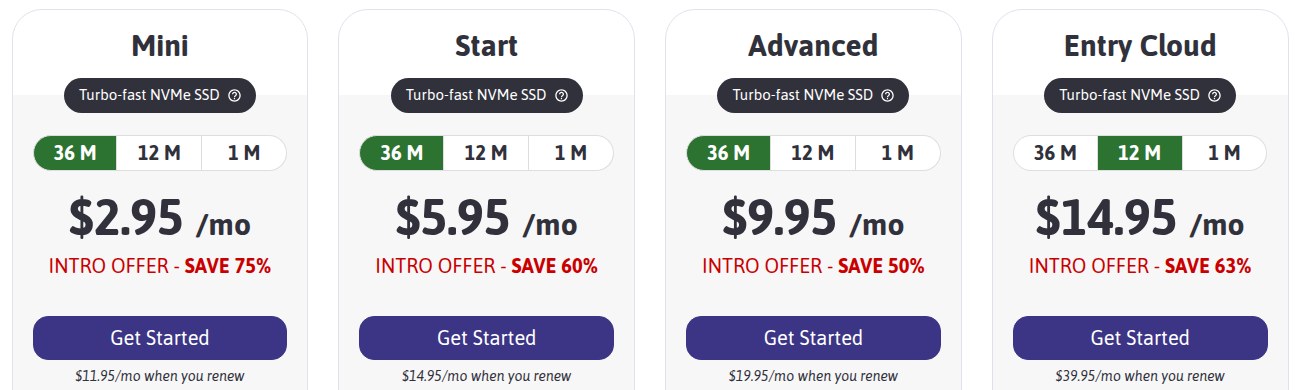
ScalaHosting offers four pricing plans for Joomla:
- Mini: $11.95/month, or $2.95/month on a 36-month intro term, for new bloggers who manage one Joomla website with 10GB of NVMe storage.
- Start: $5.95/month on a 36-month intro term (renews at $14.95/month), for bloggers running unlimited Joomla websites with 50GB of NVMe storage.
- Advanced: $9.95/month on a 36-month intro term (renews at $19.95/month), for bloggers and businesses that want 100GB of NVMe storage.
- Entry Cloud: $14.95/month on a 12-month intro term (renews at $39.95/month), for high-traffic blogs that need 2 dedicated cores, 2GB of RAM, high security, and scalable storage.
Try Joomla today.
4. Drupal
Our Verdict — Best For Content-Rich Blogs
Price: Free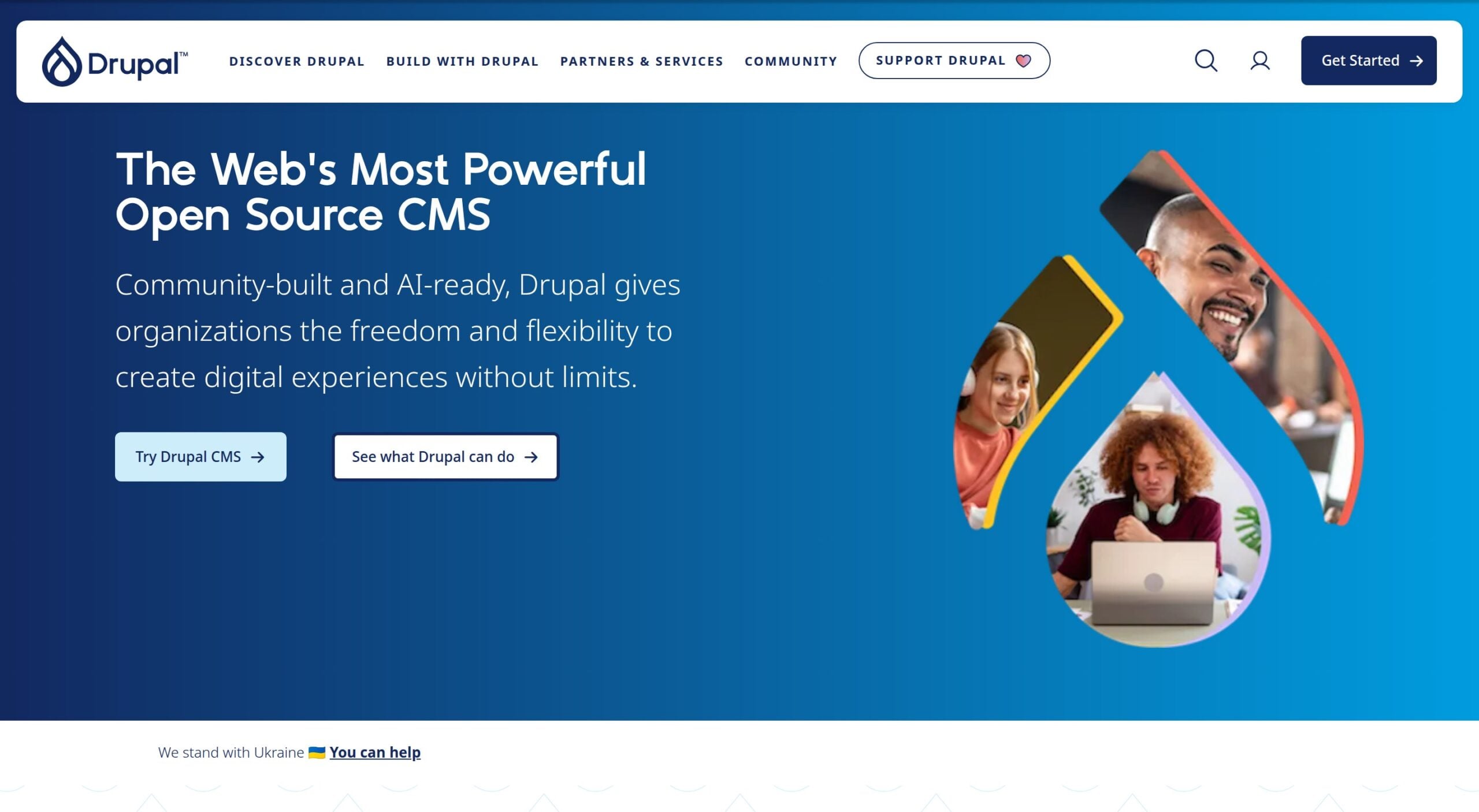
Drupal is a free, open-source CMS that runs everything from blogs to government and university websites. We think it’s the best for content-rich blogs because it is built around structured content, so large libraries of posts, categories, and media stay organized as your blog grows.
The Best Part:
Structured content. Drupal’s content tools let you build structured content that works across devices and marketing channels.
The Worst Part:
You handle hosting. Drupal is software you install on a server, so you have to find and pay for your own hosting.
Get it if you run a large blog with lots of content types and editors.
I recommend you start with Drupal CMS, the version Drupal recommends for most websites.
(free)
Best For
Drupal is best for publishers and organizations that run large, content-heavy blogs with several editors.
Top Features
Drupal CMS. Start with smart defaults and an easier editing experience built for marketers and content creators.
Modules and themes. Add features to your blog with modules and change its look with themes.
Recipes and site templates. Automate module setup with recipes, or start from a complete, configured site template.
API-first. Drupal is composable and API-first, so your content can feed apps and other channels.
Security advisories. Stay on top of security alerts and updates for Drupal and its extensions.
Pricing
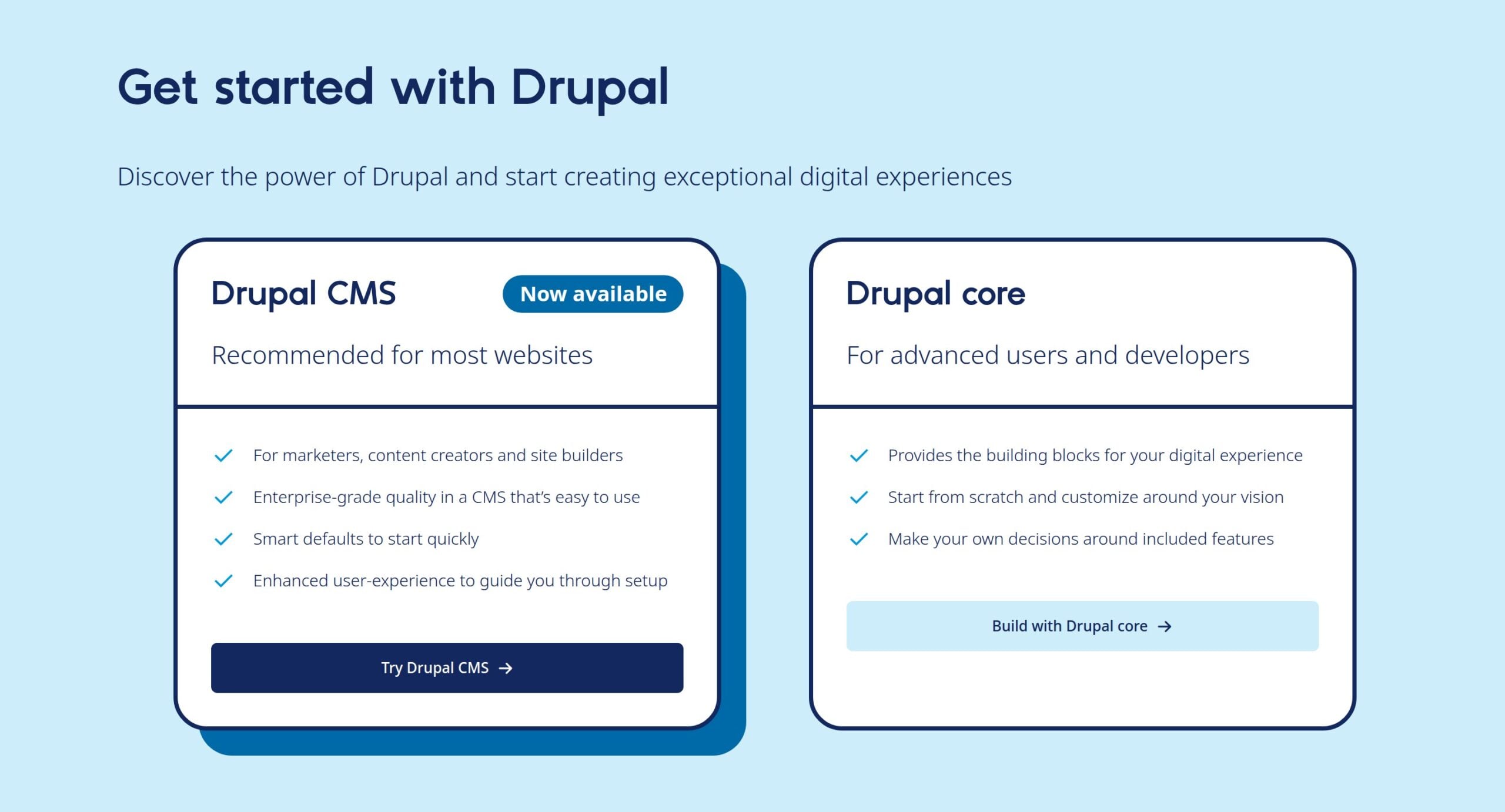
Drupal offers two pricing plans:
- Drupal CMS: Free, for marketers, content creators, and site builders who want smart defaults to start quickly.
- Drupal core: Free, for developers who want to start from scratch and customize every part of the site.
Try Drupal today for free.
5. Substack
Our Verdict — Best For Personal Newsletters
Price: Free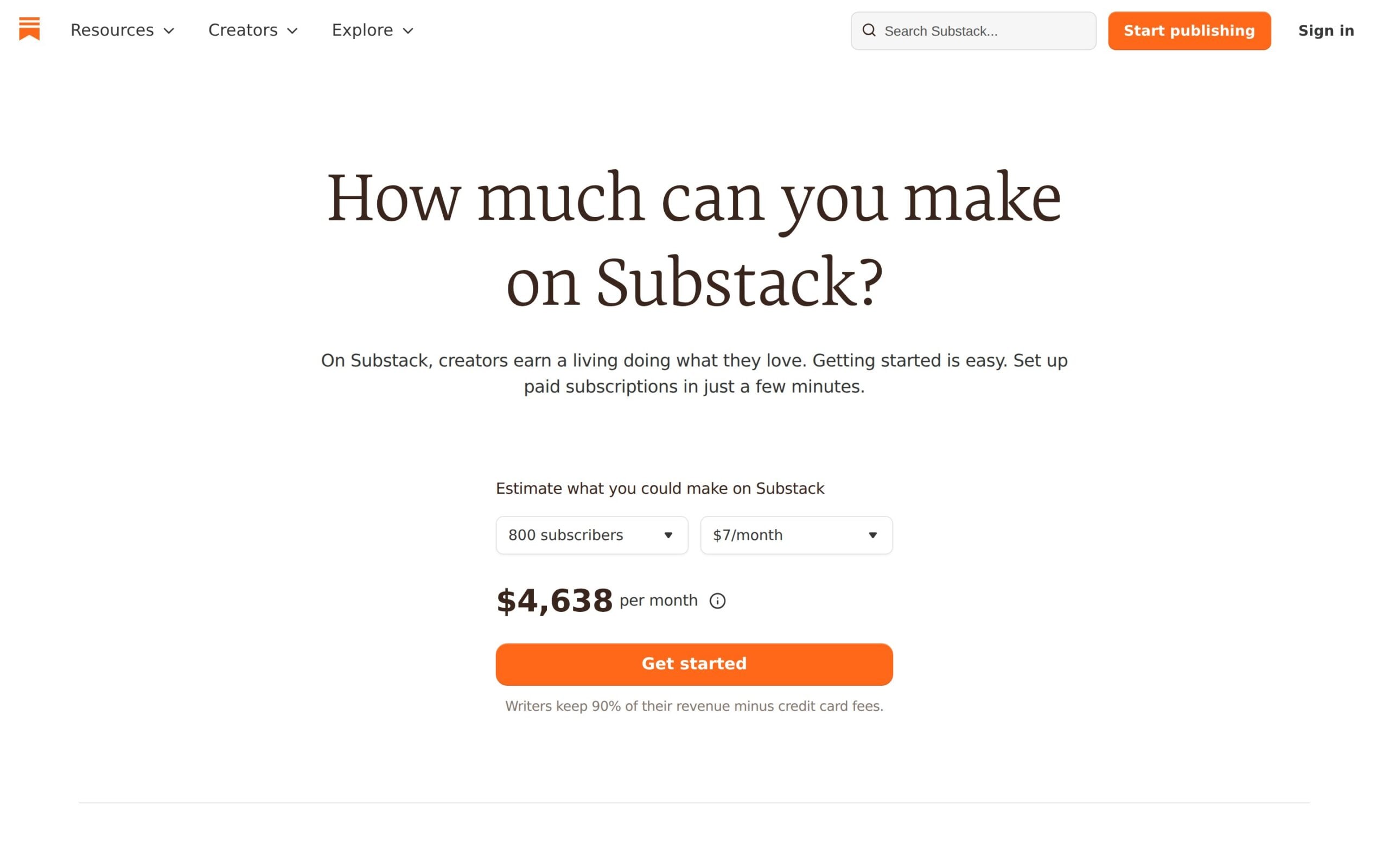
Substack is a publishing platform where you write posts, send them as a newsletter, and charge for subscriptions. We think it’s the best for personal newsletters because you own your content and your subscriber list, and you can set up paid subscriptions in a few minutes.
The Best Part:
You own your list. Your writing, mailing list, and subscriber payments stay yours, with full editorial control.
The Worst Part:
A cut of paid subscriptions. Substack keeps 10% of your subscription revenue, and Stripe charges its own card fees on top.
Get it if you want readers to pay you directly for your newsletter.
I recommend you start your Substack for free, then turn on paid subscriptions once you have a loyal audience.
(free)
Best For
Substack is best for writers who want to grow a personal newsletter and earn from paid subscribers.
Top Features
Free or paid posts. Choose which posts go out free and which are only for paid subscribers.
Your price. Set your own monthly, annual, and founding member prices.
No tech skills needed. Substack takes care of the technical side, so you can focus on writing.
Podcasts and video. Publish podcasts and video next to your written posts.
Substack app. Readers can follow you and read your posts in the Substack app.
Pricing
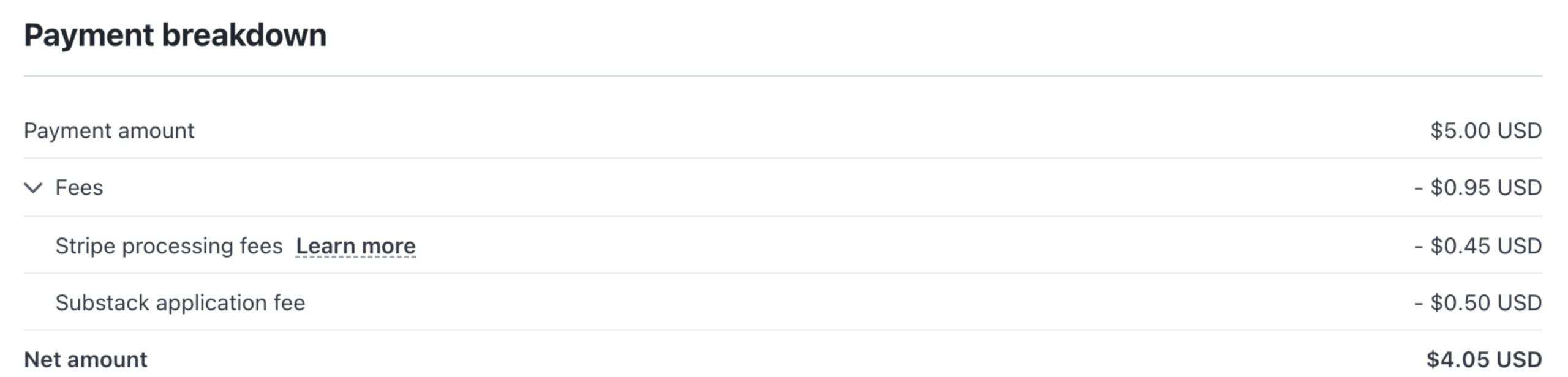
Substack offers a single pricing plan:
- Substack: Free to publish to any number of subscribers; with paid subscriptions on, Substack keeps 10% of each payment, Stripe charges 2.9% + $0.30 per US card payment plus 0.7% for billing, and a custom domain is a one-time $50.
Try Substack today for free.
6. Medium
Our Verdict — Best For Making Money Blogging
Price: Starts at $5/month
Medium is a blogging platform and reading community where anyone can publish stories. We think it’s the best for making money blogging because the Partner Program pays you when Medium members read and engage with your stories, with no website or ads to manage.
The Best Part:
Paid for engagement. Members-only stories earn when a member reads for 30 seconds or more, and earn more with claps, highlights, replies, and follows.
The Worst Part:
Membership required to earn. You need an active paid Medium membership to join the Partner Program.
Get it if you want to earn from your writing without running your own blog.
I recommend you get the Medium Member plan for $5/month, then enroll in the Partner Program.
(free plan)
Best For
Medium is best for writers who want to get paid for their stories and reach readers who are already on the platform.
Top Features
Partner Program. Put stories behind the paywall and earn from member read time and engagement.
Follower bonus. Earn a bonus when members follow you and keep reading your stories.
Boost bonus. Stories that get Boosted earn more for each read and interaction.
Publications. Create a shared publication and write with other authors around a common theme.
Custom domain. Members can bring their own custom domain to a profile or publication.
Pricing
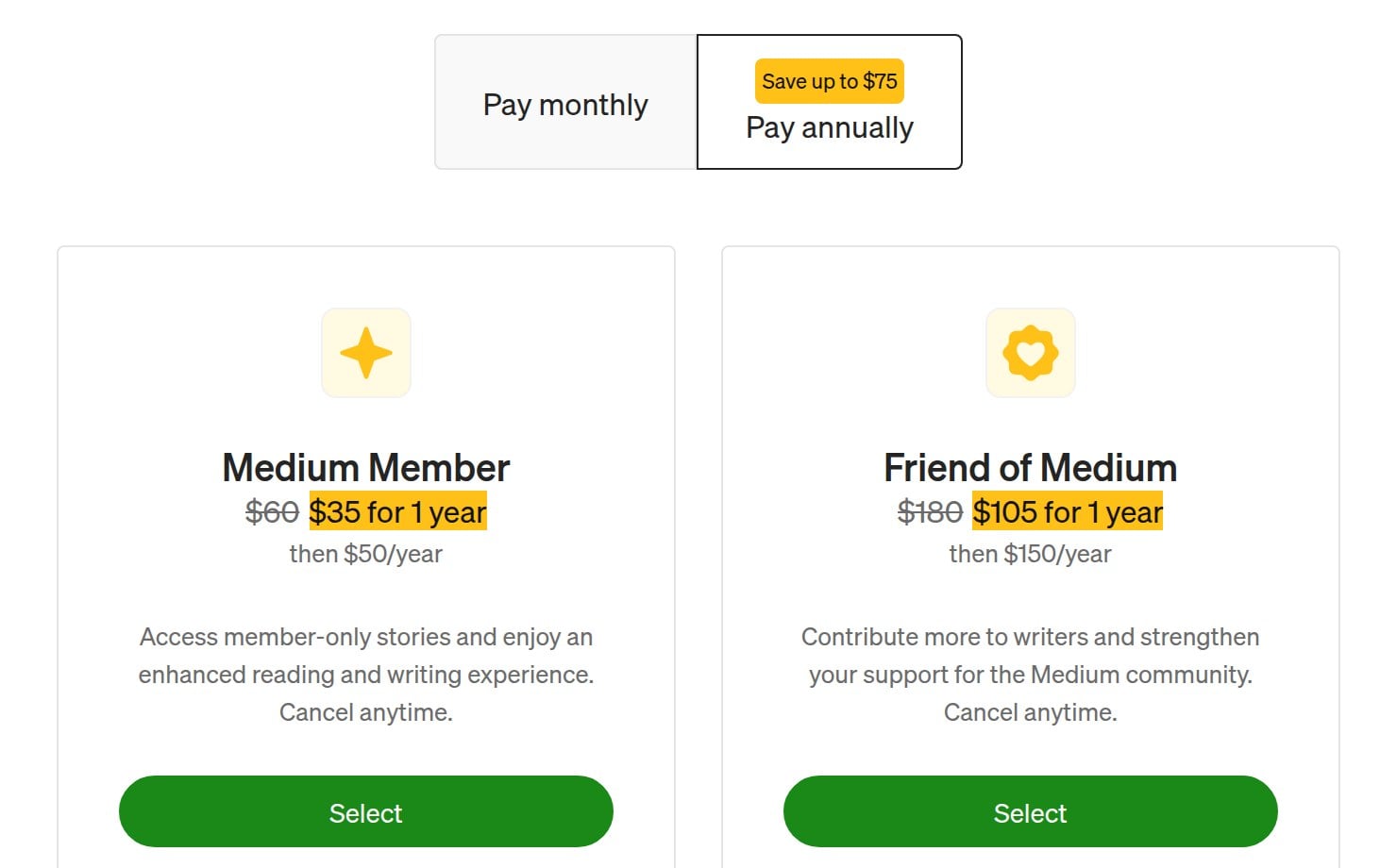
Medium offers three pricing plans:
- Free: Free, for writers who want to publish stories and follow their favorite authors.
- Medium Member: $5/month or $50/year ($35 for the first year with the welcome offer), for writers who want unlimited reading and access to the Partner Program.
- Friend of Medium: $15/month or $150/year ($105 for the first year with the welcome offer), for readers who want to send four times more to the writers they read.
Annual subscriptions provide a 17% discount.
Try Medium today with the free plan.
7. Jekyll
Our Verdict — Best For Blog Portfolios
Price: Free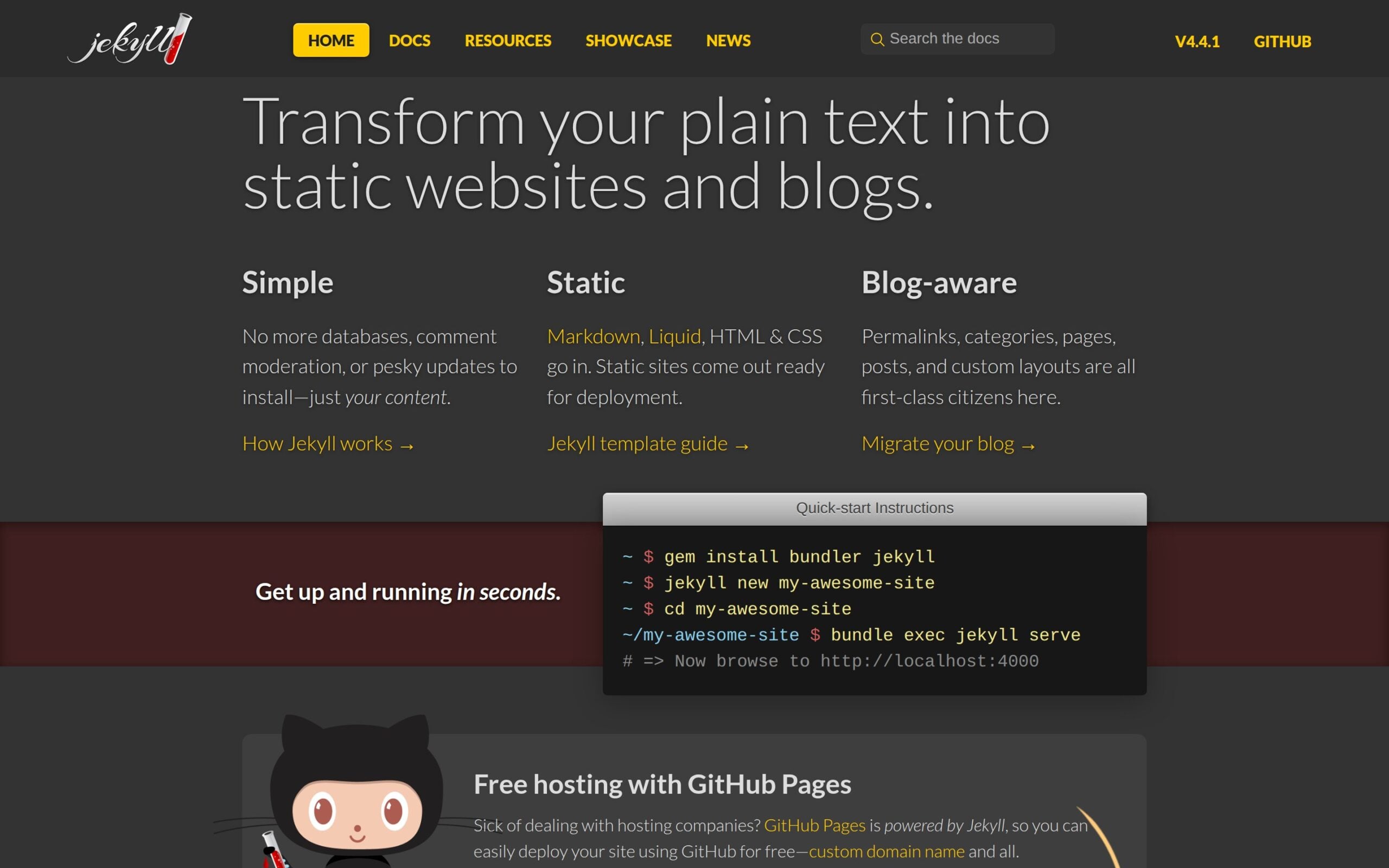
Jekyll is a free, open-source static site generator that turns plain text files into websites and blogs. We think it’s the best for blog portfolios because you can publish a fast, simple portfolio blog on GitHub Pages for free, custom domain included.
The Best Part:
Free hosting. GitHub Pages is powered by Jekyll, so you can deploy your site with GitHub for free.
The Worst Part:
Built for coders. You install Jekyll from the command line and write in Markdown and Liquid, and it isn’t officially supported on Windows.
Get it if you’re comfortable with code and want a portfolio blog with no hosting bill.
I recommend you build your Jekyll site and host it on GitHub Pages for free.
(free)
Best For
Jekyll is best for developers and designers who want a lightweight portfolio blog they fully control.
Top Features
Plain text in, website out. Write in Markdown, Liquid, HTML, and CSS, and Jekyll builds a static site ready to deploy.
Blog-aware. Permalinks, categories, pages, posts, and custom layouts are all built in.
No database. Skip databases, comment moderation, and updates to install, and keep just your content.
Themes. Add a Jekyll theme to change your site’s look, then override any of its defaults.
Quick start. Install Jekyll, create a new site, and preview it locally with a few commands.
Pricing
Jekyll offers a single pricing plan:
- Jekyll: Free and open source under the MIT License, with free hosting on GitHub Pages for public repositories.
Try Jekyll today for free.
Our Top Three Picks
Here’s a quick summary of our top three picks:
Here’s a quick comparison of our top seven picks:
Tool | Entry Offer | Pricing |
|---|---|---|
Ghost | 14-day free trial | Starts at $18/mo |
WordPress | 30-day money-back guarantee | Starts at $15.99/mo |
Joomla | Money-back guarantee | Starts at $11.95/mo |
Drupal | None | Free forever |
Substack | None | Free (10% of paid subs) |
Medium | Free plan | Starts at $5/mo |
Jekyll | None | Free forever |
Here are the top 50 open source blogging platforms we considered in this review:
- Ghost
- WordPress
- Joomla
- Drupal
- Substack
- Medium
- Jekyll
- Hexo
- Blogger
- Wix
- Squarespace
- Weebly
- Tumblr
- LiveJournal
- Hugo
- Gatsby
- Pelican
- Postach.io
- Grav
- WriteFreely
- Eleventy
- ExpressionEngine
- Craft CMS
- b2evolution
- Serendipity
- Dotclear
- Impression
- Bolt
- Anchor CMS
- Movable Type
- FlatPress
- Textpattern
- Zola
- SilverStripe
- Concrete CMS
- Contao
- Orchard CMS
- ProcessWire
- Tiki Wiki CMS Groupware
- Octopress
- Publii
- Bludit
- Yclas
- CMS Made Simple
- Umbraco
- ModX
- Plone
- Typo3
- Magnolia CMS
- Astro
Frequently Asked Questions About Open Source Blogging Platforms
What is the best open source blogging platform?
Ghost is our top pick. Reach for it if you want to start blogging without getting tangled in technicalities, thanks to a beginner-friendly interface and minimalist design.
Are open source blogging platforms free?
Some are, some charge for hosting. Drupal and Jekyll are free, open-source software, Substack and Medium are free hosted platforms to publish on, and Ghost is free to self-host, while managed Ghost, WordPress on Bluehost, and Joomla on ScalaHosting are paid.
What is Ghost best suited for?
Ghost is our overall pick, best for anyone who wants to blog without wrestling technicalities. You get a beginner-friendly interface, a self-hosted free option, and paid hosting tiers that scale up to business use.
Which blogging platform is best for SEO?
WordPress is our pick for businesses and SEO. It supports advanced SEO plugins like Yoast that help your pages rank on Google, and it powers a large share of the web.
Is Ghost or WordPress better for beginners?
Ghost is the easier, more beginner-friendly option, while WordPress leans toward businesses. Ghost is simple and intuitive; WordPress takes longer to set up but gives you extensive customization.
Which platform is best for a high-traffic blog?
Joomla is our pick for high-traffic blogs. You get advanced user management and it handles complex settings, though you will need routine backups and updates.
What is the best platform for newsletters or making money blogging?
Substack is our pick for personal newsletters and Medium is our pick for making money blogging. Both are free to publish on, though Medium’s Partner Program needs a paid membership, from $5/month, before you can earn.
Which open source blogging platforms are worth trying first?
Start with Ghost for all-around blogging, WordPress for SEO and business, and Substack or Medium if newsletters and income are the goal. Match the platform to what you want the blog to do.
The Bottom Line
To recap, here are the best open source blogging software to try this year: