

Today there are 217 different YouTube description generators. We spent 31 hours comparing the top 50 to find the seven best you can use to generate well-written, SEO-friendly YouTube descriptions.
What is the Best YouTube Description Generator?
- TextCortex — best of the best
- StoryLab — best for high volumes
- Hypotenuse — best for personalized descriptions
- TubeRanker — best for rank tracking
- Rapidtags — best for description tags
- Hootsuite — best for YouTube automation
- TubeBuddy — best for bulk description edits
1. TextCortex
Our Verdict — Best Of The Best
Price: Starts at $29.99/month
TextCortex generates YouTube descriptions on the spot, right where you need them — on YouTube.com. We think it’s the best because of its SEO-optimized descriptions, high-quality outputs, and efficient Chrome extension.
The Best Part:
It’s integrated into your browser. TextCortex's Chrome extension lets you generate YouTube descriptions right within the platform itself. No more toggling between tabs or apps.
The Worst Part:
Steep on the wallet. TextCortex's paid plan is now a per-user Premium plan at $29.99/month, which can be a little expensive for smaller content creators who only need YouTube descriptions.
Get it if you want an AI-powered tool that generates SEO-friendly, engaging YouTube descriptions while you're uploading your video.
I recommend you get started with the free plan to test the waters, then upgrade to the Premium plan for $29.99/month.
(free plan)
Best For
TextCortex is best for content creators who want a seamless, on-page solution for generating SEO-optimized YouTube descriptions while uploading their videos.
Top Features
Saves time and money. Numbers don’t lie; TextCortex automates 70% of content writing work for YouTubers and cuts costs down by up to 18 times, when compared to outsourcing.
Human-like writing. Trained with top-performing YouTube descriptions and powered by leading AI models, TextCortex spits out natural-sounding outputs that’ll leave you in awe.
Results-driven descriptions. TextCortex's AI doesn't just write descriptions; it uses a “Conversion Rate Optimization” framework to craft content that helps your YouTube videos rank better and get more views.
Boosts conversions. TextCortex can generate YouTube descriptions that are proven to convert viewers into subscribers or buyers.
Chrome extension. The TextCortex Chrome extension isn't just for generating descriptions on YouTube; it can also work on scheduling tools or any other website.
Pricing
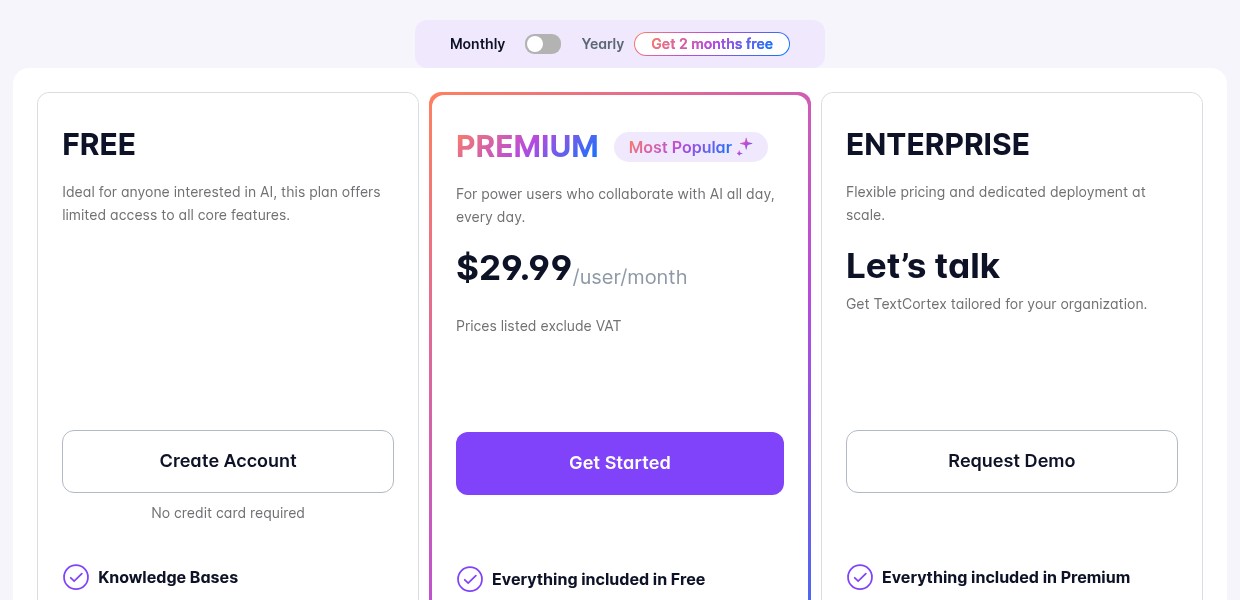
TextCortex offers three pricing plans:
- Free: Free forever, for YouTubers who want to test the waters with limited access to all core features, no credit card required.
- Premium: $29.99/user/month ($23.99/user/month billed yearly) for full-time YouTubers who want access to all major AI models, included AI usage, 10 GB of file storage, and image generation.
- Enterprise: Custom pricing, for teams and agencies that need SSO, a dedicated deployment, centralized billing, and priority support.
Annual subscriptions provide a 20% discount.
Try TextCortex today with the free plan.
2. StoryLab
Our Verdict — Best For High Volumes
Price: Starts at $15/month
StoryLab excels at generating YouTube descriptions at lightning speed. We think it’s the best for high volumes because of its ultra-speed generation, intuitive user interface, and compatibility with multiple languages.
The Best Part:
Affordable unlimited plan. StoryLab is not only fast, but it also allows you to maximize that speed with its unlimited plan. For just $19/month, you can generate as many YouTube descriptions as you need, without worrying about getting capped.
The Worst Part:
Limited free trial. StoryLab’s free trial only includes three AI runs per month, which can feel a bit restrictive.
Get it if you want to quickly generate SEO-optimized YouTube video descriptions at scale.
I recommend you get started with the free plan, then upgrade to the Unlimited plan for $19/month.
(free plan)
Best For
StoryLab is best for freelancers, YouTubers, and agencies that want to create an unlimited number of SEO-optimized descriptions quickly and affordably.
Top Features
It thinks for you. Just key in your business name, describe what your video is about, and tap on the 'Inspire me' button. StoryLab swings into action from there and generates flawless YouTube descriptions!
Rapid content generation. StoryLab's AI produces YouTube descriptions at super high speed, saving you plenty of time for other tasks.
SEO-friendly descriptions. Every generated description is optimized for search engines, increasing your chances of reaching more viewers organically.
User-friendly design. Even if you’re not techy at all, generating YouTube descriptions on StoryLab will feel like a summer breeze.
Multi-language support. Got an international audience? StoryLab has got you covered in more than 17 languages for your descriptions, including Spanish, French, and German.
Pricing

StoryLab offers three pricing plans:
- Free: Free forever, for individuals or small creators who only need a few unique YouTube descriptions each month.
- Pro: $15/month for hobbyist YouTubers, agencies, and businesses that require up to 100 fresh descriptions monthly.
- Unlimited: $19/month for large agencies or prolific YouTubers who need unlimited access to generate YouTube descriptions.
Annual subscriptions provide a 20% discount.
Try StoryLab today with the free plan.
3. Hypotenuse
Our Verdict — Best For Personalized Descriptions
Price: Custom
Hypotenuse lets you create tailored YouTube descriptions to fit your channel. We think it’s the best for personalized descriptions because of its flexible customization options, advanced AI technology, and SEO-friendly outputs.
The Best Part:
It's incredibly flexible. Hypotenuse can be tailored to meet your personal YouTube description needs, no matter how complex your content is.
The Worst Part:
Not always perfect. Even with all the right settings, Hypotenuse's AI might not hit the mark every single time. A keen eye for editing can come in handy to get those odd descriptions fine-tuned.
Get it if you want personalized YouTube descriptions that match your tone and brand like a glove.
I recommend you get started with the free trial to test the waters, then book a demo to get custom pricing for your team.
(free trial)
Best For
Hypotenuse is best for YouTubers who want personalized descriptions that are aligned with their video content.
Top Features
Avoid Google penalties. Hypotenuse's plagiarism checker makes sure your descriptions are always original right when you generate them, keeping you in the clear from search engine penalties.
Multiple drafts at once. Need options? Hypotenuse lets you generate up to 10 description drafts in one go, so you can cherry-pick your favorite.
Tailored tone and style. Whether you want your description to be casual, funny, or professional, Hypotenuse can adjust its writing style to do just what you need.
Audience-specific descriptions. With Hypotenuse, you can specify your YouTube audience for your description — the generated content will hit home with your viewers every time.
Customized to the tee. With Hypotenuse, all you need to do is drop in your product details, specific use cases, and/or interesting stats into the keyword field — you'll get YouTube descriptions that are as unique as your content.
Pricing
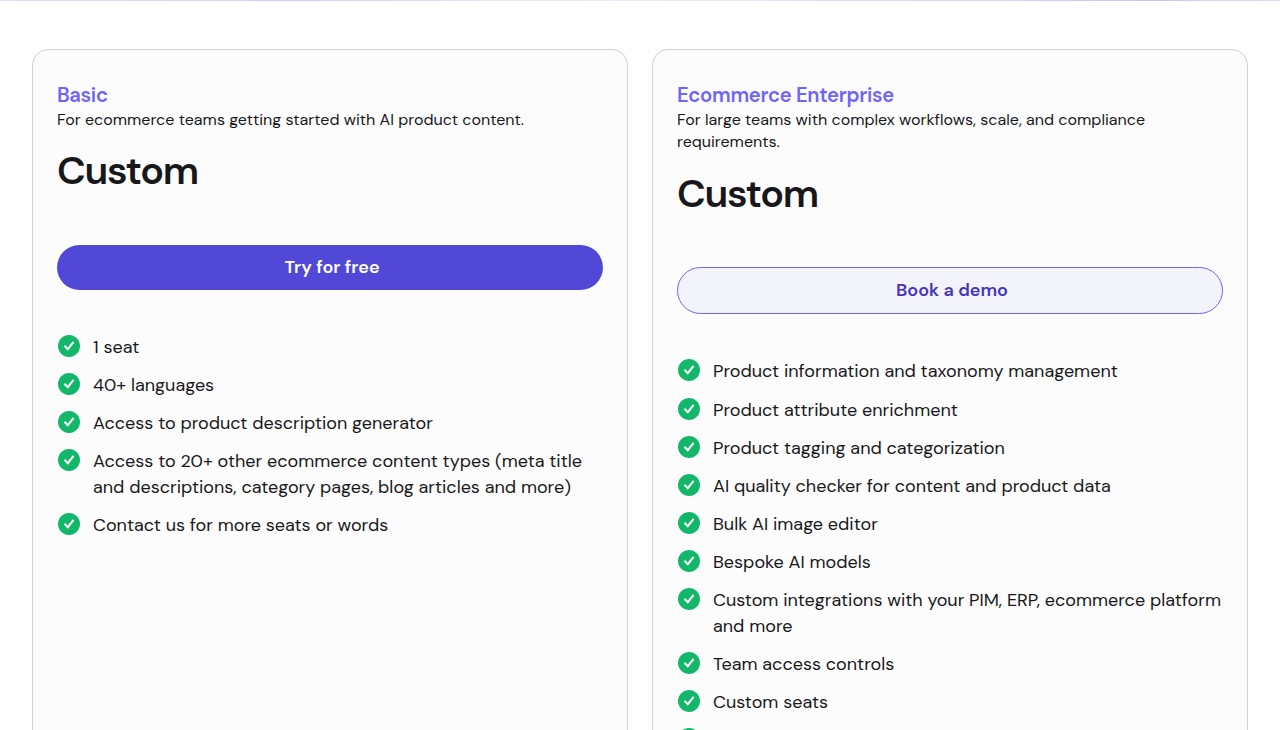
Hypotenuse offers two pricing plans:
- Basic: Custom pricing, with a free trial, for creators and small teams who want 1 seat, 40+ languages, and access to 20+ content types, with more seats or words on request.
- Ecommerce Enterprise: Custom pricing, for large teams that need bulk workflows, bespoke AI models, custom integrations, team access controls, and a dedicated account manager.
Try Hypotenuse today with a free trial.
4. TubeRanker
Our Verdict — Best For Rank Tracking
Price: Starts at $9.90/month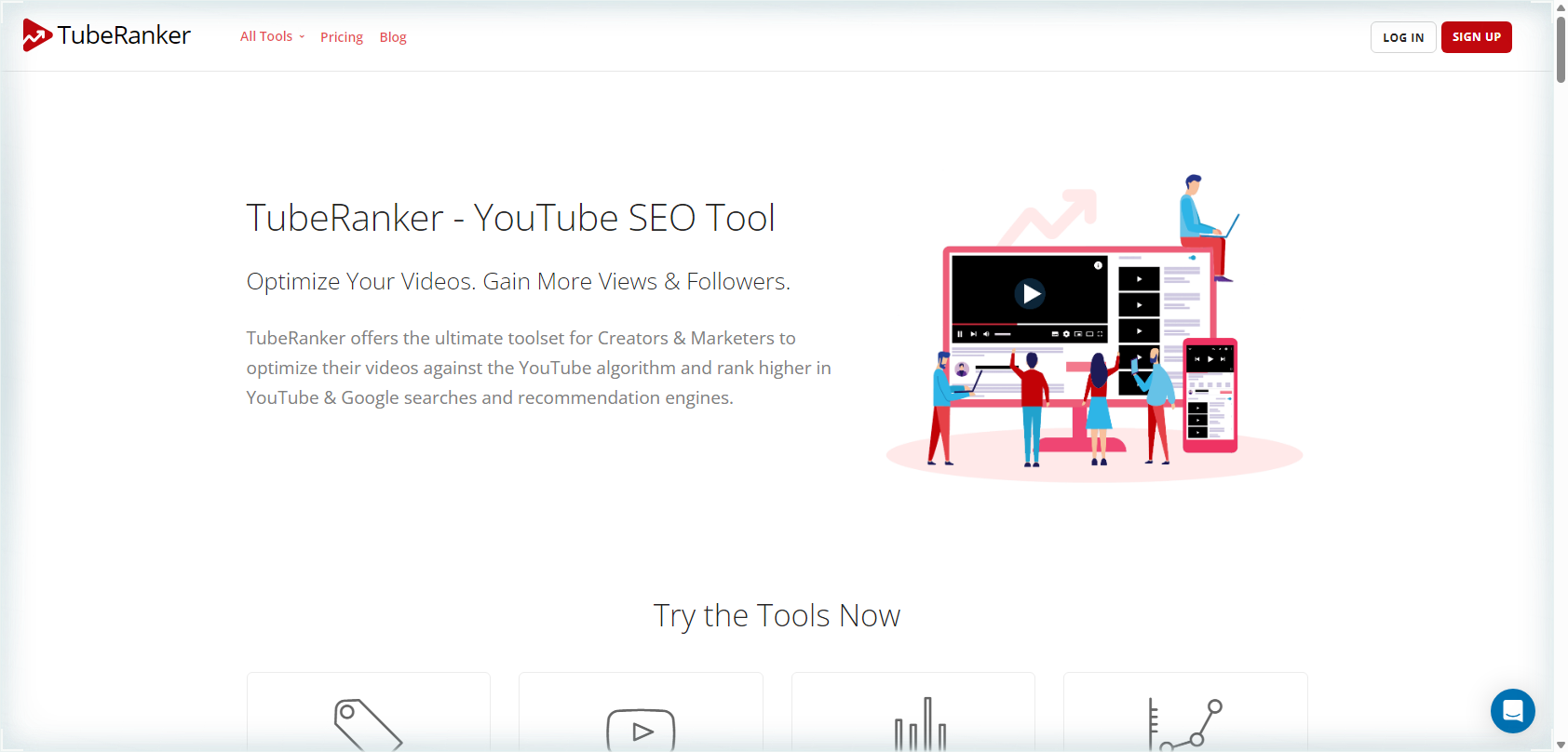
TubeRanker is a YouTube SEO toolkit with a description generator next to its keyword and ranking tools. We think it’s the best for rank tracking because once a keyword-rich description is live, you can follow where the video ranks for those keywords on either plan.
The Best Part:
Write it, then measure it. TubeRanker pairs its description generator with a rank tracker, so you can check whether a new description helps a video climb.
The Worst Part:
Research runs out on Basic. The Basic plan stops at 50 keyword searches a month, so researching many videos means upgrading.
Get it if you want your descriptions, titles, and hashtags written and your rankings tracked in one affordable tool.
I recommend you get the Basic plan and pay yearly, which brings it to $59.40/year.
(50% off yearly)
Best For
TubeRanker is best for small creators who want to watch their videos climb in YouTube search without paying for a big SEO suite.
Top Features
Description generator. Generate video descriptions as often as you like on either plan.
Title and hashtag generators. Pair each description with generated titles and hashtags, also without limits.
Rank tracker. Follow 20 keywords on Basic or 100 on Advanced.
Keyword research. Find terms to work into your descriptions with 50 or 250 searches a month.
Tag extractor. See the tags competitors put on their videos.
Pricing
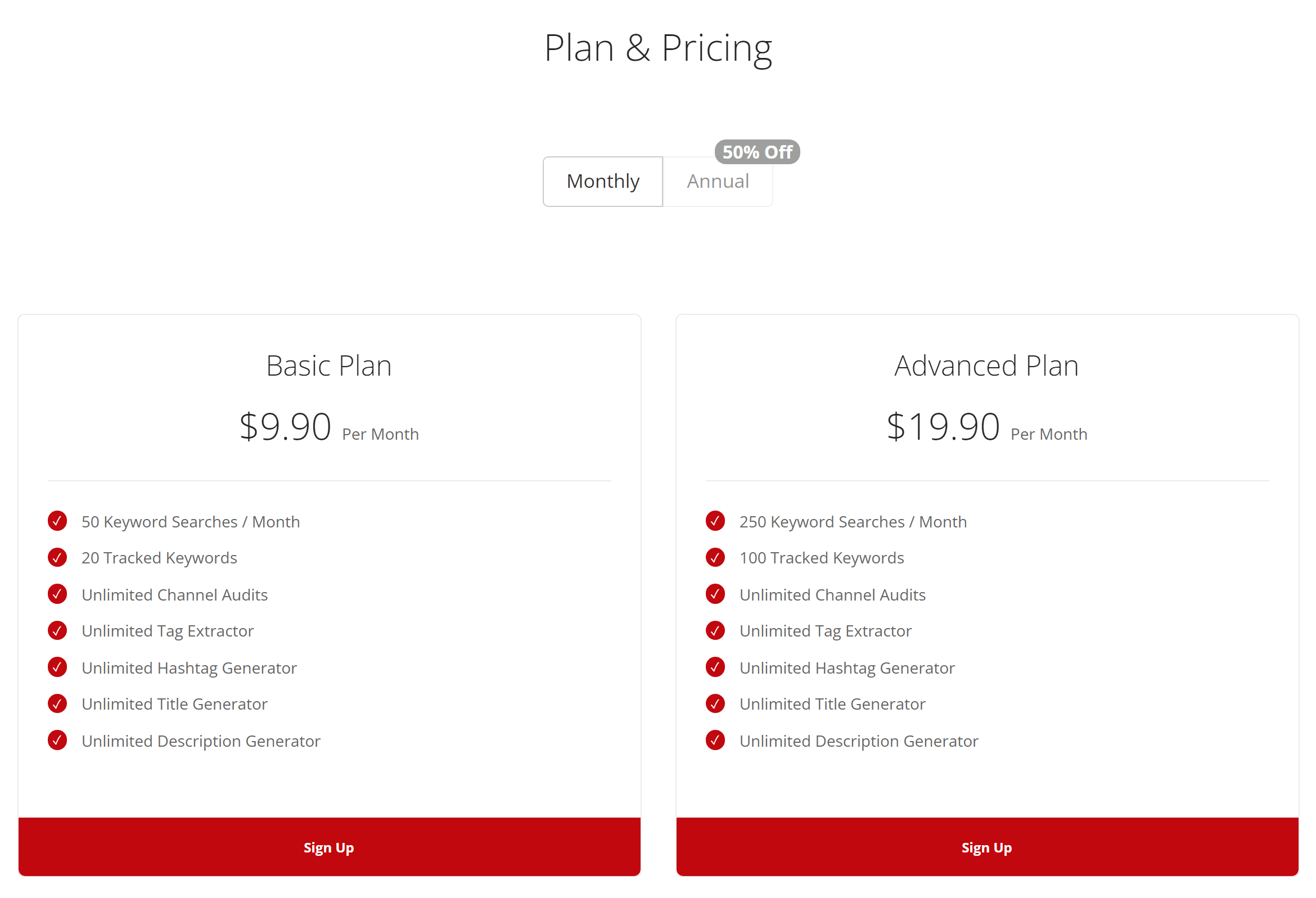
TubeRanker offers two pricing plans:
- Basic: $9.90/month, or $59.40/year, for 50 keyword searches a month and 20 tracked keywords.
- Advanced: $19.90/month, or $119.40/year, for 250 keyword searches a month and 100 tracked keywords.
Annual subscriptions provide a 50% discount.
Try TubeRanker today with the Basic plan.
5. Rapidtags
Our Verdict — Best For Description Tags
Price: Starts at $6/month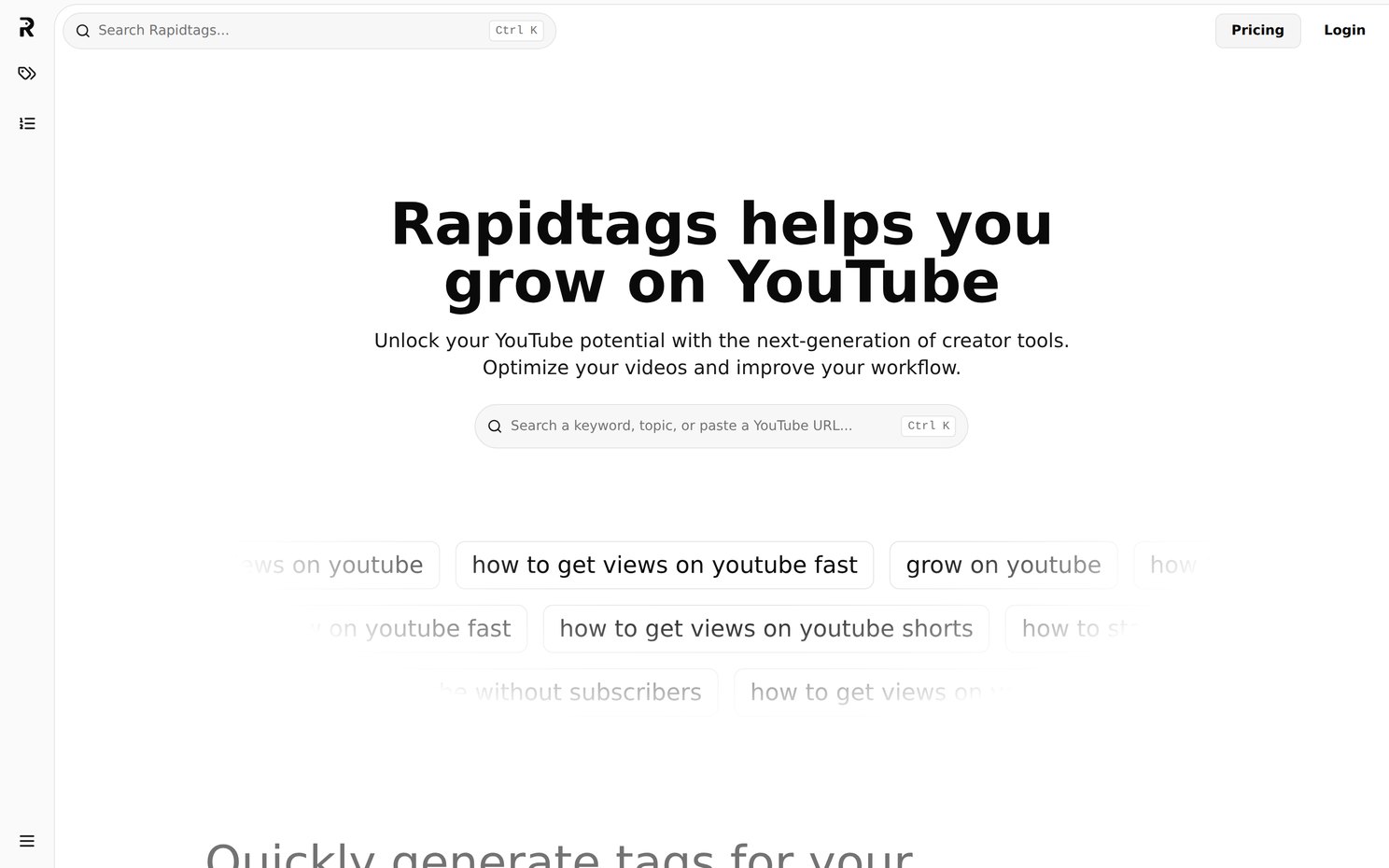
Rapidtags is a YouTube growth platform that turns a video title or search term into a ready-to-paste set of tags. We think it’s the best for description tags because every tag comes from real YouTube data, and you can copy the whole set straight into your video settings.
The Best Part:
Free to start. The free plan gives you 10 keyword generations and 3 research searches a day, enough to tag a new upload.
The Worst Part:
Ads until you pay. The free plan shows ads and keeps only your last 5 generations, so saving your work takes Starter.
Get it if you want data-backed keywords and tags for every video instead of guessing.
I recommend you get started with the free plan, then upgrade to Starter for $6/month.
(free plan)
Best For
Rapidtags is best for YouTubers who want quick, data-backed tags and keywords for each new video.
Top Features
Tag generator. Enter a title or keyword and get up to 500 characters of tags to copy.
Keyword research. See keyword scores and the top search-result videos behind each term.
SERP patterns. Spot the patterns shared by the videos that rank for a keyword.
Video rank checks. Check where a video ranks, 3 times a day on the free plan and up to 25 on Creator.
Generation history. Keep your past generations for 30 days on Starter, or your full history on Creator.
Pricing
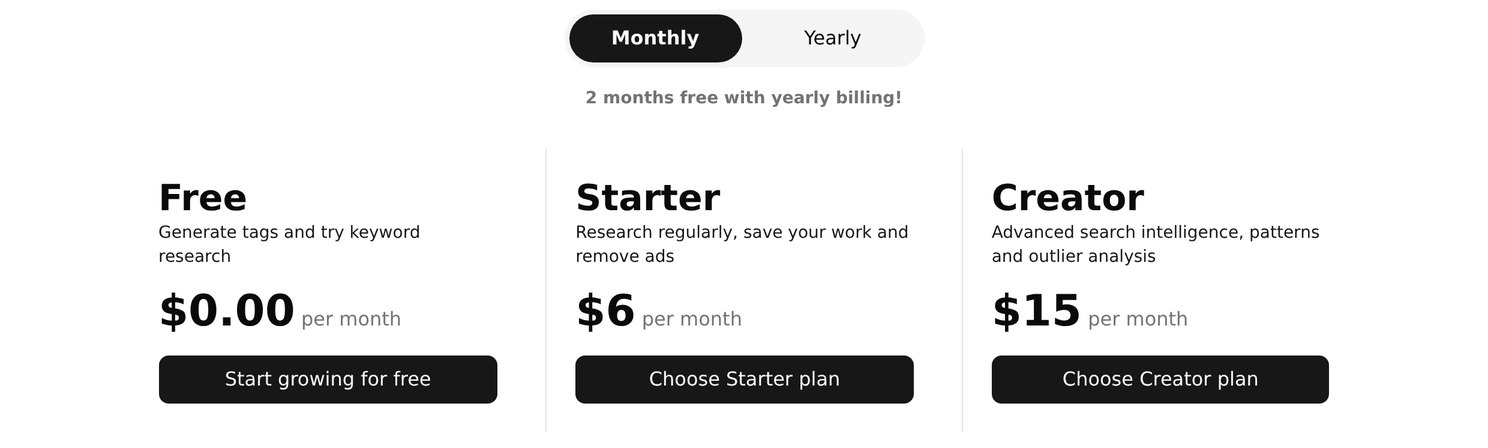
Rapidtags offers three pricing plans:
- Free: Free forever, for 10 keyword generations and 3 keyword research searches a day.
- Starter: $6/month, or $60/year, for 25 generations and 25 searches a day, saved history, and no ads.
- Creator: $15/month, or $150/year, for 50 generations and 50 searches a day, plus full SERP pattern and outlier analysis.
Annual subscriptions provide a 17% discount.
Try Rapidtags today with the free plan.
6. Hootsuite
Our Verdict — Best For YouTube Automation
Price: Starts at $99/month
Hootsuite is a social media management platform that also gives away a free AI YouTube channel description generator. We think it’s the best for YouTube automation because its paid plans schedule unlimited social posts across your accounts, draft them with built-in AI, and collect your messages in one inbox.
The Best Part:
A free description generator. Hootsuite’s free YouTube channel description generator writes a keyword-rich About section in a few clicks.
The Worst Part:
Expensive for one channel. Standard starts at $99 per user a month on annual billing, a lot if you only manage one or two accounts.
Get it if you manage several social accounts and want your posting automated from one calendar.
I recommend you start the 14-day free trial, then get the Standard plan for $99/month on annual billing.
(14-day free trial)
Best For
Hootsuite is best for brands and agencies that run YouTube alongside their other social accounts.
Top Features
Unlimited scheduling. Schedule unlimited social posts from one calendar.
AI drafting. Generate posts and images with Wisdom, the AI teammate in every plan.
One inbox. Answer messages from your connected accounts in one place.
Trend forecasts. Monitor your brand and competitors on every plan, and forecast social trends up to 90 days ahead on Professional.
Custom reports. Build custom performance reports on Professional and up.
Pricing
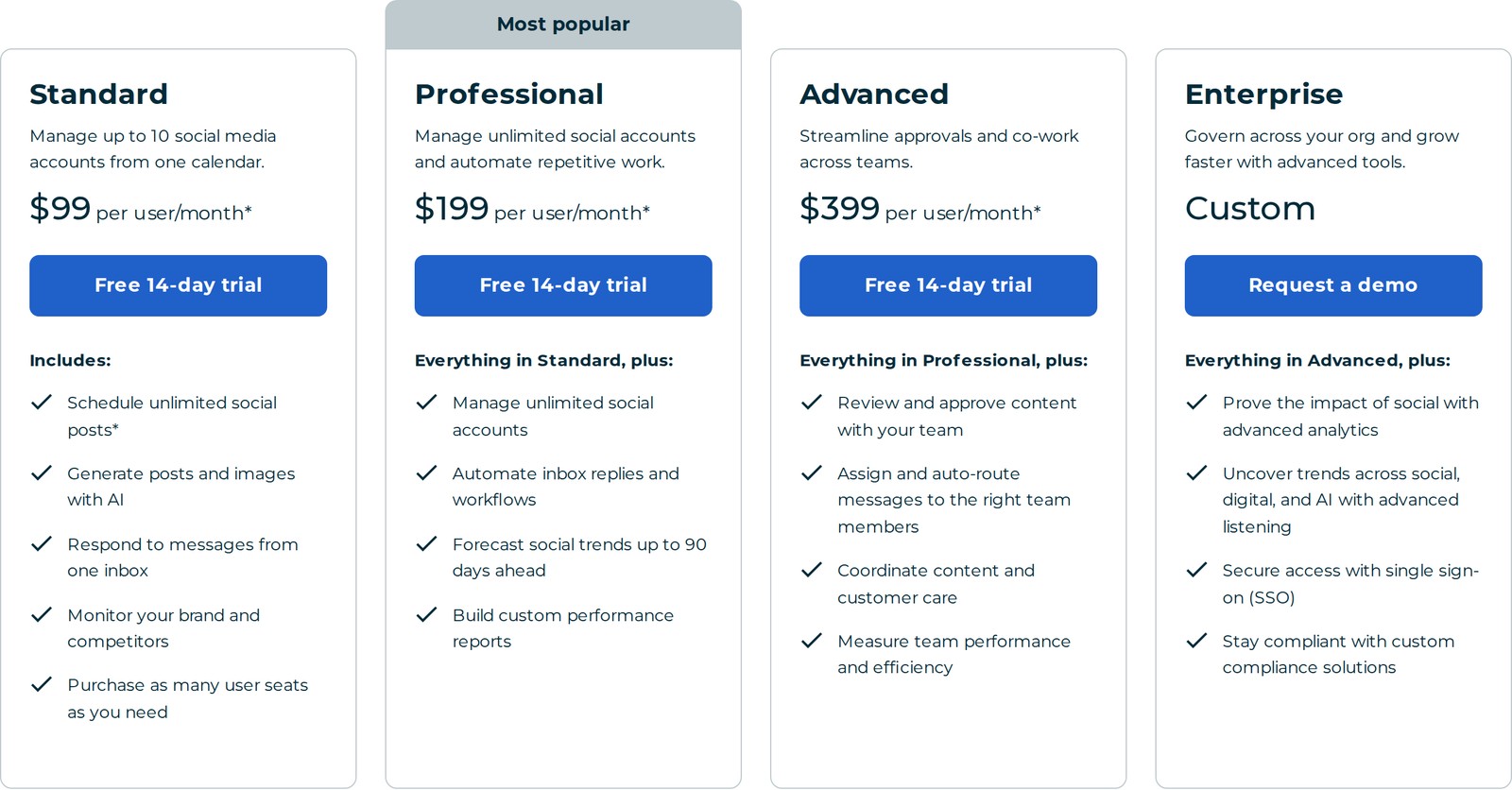
Hootsuite offers four pricing plans:
- Standard: $99/month per user, billed annually, for up to 10 social accounts.
- Professional: $199/month per user, billed annually, for unlimited social accounts plus automated inbox replies and workflows.
- Advanced: $399/month per user, billed annually, for team content approvals and performance tracking.
- Enterprise: Custom pricing, for advanced analytics, advanced listening, and single sign-on.
Try Hootsuite today with a free 14-day trial.
7. TubeBuddy
Our Verdict — Best For Bulk Description Edits
Price: Starts at $15/month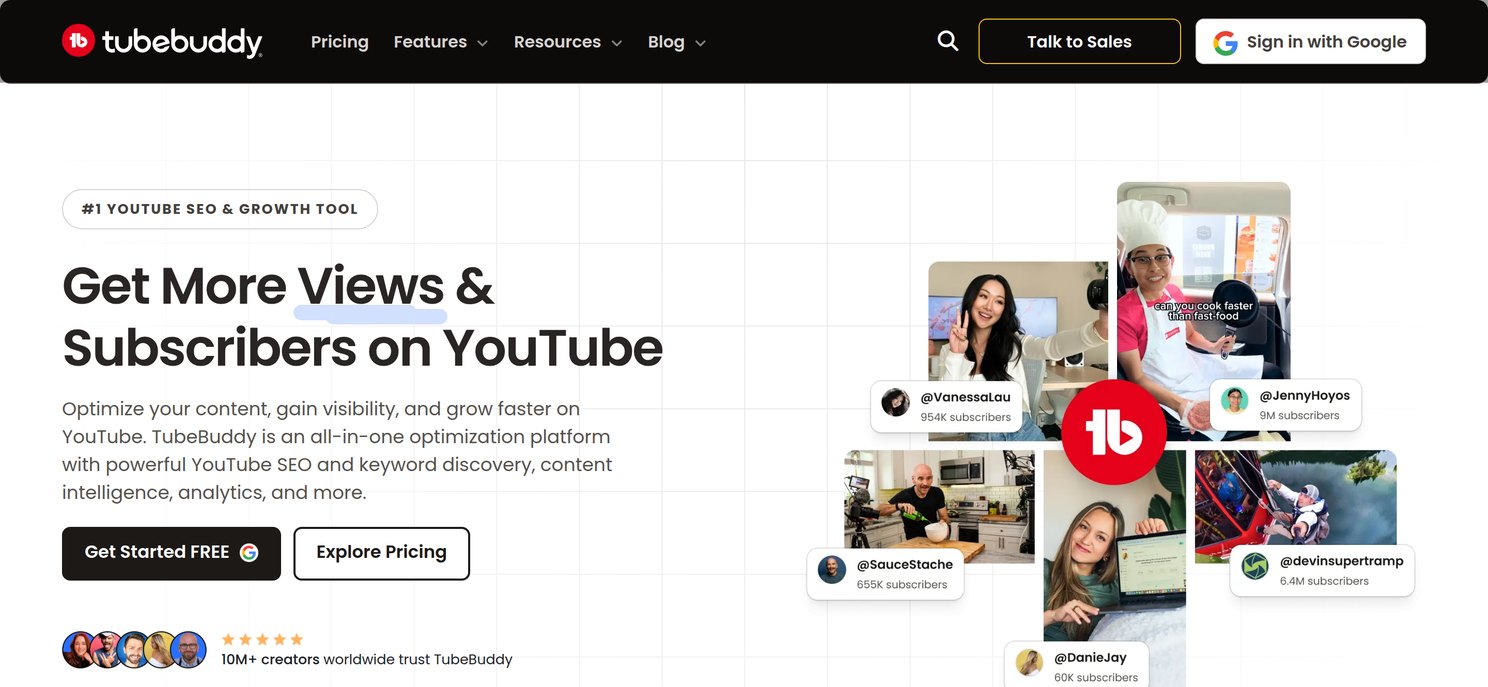
TubeBuddy is a YouTube channel management toolkit with SEO, content strategy, and productivity tools. We think it’s the best for bulk description edits because Bulk Find, Replace & Append updates the descriptions of many videos at once, and Default Upload Profiles save your settings for new uploads.
The Best Part:
Fix every description at once. Swap an old link or add a new call to action across your back catalog in one pass.
The Worst Part:
Bulk tools cost more. Full bulk processing and editing come with Legend, so the $15/month Pro plan won’t cover big catalog updates.
Get it if you run an established channel and want descriptions, tags, and titles managed in bulk.
I recommend you get started with the free plan, then upgrade to Legend for $32.99/month.
(free plan)
Best For
TubeBuddy is best for creators with large video libraries who want every description kept up to date.
Top Features
Default upload profiles. Save default upload settings to reuse on every new upload.
Bulk find, replace, and append. Change text across many video descriptions in a single pass.
Keyword Explorer. Find search terms worth putting in your titles and descriptions.
Title generator. Get title ideas to pair with each new description.
A/B testing. Run A/B tests on your videos to see what earns more clicks.
Pricing
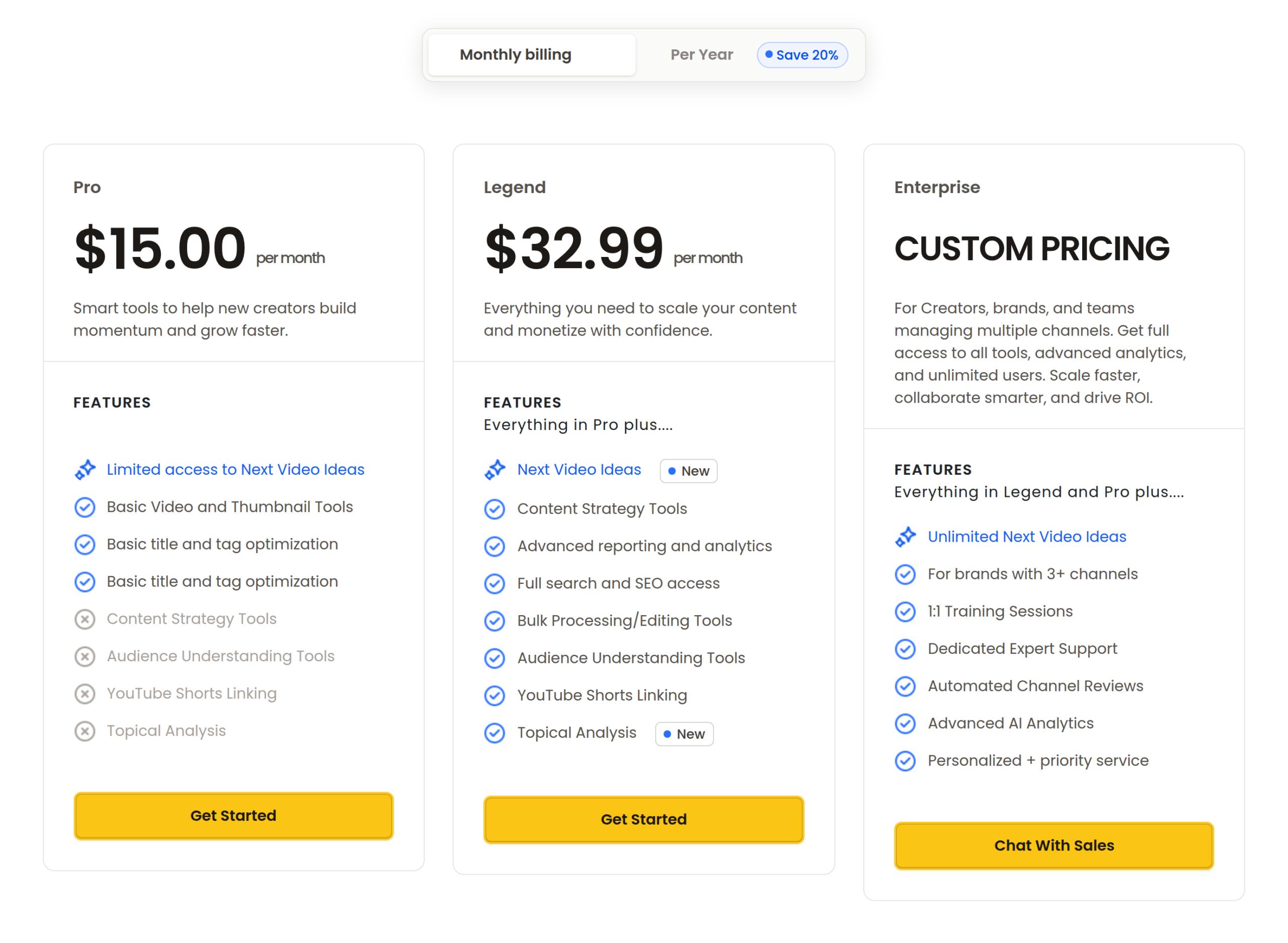
TubeBuddy offers four pricing plans:
- Free: Free forever, with no credit card required.
- Pro: $15/month, or $12/month billed annually, for basic video, thumbnail, title, and tag tools.
- Legend: $32.99/month, or $26.39/month billed annually, for full SEO access, content strategy, and bulk editing tools, with 2 user seats.
- Enterprise: Custom pricing, for brands with 3+ channels that want unlimited users and dedicated support.
Annual subscriptions provide a 20% discount.
Try TubeBuddy today with the free plan.
Our Top Three Picks
Here’s a quick summary of our top three picks:
- TextCortex — best of the best
- StoryLab — best for high volumes
- Hypotenuse — best for personalized descriptions
Here’s a quick comparison of our top seven picks:
Tool | Entry Offer | Pricing |
|---|---|---|
TextCortex | Free plan | Starts at $29.99/mo |
StoryLab | Free plan | Starts at $15/mo |
Hypotenuse | Free trial | Custom |
TubeRanker | None | Starts at $9.90/mo |
Rapidtags | Free plan | Starts at $6/mo |
Hootsuite | 14-day free trial | Starts at $99/mo |
TubeBuddy | Free plan | Starts at $15/mo |
Here are the top 50 best YouTube description generators we considered in this review:
- TextCortex
- StoryLab
- Hypotenuse
- TubeRanker
- Rapidtags
- Hootsuite
- TubeBuddy
- YTRCP
- nichesss
- INK
- Keyword Tool
- Maekersuite
- Tube Arsenal
- Weshare
- MetaTags.io
- VidIQ
- AnswerThePublic
- Soovle
- Ubersuggest
- LSIGraph
- Keysearch
- Claude
- Writesonic
- GrowthBar
- Copy.ai
- LongShot
- Simplified
- Anyword
- Scalenut
- Copymatic
- Sudowrite
- Paragraph AI
- Rytr
- Chibi
- Notion AI
- Smart Copy
- NeuralText
- Mem
- Outranking
- Hyperwrite
- Frase
- Jasper
- Writer
- Wordtune
- ChatGPT
- Google Gemini
- ShortlyAI
- Cliche Finder
- Grammarly
- Hemingway Editor
Frequently Asked Questions About YouTube Description Generators
What is the best YouTube description generator?
TextCortex is our top pick. StoryLab is the one to reach for at high volume, Hypotenuse for personalized descriptions, and TubeRanker for rank tracking.
Is there a free YouTube description generator?
Yes. TextCortex, StoryLab, and TubeBuddy include a free plan, Hootsuite offers a free YouTube channel description generator, and Rapidtags has a free plan for the tags that go with your description.
Which YouTube description generator should I choose?
Match the tool to your need. Go with TextCortex overall, StoryLab for high volume, Hypotenuse for personalized descriptions, TubeRanker for rank tracking, and Hootsuite for automation. Several give you free plans or trials before you pay.
Does a YouTube description help with SEO?
Yes. YouTube is the second-largest search engine, so optimizing your descriptions matters for visibility and rankings. Focus on content relevancy and SEO when you write them.
How long can a YouTube description be?
You get up to 5,000 characters for a video description. Make the first two to three lines count for your key information and calls to action.
What should I include in a YouTube description?
Open with an engaging summary that matches your video title, then work in your target keywords, social links, and affiliate links where they fit. Put your most important information and calls to action in the first two to three lines.
Can AI write good YouTube descriptions?
Yes. AI tools like TextCortex, Hypotenuse, and StoryLab generate strong descriptions, from our top pick down to the best option at high volume. Skip generic copy-paste output and keep your content original to avoid Google penalties.
Which YouTube description tool is best for automation?
Hootsuite is our pick for automation, with a free trial to start. For rank tracking reach for TubeRanker, and for description tags reach for Rapidtags.
Which tool is best for editing YouTube descriptions in bulk?
TubeBuddy is our pick for bulk description edits. Its Legend plan lets you find, replace, and append text across many video descriptions at once.
The Bottom Line
To recap, here are the best YouTube description generators to try this year:
- TextCortex — best of the best
- StoryLab — best for high volumes
- Hypotenuse — best for personalized descriptions
- TubeRanker — best for rank tracking
- Rapidtags — best for description tags
- Hootsuite — best for YouTube automation
- TubeBuddy — best for bulk description edits