

Today there are 109 different AI YouTube shorts generators. We spent 50 hours comparing the top 50 to find the seven best you can use to create your shorts.
What is the Best AI YouTube Shorts Generator?
1. Submagic
Our Verdict — Best Of The Best
Price: Starts at $19/month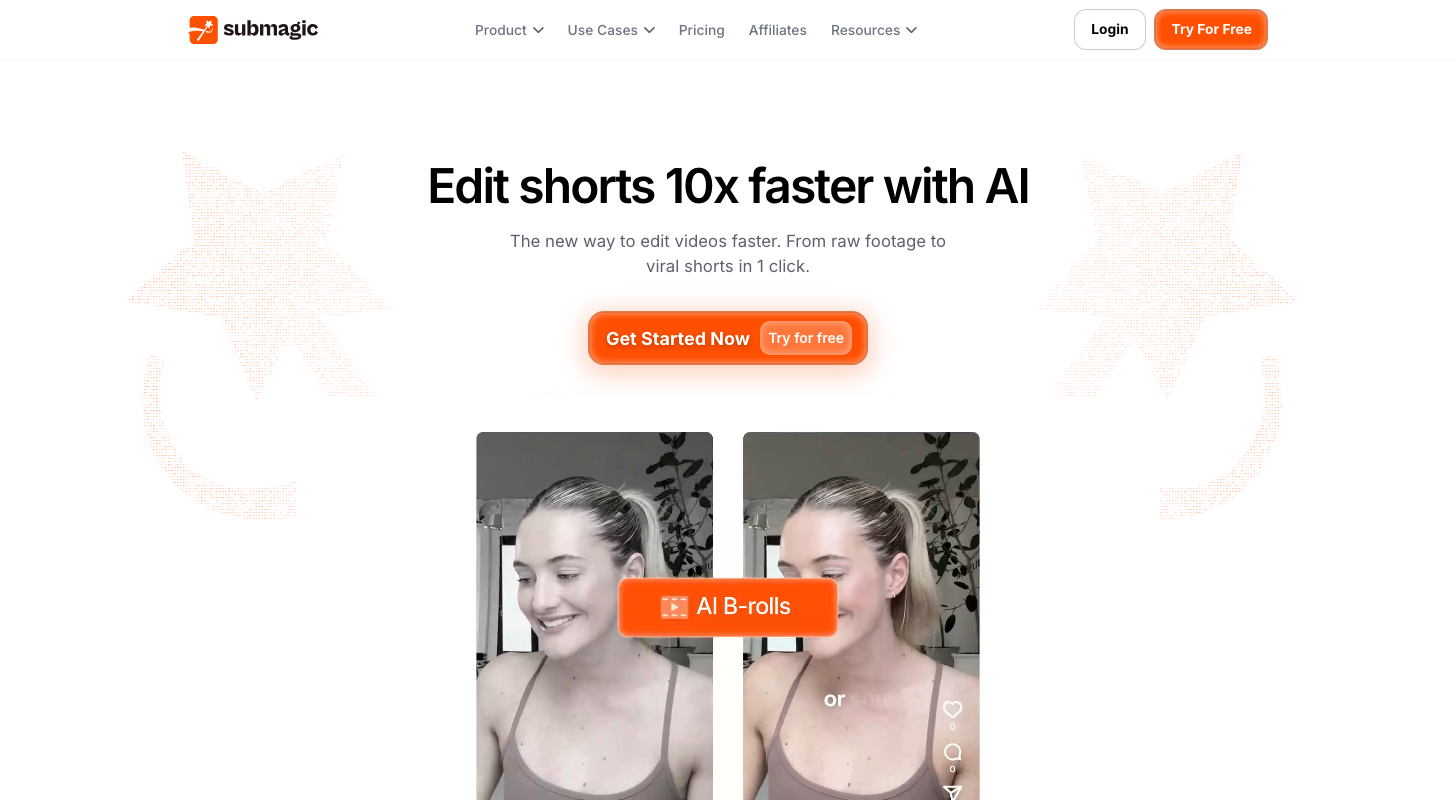
Submagic enables you to create stunning b-roll shorts with just one click. We think it’s the best of the best because of how easy it is to create outstanding looking videos.
The Best Part:
One-click to heaven. Click on the “Magic B-Rolls” button to add high-quality b-roll footage into your vids, for that professional look.
The Worst Part:
Can get a bit repetitive. While the selection of b-roll videos is in the several thousands, you can get some repeat b-roll videos now and then.
Get it if you want to create tasty shorts, filled with b-roll videos.
I recommend you get started with the free trial.
(free trial)
Best For
Submagic is best for anyone who wants to create shorts that get watched and shared.
Top Features
Sexy vids. Add b-roll footage, dynamic subtitles, and dynamic framing, your videos will become an eye magnet.
Good ears. When creating automatic captions, you’ll barely have to fix anything, as Submagic is super accurate when creating subtitles.
Brand it. You can pick from a selection of preset styles, or you can create your own visual style, to keep an identity throughout all your shorts.
Easy on the fingers. Submagic’s user interface is a summer breeze… easy like Sunday morning.
Mr. Worldwide. With 48+ languages to choose from, you can do a boss move and caption your videos to get more viewers around the globe.
Pricing
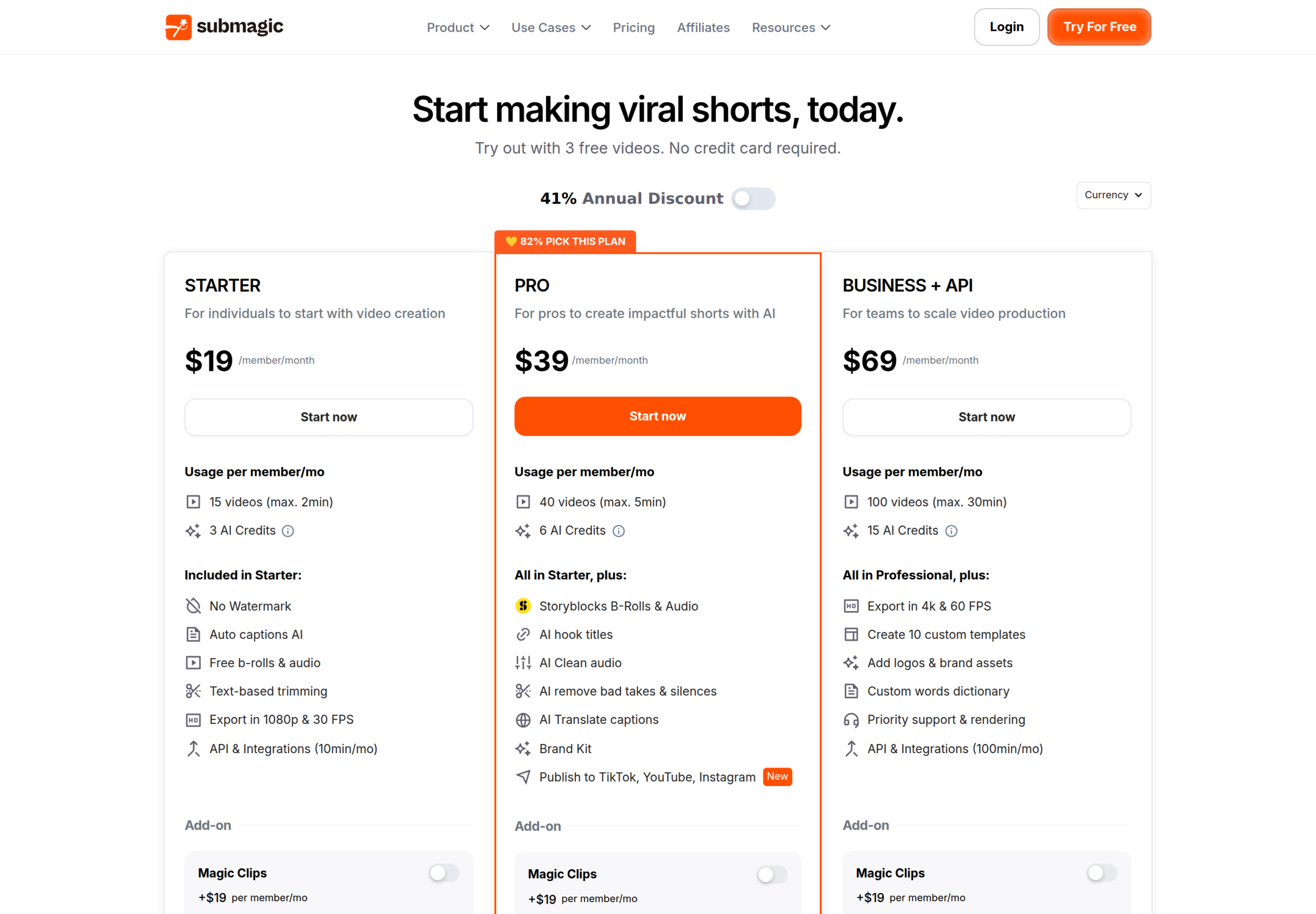
Submagic offers three pricing plans:
- Starter: $19/month for 15 videos a month, up to 2 minutes each.
- Pro: $39/month for 40 videos a month, up to 5 minutes each, plus brand kit.
- Business + API: $69/month for 100 videos a month, up to 30 minutes each, in 4K.
Annual subscriptions provide up to a 41% discount.
Try Submagic today with a free trial.
2. OpusClip
Our Verdict — Best For Content Repurposing
Price: Starts at $15/month
OpusClip lets you upload long form videos and turn them into tens of shorts, quick and easy. We think it’s the best for content repurposing because of how easy it makes it to create short clips from long-form videos.
The Best Part:
Raw footage magic. Upload a long video, click a button, get tons of shorts you can use. It’s almost magic.
The Worst Part:
Limited options. People who are used to full-blown video editors might find OpusClip a bit limited when it comes to video customization features.
Get it if you want to create lots of shorts from each one of your videos.
I recommend you get started with the free plan.
(free plan)
Best For
OpusClip is best for anyone who wants to turn their long videos into many engaging shorts.
Top Features
Saucy videos. Auto subtitles, sexy transitions, different camera takes… Everything you need to make your shorts pop.
It’s super easy. OpusClip’s interface is beyond user-friendly. Nana could operate it like a boss.
Edit at will. Upload many video and audio formats, trim, split, extract, and add many different effects — whatever floats your boat.
Multi-track. OpusClip offers a multi-track editor that enables you to edit with multiple video and audio tracks at once.
Bang for buck. OpusClip prices are surprisingly affordable, especially when you consider how amazing the output really is.
Pricing
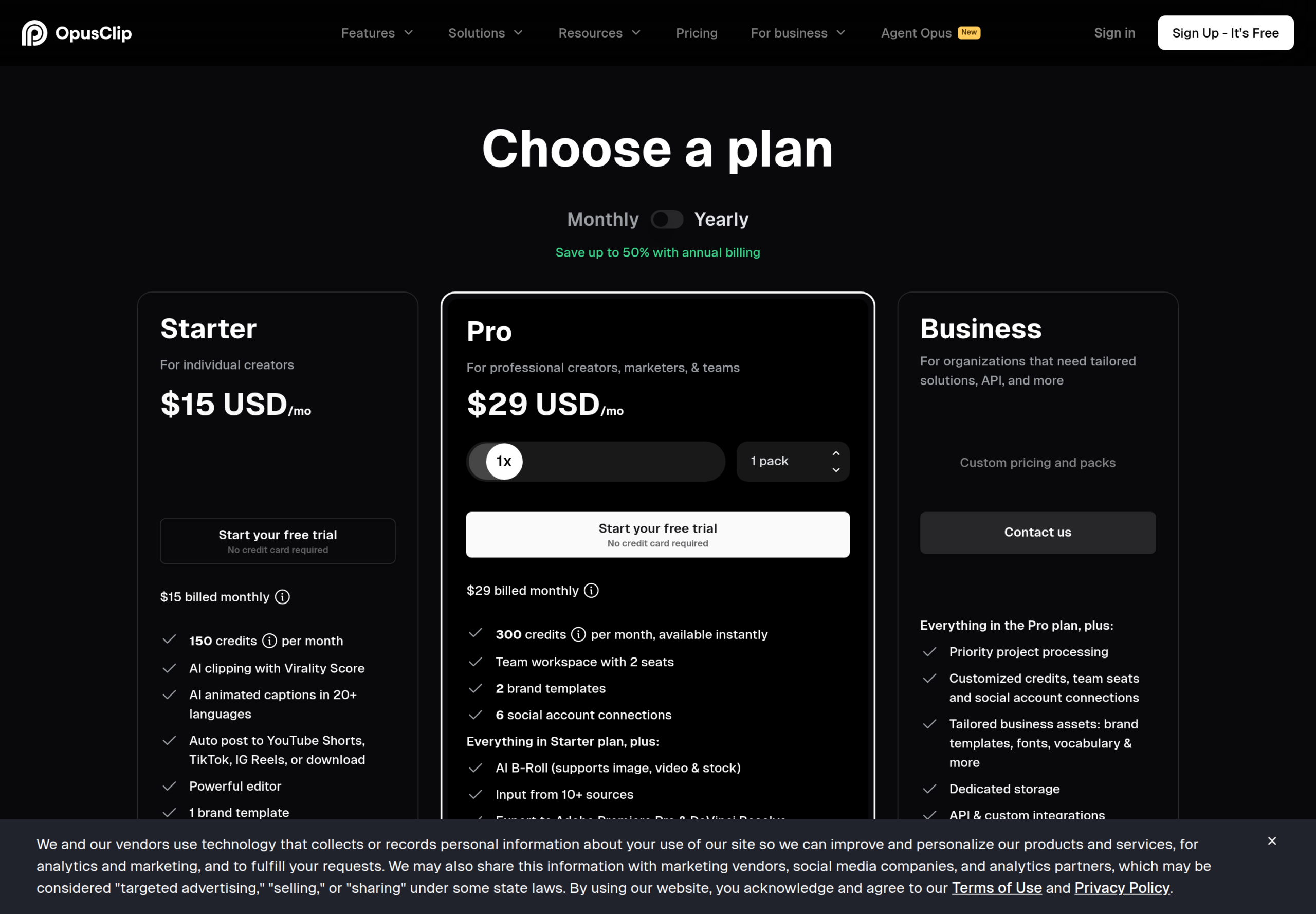
OpusClip offers two pricing plans:
- Starter: $15/month for 150 credits a month.
- Pro: $29/month for 300 credits a month, 2 seats, and 6 social accounts.
Try OpusClip today with a free plan.
3. 2short AI
Our Verdict — Best For Facial Tracking
Price: Starts at $9.90/month
2short AI allows you to turn long, boring videos into engaging shorts, within a few seconds. We think it’s the best for facial tracking because of its smooth dynamic virtual camera effects.
The Best Part:
Dynamic facial tracking. Whoever is speaking will be in the spotlight, thanks to 2short AI. The virtual camera effects are super smooth.
The Worst Part:
It takes its time. Whenever you upload a new video, you’ll have to wait a tad before it gets analyzed by the AI.
Get it if you want cool shorts with great facial tracking.
I recommend you get started with the free plan.
(free plan)
Best For
2short AI is best for creating dynamic videos that always keep the speaker in the spotlight.
Top Features
Repurpose it all. Get all your old videos, and turn them into fresh new content. It’s like breathing new life into dead content.
Animated subtitles. One click and boom, you’ll get animated subtitles that will make your videos much more engaging.
Platform agnostic. 2short AI isn’t just for YouTube. Vertical, square, horizontal… Choose any aspect ratio you want, for all platforms alike.
Free forever. You can start spicing up your videos with 30 minutes of AI video analyzing per month, free of charge… for life.
Presets. Upload your own logos, overlays, and resources to brand your videos with your own identity.
Pricing
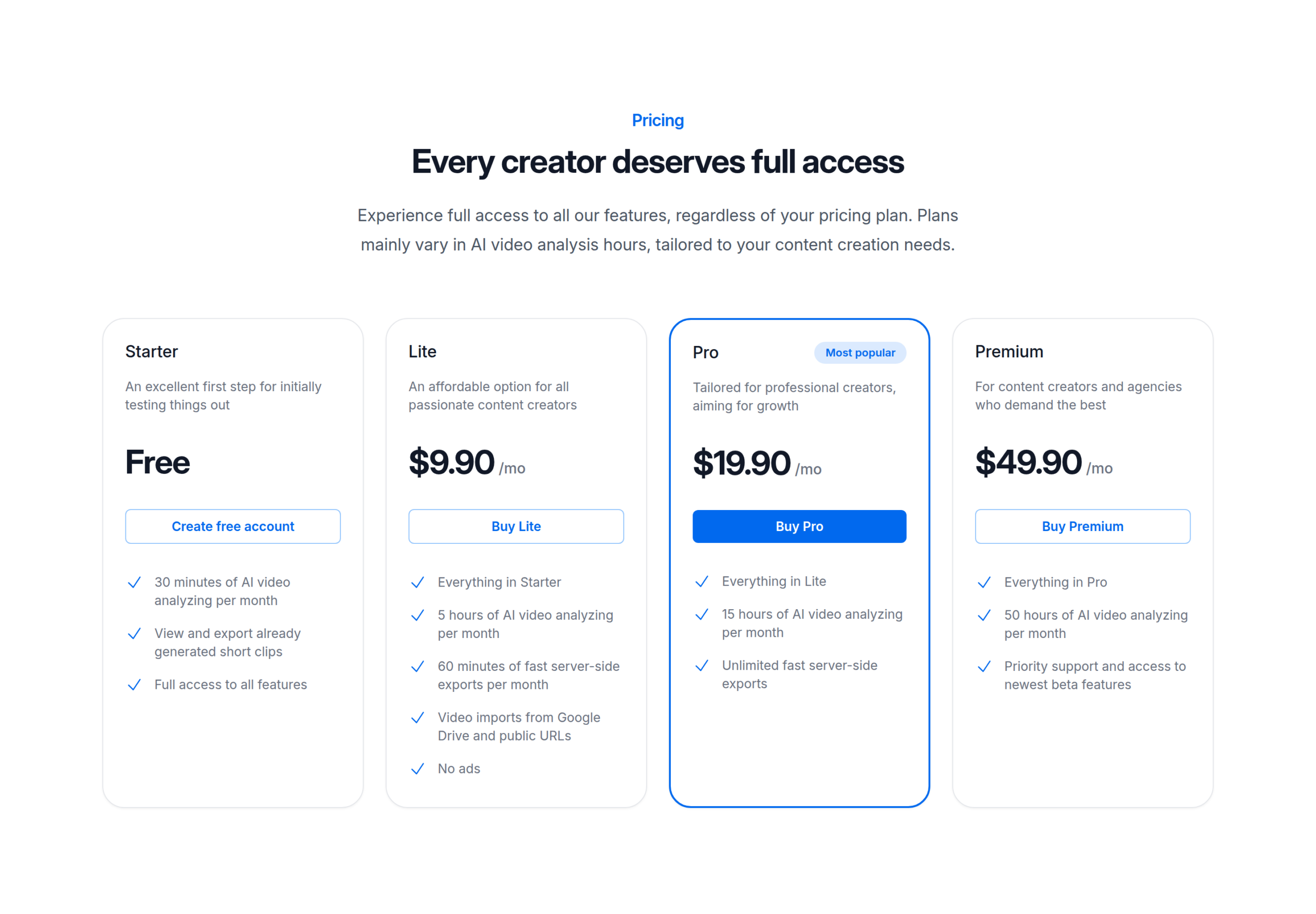
2short AI offers three pricing plans:
- Lite: $9.9/month for 5 hours of AI video analyzing a month.
- Pro: $19.9/month for 15 hours of AI video analyzing a month and unlimited fast exports.
- Premium: $49.9/month for 50 hours of AI video analyzing a month.
Try 2short today with a free plan.
Our Top Three Picks
Here’s a quick summary of our top three picks:
Here’s a quick comparison of our top seven picks:
Tool | Entry Offer | Pricing |
|---|---|---|
Submagic | Free trial | Starts at $19/mo |
OpusClip | Free plan | Starts at $15/mo |
2short AI | Free plan | Starts at $9.90/mo |
Synthesia | Free plan | Starts at $19/mo |
VEED | Free plan | Starts at $25/mo |
Invideo | None | Starts at $20/mo |
CapCut | Free plan | Starts at $19.99/mo |
Here are the top 50 AI YouTube short generator tools we considered in this review:
- Submagic
- OpusClip
- 2short AI
- Synthesia
- VEED
- Invideo
- CapCut
- Munch
- HitPaw
- KLAP
- Woxo
- Pictory
- Runway
- Vozo
- Filmora
- Vizard AI
- Kapwing
- Videogen
- MakeShorts
- Veeroll
- Vadoo
- QuickVid
- Vondy
- Flixier
- Virbo
- SendShort
- YouTube Create
- Autoshorts
- Krikey
- Canva
- Steve AI
- LiveLink
- Exemplary AI
- Rask
- Clip.fm
- quso.ai
- TopView
- Revid
- Taja
- Dumme
- Flowjin
- Media io
- Reap
- Descript
- Appy Pie
- Clipchamp
- Reeporter
- Captions
- Wisecut
- Zubtitle
Frequently Asked Questions About AI YouTube Shorts Generators
What is an AI YouTube shorts generator?
An AI YouTube shorts generator turns long videos into short, vertical clips ready for YouTube Shorts, often adding captions, effects, and repurposing existing content automatically. It saves you hours of manual editing by finding the best moments and formatting them for short-form feeds.
What is the best AI YouTube shorts generator?
Submagic is our pick for the best overall. For specific needs, OpusClip is best for content repurposing, 2short AI is best for facial tracking, Synthesia is best for presenter videos, VEED is best for social videos, InVideo is best for shorts, and CapCut is best for auto subtitles. The right choice depends on whether you create shorts from scratch.
How do you choose the right AI YouTube shorts generator?
Match the tool to your main goal. Pick OpusClip if you want to repurpose long videos, 2short AI for facial tracking, Synthesia for presenter videos, VEED for social videos, InVideo for shorts, and CapCut for auto subtitles, while Submagic is the strongest all-around choice. Decide whether you mostly recycle long-form content or create shorts from scratch, then choose the tool built for that.
Is there a free AI YouTube shorts generator?
Yes. OpusClip, 2short AI, Synthesia, VEED, and CapCut all offer free plans, while Submagic provides a free trial. Free tiers usually limit the number of videos or add watermarks, so creators publishing regularly tend to move to a paid plan.
What is the best tool for repurposing long videos into shorts?
OpusClip is best for content repurposing because it specializes in taking your long videos and pulling out the strongest short clips automatically. Submagic is the best all-around pick, but if your main goal is to recycle existing long-form content into Shorts, OpusClip focuses on exactly that.
Can these tools add captions in other languages?
Yes. Tools like Submagic support many languages, so you can caption your videos to reach viewers around the world. Auto-captioning is a core feature across this category, with CapCut singled out as best for auto subtitles.
The Bottom Line
To recap, here are the best AI YouTube shorts generator software to try this year: